What Is a CNAME Record and How Does It Work?
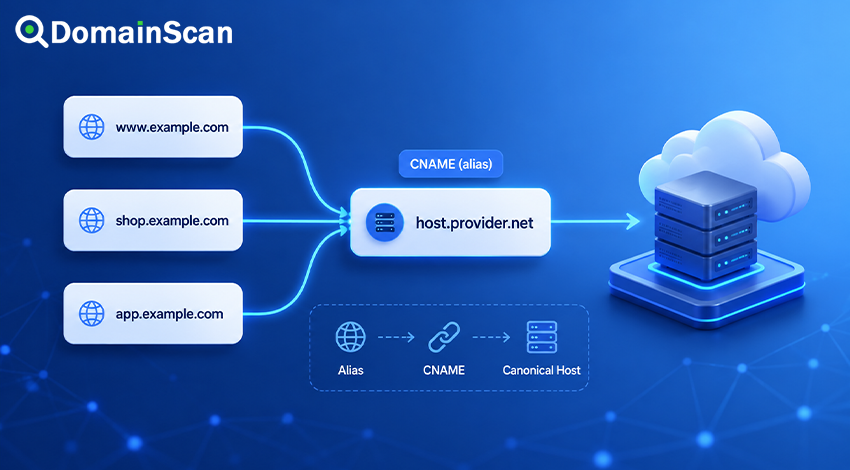
A CNAME record is a type of DNS record that makes one hostname an alias of another hostname.
Instead of pointing directly to an IP address, a CNAME record tells DNS resolvers to continue the lookup using a different domain name.
A basic CNAME record looks like this:
www.example.com. 3600 IN CNAME example.com.
This record means that www.example.com is an alias of example.com.
When a resolver receives the CNAME response, it continues resolving the canonical hostname until it reaches an address record or another usable answer.
CNAME records are commonly used for websites, content delivery networks, hosted applications, verification services, and third-party platforms. They can make DNS management easier, but incorrect use may create resolution failures, redirect misunderstandings, or conflicts with other DNS records.
What Does CNAME Mean?
CNAME stands for Canonical Name.
In a CNAME record, the hostname on the left is the alias. The hostname on the right is the canonical name or target.
For example:
store.example.com. 3600 IN CNAME shops.example.net.
In this record:
store.example.comis the alias.shops.example.netis the canonical target.
The target must be a hostname. It cannot be an IP address, URL, path, or port number.
This is valid:
blog.example.com. 3600 IN CNAME hosting.example.net.
This is not a valid CNAME value:
blog.example.com. 3600 IN CNAME 192.0.2.10
An A record should be used when a hostname needs to point directly to an IPv4 address.
How Does a CNAME Record Work?
Suppose a user visits:
www.example.com
The DNS resolver asks for the address associated with that hostname. The authoritative server may return:
www.example.com. 3600 IN CNAME example.com.
The resolver now knows that www.example.com is an alias. It continues the lookup for example.com.
The next response may contain:
example.com. 3600 IN A 192.0.2.10
The resolver can then return both the alias relationship and the final IPv4 address to the client.
A simplified resolution path looks like this:
www.example.com
        ↓
CNAME example.com
        ↓
A 192.0.2.10
The browser eventually connects to 192.0.2.10, but the requested hostname remains www.example.com.
This distinction matters because a CNAME record does not change the address shown in the browser.
A CNAME Record Is Not a Website Redirect
A CNAME record is often confused with an HTTP redirect, but they operate at different layers.
A CNAME record changes how a hostname is resolved in DNS. It does not send the browser to another URL.
For example:
www.example.com. 3600 IN CNAME example.com.
When a user opens:
https://www.example.com
the browser normally continues displaying www.example.com. DNS only helps it locate the server.
By contrast, an HTTP redirect can tell the browser to load a different address:
https://www.example.com
        ↓
https://example.com
That redirect must be configured on a web server, reverse proxy, CDN, application, or domain forwarding service.
Creating a CNAME record alone does not create a 301 or 302 redirect.
When Should You Use a CNAME Record?
A CNAME record is useful when one hostname should follow another hostname rather than point to a fixed IP address.
Pointing www to the root domain
A common configuration is:
www.example.com. 3600 IN CNAME example.com.
The root domain can then use A and AAAA records:
example.com. 3600 IN A    192.0.2.10
example.com. 3600 IN AAAA 2001:db8::10
If the root domain’s addresses change, www.example.com follows the updated result automatically.
Connecting a subdomain to a hosted service
Third-party platforms often ask customers to create a CNAME record:
app.example.com. 3600 IN CNAME customer.hosted-platform.net.
The platform can change its server addresses without requiring each customer to update DNS manually.
Connecting a domain to a CDN
A content delivery network may provide a hostname such as:
example.cdn-provider.net
The customer can publish:
static.example.com. 300 IN CNAME example.cdn-provider.net.
The CDN controls the address records behind its hostname and can distribute traffic across its network.
Using one destination for several subdomains
Multiple aliases can point to one canonical hostname:
shop.example.com.    3600 IN CNAME services.example.net.
account.example.com. 3600 IN CNAME services.example.net.
portal.example.com.  3600 IN CNAME services.example.net.
The destination infrastructure can then handle each requested hostname separately.
CNAME Record vs A Record
An A record and a CNAME record can both help users reach a service, but they contain different types of values.
A record
An A record points directly to an IPv4 address:
www.example.com. 3600 IN A 192.0.2.10
CNAME record
A CNAME record points to another hostname:
www.example.com. 3600 IN CNAME example.com.
The practical difference is important.
If the server IP changes, an A record must usually be updated. A CNAME can continue pointing to the same target hostname while the target’s address records are changed elsewhere.
An A record is more direct. A CNAME provides easier alias management.
CNAME Record vs AAAA Record
An AAAA record points directly to an IPv6 address:
example.com. 3600 IN AAAA 2001:db8::10
A CNAME record does not contain either an IPv4 or IPv6 address. It points to another hostname, which may eventually return A records, AAAA records, or both.
For example:
www.example.com. 3600 IN CNAME example.com.
example.com.     3600 IN A     192.0.2.10
example.com.     3600 IN AAAA  2001:db8::10
The client may receive both address types after following the alias.
Can a CNAME Point to Another CNAME?
Technically, one CNAME can point to a hostname that is itself another CNAME.
For example:
www.example.com. 3600 IN CNAME web.example.net.
web.example.net. 3600 IN CNAME host.provider.net.
host.provider.net. 3600 IN A 192.0.2.10
This is called a CNAME chain.
Although a short chain may resolve successfully, long chains are generally undesirable. Each additional alias may require more DNS processing and creates another point where the lookup can fail.
A better configuration usually points the first alias directly to the final service hostname:
www.example.com. 3600 IN CNAME host.provider.net.
What Is a CNAME Loop?
A CNAME loop occurs when aliases eventually point back to themselves.
For example:
www.example.com. 3600 IN CNAME shop.example.com.
shop.example.com. 3600 IN CNAME www.example.com.
The resolver cannot reach a final address because each hostname points to the other.
This configuration causes DNS resolution to fail.
A self-referencing record creates the same problem:
www.example.com. 3600 IN CNAME www.example.com.
Every CNAME chain must eventually end at a hostname that provides the required non-CNAME data, such as an A or AAAA record.
Can a CNAME Record Exist With Other Records?
Under standard DNS behavior, a hostname that has a CNAME record should not also have other data records.
This configuration is problematic:
www.example.com. 3600 IN CNAME example.com.
www.example.com. 3600 IN A     192.0.2.10
The same owner name is being defined both as an alias and as a direct address.
A CNAME also should not normally coexist at the same hostname with records such as:
- A
- AAAA
- MX
- TXT
- NS
Some DNS control panels prevent this automatically. Others may allow unusual configurations that different resolvers handle inconsistently.
When a hostname needs additional records, it is usually better to avoid using a standard CNAME at that name.
Can the Root Domain Use a CNAME Record?
The root domain, also called the zone apex, normally cannot use a standard CNAME record.
The zone apex must already contain records such as SOA and NS:
example.com. 86400 IN SOA ns1.example.net. hostmaster.example.net. ...
example.com. 86400 IN NS  ns1.example.net.
example.com. 86400 IN NS  ns2.example.net.
Because a CNAME should not coexist with other data at the same name, a standard CNAME conflicts with the required apex records.
This is why the root domain commonly uses A and AAAA records:
example.com. 3600 IN A    192.0.2.10
example.com. 3600 IN AAAA 2001:db8::10
Many DNS providers offer alternatives with names such as:
- ALIAS
- ANAME
- CNAME flattening
- Apex alias
These are provider-specific features rather than ordinary CNAME records. The provider follows the target hostname internally and returns address records to DNS clients.
Can an MX Record Point to a CNAME?
An MX record should point to a hostname that resolves directly to address records, not to an alias.
A recommended configuration looks like this:
example.com.      3600 IN MX 10 mail.example.com.
mail.example.com. 3600 IN A     192.0.2.50
This configuration should be avoided:
example.com.      3600 IN MX 10 mail.example.com.
mail.example.com. 3600 IN CNAME mail.provider.net.
Some mail systems may still follow the alias, but relying on that behavior can create compatibility and delivery problems.
The MX target should have its own A or AAAA records.
Can an NS Record Point to a CNAME?
An NS record should point to a hostname that has direct address records.
For example:
example.com. 86400 IN NS ns1.example.net.
ns1.example.net. 3600 IN A 192.0.2.53
The name server hostname should not depend on a CNAME:
ns1.example.net. 3600 IN CNAME dns.provider.net.
Authoritative DNS infrastructure needs clear and reliable address resolution. Adding aliases to name server targets can create operational problems and additional dependencies.
Can a CNAME Point to a URL?
No. A CNAME target must be a hostname.
This is valid:
blog.example.com. 3600 IN CNAME hosting.example.net.
This is invalid:
blog.example.com. 3600 IN CNAME https://hosting.example.net/blog
A CNAME cannot contain:
http://orhttps://- A folder path
- A query string
- A port number
- A complete web address
To send visitors to a specific URL, configure an HTTP redirect instead.
Can a CNAME Point to an IP Address?
No. A CNAME record must point to another domain name.
This is invalid:
www.example.com. 3600 IN CNAME 192.0.2.10
Use an A record for IPv4:
www.example.com. 3600 IN A 192.0.2.10
Use an AAAA record for IPv6:
www.example.com. 3600 IN AAAA 2001:db8::10
How Does TTL Work With CNAME Records?
A CNAME record has its own Time to Live value.
For example:
www.example.com. 3600 IN CNAME example.com.
The resolver may cache this alias relationship for up to 3600 seconds.
The target hostname’s A or AAAA records also have their own TTL values:
example.com. 300 IN A 192.0.2.10
The alias and the final address may therefore expire at different times.
If the CNAME target changes, resolvers that cached the old alias may continue using it until the CNAME TTL expires.
If only the target’s IP address changes, the CNAME may remain unchanged while the target address record is refreshed according to its own TTL.
Does a CNAME Record Slow Down DNS?
A CNAME may require the resolver to perform an additional lookup for the target hostname.
In many cases, the extra delay is small because resolvers cache results and authoritative servers may include related records in the response.
However, performance can become worse when:
- The CNAME chain is long.
- The target uses slow or unreliable DNS servers.
- The target repeatedly changes.
- The resolver must contact several unrelated DNS zones.
- The chain includes configuration errors.
A single, well-configured CNAME is common and normally not a serious performance concern. Unnecessary chains should still be avoided.
How to Check a CNAME Record
You can use the DomainScan DNS Lookup tool to inspect the CNAME record published for a hostname.
A basic check involves:
- Enter the complete hostname.
- Select the CNAME record type.
- Run the lookup.
- Confirm that the returned target is correct.
- Resolve the target hostname to verify that it returns usable address records.
Always check the exact hostname involved.
These names can have completely different DNS configurations:
example.com
www.example.com
shop.example.com
api.example.com
A CNAME configured for www.example.com does not automatically apply to the root domain or other subdomains.
Common CNAME Problems
The CNAME target does not exist
If the target hostname returns NXDOMAIN, the alias cannot resolve successfully.
For example:
www.example.com. 3600 IN CNAME missing.example.net.
If missing.example.net does not exist, users cannot obtain a final address.
The CNAME points to the wrong hostname
A spelling mistake or outdated service target can send traffic to the wrong infrastructure.
Compare the published value with the exact hostname supplied by the hosting or service provider.
The alias has no final address
The target hostname may exist but have no A or AAAA records.
In that case, the CNAME itself is valid, but clients still cannot obtain an address for the service.
The CNAME was added to the wrong DNS zone
A domain may be registered with one provider while its authoritative DNS is hosted elsewhere.
Changing records in a non-authoritative control panel has no effect on public DNS.
Check the domain’s NS records to identify the active DNS provider.
The root domain was configured as a CNAME
Some control panels reject this immediately. Others use a provider-specific flattening feature while displaying it as a CNAME-like option.
Confirm whether the provider is creating a true CNAME or synthesizing address records.
The CNAME conflicts with another record
If the same hostname already has an A, AAAA, TXT, or another record, the DNS provider may reject the CNAME.
Remove the conflicting record only after confirming that it is no longer required.
The service does not recognize the hostname
A correct CNAME only directs DNS resolution. The destination platform must also be configured to accept the custom domain.
For example, a hosted application may require the customer to add app.example.com inside the service dashboard before the platform will serve the correct site.
The SSL certificate does not include the alias
The DNS lookup may work while HTTPS still fails.
The server must present a certificate valid for the hostname entered by the user.
If visitors use:
https://shop.example.com
the certificate must include shop.example.com, even when that hostname is a CNAME to another domain.
Why a Working CNAME May Still Show an Error Page
DNS resolution is only the first stage of a connection.
A valid CNAME does not confirm that:
- The destination server is online.
- The service recognizes the requested hostname.
- The SSL certificate is valid.
- The web application is configured correctly.
- The CDN or reverse proxy has been activated.
- The origin server is reachable.
When the CNAME resolves correctly but the website still fails, continue testing the HTTP response, SSL certificate, hosting configuration, and destination service.
How to Change a CNAME Record Safely
Before changing a CNAME record, confirm:
- The target hostname is correct.
- The target resolves successfully.
- The destination service is ready to accept the alias.
- The SSL certificate covers the hostname.
- No conflicting records exist at the alias name.
- The current TTL has been considered.
For a planned migration, lowering the TTL in advance may reduce the time during which users continue receiving an older CNAME target.
After making the change, check both the CNAME response and the final A or AAAA records returned by the target.
Frequently Asked Questions
What is the purpose of a CNAME record?
A CNAME record makes one hostname an alias of another hostname. It allows the alias to follow the DNS configuration of the target.
Does a CNAME hide the target domain?
The target may not appear in the browser address bar, but it is visible through DNS lookups.
A CNAME should not be treated as a privacy or security feature.
Can multiple CNAME records point to the same target?
Yes. Several aliases can point to one canonical hostname.
blog.example.com. 3600 IN CNAME hosting.example.net.
shop.example.com. 3600 IN CNAME hosting.example.net.
The destination service must still be configured to handle each hostname.
Can one hostname have two CNAME targets?
A hostname should not have multiple conflicting CNAME records.
An alias is expected to identify one canonical target. Multiple targets can produce unpredictable or invalid results.
Should www use a CNAME or an A record?
Both can work.
A CNAME is convenient when www should always follow another hostname. An A record provides direct control over the IPv4 address but must be updated separately when that address changes.
Does changing a CNAME move website files?
No. A DNS change only changes how the hostname is resolved.
Website files, databases, application settings, SSL certificates, and hosting configuration must be prepared separately.
How long does a CNAME change take?
The authoritative DNS provider may publish the update quickly, but recursive resolvers may continue using the previous value until its TTL expires.
The visible delay depends on the previous TTL and caching behavior.
Final Thoughts
A CNAME record allows one hostname to act as an alias of another hostname. It is useful when a service provider, CDN, hosted platform, or another domain controls the destination addresses.
The main rule is simple: a CNAME points to a hostname, not to an IP address or URL.
Correct configuration also requires avoiding conflicting records, unnecessary CNAME chains, loops, invalid root-domain usage, and aliases used as MX or NS targets.
When troubleshooting, check the complete resolution path. Confirm the alias, resolve the target hostname, review the final A and AAAA records, and then test the destination service separately.
Use the DomainScan DNS Lookup tool to inspect a hostname’s CNAME record and verify that the target resolves as expected.