What Is an Open Port? How Port Scanning Works and What the Results Mean
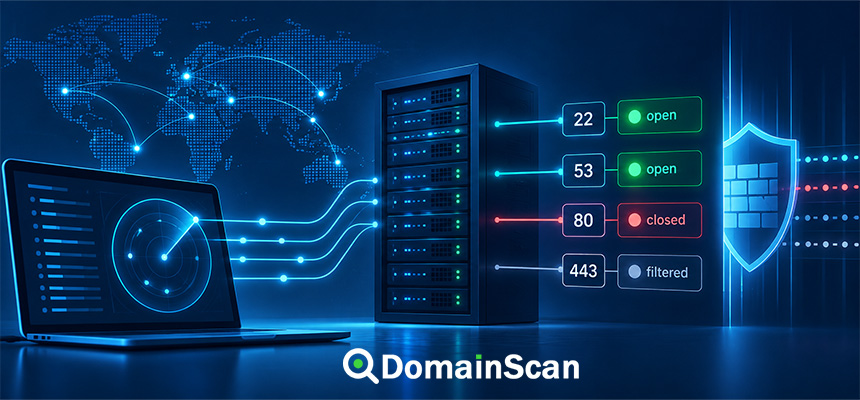
An open port is a network port on a device or server that is currently accepting connections for a particular service.
For example, a web server may accept HTTPS connections on:
TCP port 443
while a remote administration service may listen on:
TCP port 22
Network ports allow many different services to use the same IP address at the same time.
A single server can therefore host a website, receive email, provide DNS services, and accept administrative connections without those services interfering with one another.
Understanding whether a port is open, closed, or filtered is one of the most useful skills in server and network troubleshooting.
What Is a Network Port?
A network port is a logical number used by TCP or UDP to identify a specific service or application on a networked device.
An IP address identifies the device:
192.0.2.10
A port identifies the service:
192.0.2.10:443
In this example:
192.0.2.10is the server IP address.443is the port number.
Together they identify a particular network endpoint.
Why Are Ports Necessary?
Without port numbers, an operating system would have no simple way to determine which application should receive incoming network traffic.
Consider a server running several services:
192.0.2.10:22   → SSH
192.0.2.10:80   → HTTP
192.0.2.10:443  → HTTPS
192.0.2.10:25   → SMTP
All four services use the same IP address.
The port number allows the operating system to send each incoming connection to the correct application.
What Does “Open Port” Mean?
A port is generally considered open when a service is listening on that port and the network allows a client to reach it.
For example:
example.com → 192.0.2.10

TCP 443 → Open
This usually means a service on the server is accepting TCP connections on port 443.
For a website, that service may be an HTTPS server such as:
- Nginx
- Apache
- A load balancer
- A reverse proxy
- A CDN edge service
Does an Open Port Mean the Service Works Correctly?
No.
An open port only tells you that a network service appears reachable on that port.
It does not prove that the application behind the port is working correctly.
For example:
TCP 443 → Open
but the HTTPS service could still have:
- An expired SSL certificate
- A certificate name mismatch
- A broken TLS configuration
- An application error
- An incorrect virtual host
Port availability is only one layer of troubleshooting.
Open Port vs Closed Port
A closed port is reachable at the network level but does not currently have a service accepting connections.
A simplified example:
TCP 443 → Open
TCP 22  → Closed
This could mean the web server is running but SSH is not listening on the public interface.
A closed port is different from a connection timeout caused by a firewall.
What Is a Filtered Port?
A filtered port is a port where a firewall, router, security group, or other network device prevents a scanner from determining the normal service state.
For example:
TCP 22 → Filtered
may mean a firewall silently drops connection attempts to SSH.
Instead of clearly accepting or rejecting the connection, the network may simply provide no useful response.
Open vs Closed vs Filtered
A simplified comparison is:
Open
A service is accepting connections.

Closed
The host is reachable, but no service is accepting the connection.

Filtered
A firewall or network rule prevents a clear determination.
These states are useful diagnostic signals, but real network behavior can be more complex depending on the protocol and filtering method.
What Is Port Scanning?
Port scanning is the process of testing one or more ports on a network address to determine how the host responds.
For example, a port check might test:
192.0.2.10:22
192.0.2.10:80
192.0.2.10:443
The results might be:
22  → Closed
80  → Open
443 → Open
This information helps administrators understand which network services are reachable.
What Is a Port Checker?
A port checker is a tool that tests whether a specified port can be reached on a hostname or IP address.
For example, you may want to check:
example.com
Port 443
A port checker resolves the hostname, connects to the relevant address, and reports whether the endpoint appears reachable.
DomainScan Open Ports Lookup can be used to investigate publicly reachable services on a domain or server.
TCP Ports vs UDP Ports
The two most common internet transport protocols are TCP and UDP.
TCP
TCP is connection-oriented.
Before application data is exchanged, a connection is established between client and server.
Common TCP services include:
- HTTP
- HTTPS
- SSH
- SMTP
- IMAP
- FTP
UDP
UDP is connectionless.
Applications send datagrams without creating a TCP-style connection first.
Common UDP uses include:
- DNS
- Some VPN protocols
- Real-time communication
- Network management protocols
Why UDP Port Scanning Is More Difficult
TCP provides clearer connection behavior.
A scanner can often tell whether a TCP port accepts or rejects a connection.
UDP behaves differently because there is no equivalent TCP handshake.
If a UDP probe receives no response, several explanations are possible:
- The service is listening but does not respond to that packet.
- The packet was filtered.
- The reply was lost.
- The port is closed but no error was returned.
UDP port results therefore often require more interpretation.
How Does a TCP Port Check Work?
TCP begins with a connection establishment process.
A simplified view is:
Client → SYN
Server → SYN-ACK
Client → ACK
This is commonly called the TCP three-way handshake.
If the server accepts the connection, the port appears open.
What Happens When a TCP Port Is Closed?
If the host is reachable but no service is listening, the operating system may actively reject the connection.
Conceptually:
Client:
Can I connect to port 443?

Server:
No service is listening here.
This can often be detected much faster than a filtered connection.
Why Filtered Ports Often Time Out
Firewalls can silently discard packets instead of rejecting them.
The client sends:
Connection request
but receives no response.
It waits until the connection attempt reaches its timeout.
This is one reason firewall-related problems can take longer to diagnose.
Common Port Numbers
Many popular internet services use conventional port numbers.
20/21   FTP
22      SSH
25      SMTP
53      DNS
80      HTTP
110     POP3
143     IMAP
443     HTTPS
465     Mail submission over TLS in many environments
587     Mail submission
993     IMAP over TLS
995     POP3 over TLS
These are common defaults, but applications can technically run on different ports.
What Is Port 80?
Port 80 is the conventional port for HTTP.
For example:
http://example.com
normally connects to:
example.com:80
A website may keep port 80 open only to redirect visitors to HTTPS.
What Is Port 443?
Port 443 is the standard TCP port for HTTPS.
For example:
https://example.com
normally connects to:
example.com:443
If port 443 is unreachable, HTTPS cannot work through that endpoint even if a valid SSL certificate exists on the server.
What Is Port 22?
TCP port 22 is commonly used for SSH.
SSH allows secure remote administration of servers.
A server administrator may connect using:
server.example.com:22
Public SSH exposure should be managed carefully using appropriate authentication and firewall controls.
What Is Port 25?
TCP port 25 is traditionally used for SMTP communication between mail servers.
Cloud providers sometimes restrict outbound port 25 to reduce abuse and spam.
Email submission from users commonly uses other ports such as 587.
What Is Port 53?
Port 53 is associated with DNS.
DNS commonly uses both:
UDP 53
TCP 53
UDP handles many ordinary DNS queries, while TCP is also required for certain DNS operations and larger responses.
Why DNS Servers Need TCP and UDP Port 53
A common DNS configuration mistake is allowing UDP 53 but blocking TCP 53.
Small DNS queries may appear to work while some larger responses fail.
Authoritative DNS infrastructure should be configured according to the requirements of both protocols.
Can Any Application Use Any Port?
Applications can generally be configured to listen on non-standard ports when the operating system and permissions allow it.
For example, a development web server may run on:
8080
instead of:
80
The user then needs to specify the port explicitly:
http://example.com:8080
Why Use Non-Standard Ports?
Reasons can include:
- Development environments
- Running multiple services
- Internal applications
- Proxy architectures
- Avoiding port conflicts
Changing a port does not by itself make a service secure.
Does Using a Different Port Improve Security?
Moving an administrative service from a common port to an unusual port may reduce some automated background connection attempts.
However, this is not a replacement for proper security controls.
A service still needs:
- Strong authentication
- Security updates
- Firewall rules
- Access controls
- Monitoring
Open Ports and Firewalls
A firewall controls which network traffic is allowed to reach a system.
A server application might be listening on:
TCP 22
but a firewall may allow SSH only from a trusted administrative IP address.
From the public internet, the port may therefore appear filtered even though the SSH service is running.
Service Listening vs Firewall Allowing Traffic
These are separate conditions.
For a service to be publicly reachable:
Application must listen
        +
Firewall must allow traffic
        +
Network routing must work
If any one of these conditions fails, users may not be able to connect.
Why a Port Is Open Locally but Closed From the Internet
An administrator may confirm that an application is listening on the server but still find that external users cannot reach it.
Possible causes include:
- Operating system firewall
- Cloud security group
- Router firewall
- NAT configuration
- Hosting provider restrictions
- Service bound only to localhost
What Does “Bound to Localhost” Mean?
An application can listen only on a local interface such as:
127.0.0.1
For example:
127.0.0.1:3000
The service is available to applications on the same server but not directly to the public internet.
This is common in reverse-proxy architectures.
Example: Reverse Proxy Architecture
A secure deployment may look like:
Internet
   ↓
TCP 443
   ↓
Nginx
   ↓
127.0.0.1:3000
   ↓
Application
Port 3000 does not need to be public.
Only the reverse proxy needs access to it locally.
Why Internal Application Ports Should Not Always Be Public
Many applications are designed to sit behind a reverse proxy.
Exposing every backend service to the internet increases the network attack surface unnecessarily.
Examples might include:
- Databases
- Internal APIs
- Admin panels
- Application development servers
- Cache servers
Only services that actually need public access should normally be exposed.
What Is an Attack Surface?
An attack surface is the collection of externally reachable systems, applications, services, and interfaces that could potentially be targeted.
Each unnecessary public service creates another component that needs:
- Updates
- Authentication
- Monitoring
- Secure configuration
Reducing unnecessary exposure is a basic network security practice.
Does an Open Port Mean a Server Is Vulnerable?
No.
Public servers need open ports to provide services.
A web server normally needs:
80
443
or at least port 443 for secure web access.
The security question is not simply whether a port is open.
More important questions are:
- What service is running?
- Is the service intended to be public?
- Is the software up to date?
- Is authentication configured correctly?
- Is access restricted where appropriate?
Why Unnecessary Open Ports Matter
An unused or forgotten service may still contain:
- Old software
- Default credentials
- Weak configuration
- Unpatched vulnerabilities
Administrators should periodically review which services are publicly reachable.
Open Ports and Cloud Servers
Cloud infrastructure often has several layers of access control.
For example:
Internet
   ↓
Cloud Firewall / Security Group
   ↓
Server Firewall
   ↓
Application
A service can be correctly configured on the operating system but still blocked by the cloud platform.
What Is a Security Group?
A security group is a cloud-level network access control mechanism used by many hosting platforms.
Rules may allow traffic such as:
TCP 80  from anywhere
TCP 443 from anywhere
TCP 22  from administrator IP only
The exact implementation depends on the provider.
Open Ports and NAT
Network Address Translation, or NAT, allows private devices to communicate through a public address.
A device inside a private network may have:
192.168.1.50
while the router has a public internet address.
An incoming port may need a forwarding rule:
Public IP:443
     ↓
192.168.1.50:443
Without that rule, the internal service may not be reachable externally.
What Is Port Forwarding?
Port forwarding maps incoming traffic on one network endpoint to another destination.
For example:
203.0.113.20:443
        ↓
192.168.1.50:443
This is common in home networks and some private infrastructure.
Can Port Forwarding Be Misconfigured?
Yes.
Common problems include:
- Forwarding to the wrong private IP
- Using the wrong destination port
- Firewall blocking the forwarded traffic
- The internal device changing IP address
- The service not listening
Why Port 443 Can Be Open but HTTPS Still Fails
This is an important troubleshooting distinction.
The network connection may succeed:
TCP 443 → Open
while the TLS layer fails.
Possible causes include:
- Port 443 serving plain HTTP
- Invalid SSL certificate
- Unsupported TLS configuration
- Wrong SNI virtual host
- Broken reverse proxy
Use an SSL checker after confirming basic port connectivity.
Why Port 80 Can Be Open but the Website Does Not Load
An open port tells you only that a service accepts network connections.
The application can still return:
- HTTP 500 errors
- HTTP 403 errors
- Redirect loops
- Application crashes
Network and application troubleshooting should be treated as separate layers.
Open Port vs Application Health
A useful troubleshooting model is:
DNS
 ↓
Network routing
 ↓
Port availability
 ↓
TLS
 ↓
HTTP
 ↓
Application
A successful check at one layer does not guarantee success at the next.
Why DNS Should Be Checked Before a Port Scan
When testing:
example.com:443
the hostname must first resolve to an IP address.
If DNS points to the wrong server, you may scan the wrong system.
Use DomainScan DNS Lookup to verify the current A and AAAA records before drawing conclusions from port results.
A Records and Port Checks
An A record provides an IPv4 address:
example.com. IN A 192.0.2.10
A port check for the hostname may therefore test:
192.0.2.10:443
AAAA Records and Port Checks
An AAAA record provides an IPv6 address:
example.com. IN AAAA 2001:db8::10
The IPv6 endpoint can have different firewall and service configuration from IPv4.
Why a Port Can Be Open Over IPv4 but Closed Over IPv6
For example:
IPv4:
192.0.2.10:443 → Open

IPv6:
2001:db8::10:443 → Closed
This can happen when:
- The service listens only on IPv4.
- The IPv6 firewall is different.
- The AAAA record points to another server.
IPv4 and IPv6 should be tested independently when both are published.
Why a Website Works for Some Users but Not Others
Some networks may prefer IPv6.
If:
IPv4 → works
IPv6 → port blocked
users on IPv6-capable networks can experience failures while others see no problem.
This can make a server issue appear intermittent.
Ports and CDNs
A website behind a CDN may not expose the origin server directly.
For example:
example.com
    ↓
CDN IP
    ↓
Origin Server
A public port scan of the domain tests the CDN edge rather than necessarily testing the origin server.
This distinction is important when interpreting results.
Ports and Reverse Proxies
A reverse proxy may expose only:
80
443
while internal applications run on:
3000
8000
8080
The internal ports may intentionally be inaccessible from the public internet.
This is often the preferred design.
Ports and Load Balancers
A load balancer may accept public traffic:
443
and send it to backend servers using another port:
8080
The backend port does not need to be publicly reachable when traffic flows only through the load balancer.
Open Ports and Shared Hosting
On shared hosting, many domains may use one public server.
A port scan of one domain effectively tests the shared infrastructure address.
The result does not necessarily identify services belonging exclusively to that domain.
Can an Open Port Reveal Which Website Uses It?
Not necessarily.
One IP address may host:
- Many websites
- A CDN edge
- A reverse proxy
- Multiple virtual hosts
An open port is a property of the network endpoint, not proof that one particular website owns the service.
Ports and SSL Certificates
SSL certificates normally become relevant after a TCP connection to the HTTPS service has been established.
The sequence is:
DNS
 ↓
Port 443
 ↓
TLS handshake
 ↓
Certificate validation
 ↓
HTTPS
If port 443 is closed, the browser never reaches the certificate-validation step.
Ports and SNI
A shared HTTPS endpoint may host many certificates on one open port:
192.0.2.10:443
SNI tells that TLS endpoint which hostname the client wants.
The same port therefore supports multiple secure websites.
Ports and HSTS
HSTS tells the browser to use HTTPS.
If HTTPS is forced but port 443 is unavailable, the site becomes inaccessible.
This is why infrastructure should be stable before enabling strict long-term HSTS policies.
Ports and HTTP Redirects
A common website configuration is:
Port 80
  ↓
HTTP request
  ↓
301 redirect
  ↓
Port 443
  ↓
HTTPS
Both ports can be intentionally open even though all actual website content is served securely over HTTPS.
Should You Close Port 80 After Enabling HTTPS?
Not necessarily.
Many public websites keep port 80 open to redirect users from:
http://example.com
to:
https://example.com
Closing port 80 completely can prevent that redirect from occurring for users who enter the HTTP URL.
Should Database Ports Be Public?
In many web architectures, databases should not be directly exposed to the public internet.
Applications may connect through a private network instead.
For example:
Web Server
    ↓ Private Network
Database Server
Firewall rules can restrict the database to trusted application servers.
Should Redis or Cache Ports Be Public?
Internal cache and data services generally should not be publicly exposed unless there is a specific architecture requiring it and appropriate security controls are in place.
These services are often designed for trusted internal networks.
Why Service Exposure Should Be Intentional
For every public port, an administrator should be able to answer:
- What service uses this port?
- Why does it need public access?
- Who should be able to connect?
- How is it authenticated?
- Is it being monitored?
- Is the software maintained?
An unknown public service deserves investigation.
How to Check Open Ports
Using DomainScan Open Ports Lookup, start with a hostname or IP address.
For example:
example.com
Then inspect the ports relevant to the service you are troubleshooting.
For a website, begin with:
80
443
For server administration, you may also need to verify the configured SSH port.
How to Troubleshoot a Port That Should Be Open
Step 1: Confirm DNS
Check the hostname's A and AAAA records.
Step 2: Confirm the application is running
The service should actually be listening on the expected port.
Step 3: Check the listening interface
Make sure the service is not bound only to localhost when public access is required.
Step 4: Check the operating system firewall
Verify that the server allows the required inbound traffic.
Step 5: Check cloud firewall rules
Cloud security groups or network ACLs may block the port.
Step 6: Check router or NAT configuration
Private networks may require port forwarding.
Step 7: Check hosting provider restrictions
Some providers restrict particular network services.
Step 8: Test IPv4 and IPv6 separately
They may have different configurations.
How to Troubleshoot a Port That Should Be Closed
If an unexpected port appears open:
- Identify the process using the port.
- Determine whether the service is required.
- Check whether it should be publicly accessible.
- Restrict access using a firewall when appropriate.
- Disable the service if it is unnecessary.
- Confirm the port is no longer reachable externally.
Why You Should Not Close Ports Randomly
An unfamiliar port may still belong to a legitimate service.
Closing it without understanding its role can break:
- Web applications
- Email delivery
- Monitoring
- VPN connectivity
- Administrative access
Identify the service before changing network rules.
Port Check Results Can Change Over Time
A port may appear open today and closed tomorrow because:
- A service was restarted.
- A firewall rule changed.
- DNS changed to another server.
- A load balancer was updated.
- The server failed.
Port results represent the endpoint observed at the time of the test.
Why Different Port Checkers Can Show Different Results
Possible reasons include:
- Different source networks
- Geo-based firewall rules
- IPv4 vs IPv6
- Temporary packet loss
- Rate limiting
- Different timeout values
- DNS resolving to different addresses
Do not rely on one isolated result when troubleshooting an important service.
Can a Firewall Allow One Country but Block Another?
Yes.
Firewalls and security platforms can apply rules based on:
- Source IP address
- Network range
- Region
- VPN status
- Threat reputation
A service may therefore appear open from one network and filtered from another.
Can a Port Be Open Only to One IP Address?
Yes.
For example, an administrator might allow SSH only from:
203.0.113.15
while blocking everyone else.
This is a common way to reduce public administrative exposure.
Why Monitoring Open Ports Matters
Infrastructure changes over time.
A software installation, control panel, container, or temporary test service can accidentally expose another port.
Periodic review helps identify:
- Unexpected services
- Old administrative interfaces
- Temporary development servers
- Firewall configuration drift
Does a Port Scan Damage a Server?
A normal connectivity check simply attempts to determine whether network services respond.
However, large-scale or aggressive scanning can generate substantial traffic and may trigger security monitoring.
Administrators should scan infrastructure they own or are authorized to test and keep diagnostic activity appropriate to the task.
Open Port Checks and Authorization
Port checking is a normal part of network administration and troubleshooting.
When performing broader security testing, use systems you own or have permission to assess.
Production networks may also have monitoring and acceptable-use policies that should be respected.
A Practical Website Port Checklist
For a typical public website:
DNS
✓ A record correct
✓ AAAA record correct if IPv6 is used

HTTP
✓ Port 80 reachable if HTTP redirect is required

HTTPS
✓ Port 443 reachable
✓ TLS works
✓ Certificate is valid
✓ Hostname matches

Infrastructure
✓ No unnecessary public backend ports
✓ Firewall rules documented
✓ IPv4 and IPv6 consistent
A Practical Server Port Troubleshooting Checklist
- Identify the hostname or IP address.
- Check DNS records.
- Identify the expected port.
- Check whether the application is running.
- Confirm which interface the service is listening on.
- Check the operating system firewall.
- Check cloud security rules.
- Check NAT and port forwarding.
- Check provider-level restrictions.
- Test IPv4.
- Test IPv6.
- Check proxy or load balancer configuration.
- Retest from an external network.
How DomainScan Can Help
DomainScan provides several tools that can be combined when troubleshooting network connectivity.
Open Ports Lookup
Use it to investigate whether common network ports appear reachable on a domain or server.
DNS Lookup
Use it first to confirm where the hostname currently resolves.
Important records include:
A
AAAA
CNAME
DNS Propagation Check
Use it after infrastructure changes when different networks may still resolve the hostname to different servers.
SSL Checker
If port 443 is open, use SSL Checker to inspect the HTTPS certificate and TLS configuration.
Domain Location
Use it to investigate network and location information associated with an address when diagnosing infrastructure.
Frequently Asked Questions
What is an open port?
An open port is a network port where a service is accepting connections and the network path allows clients to reach it.
What is a closed port?
A closed port usually means the host is reachable but no service is accepting connections on that port.
What is a filtered port?
A filtered port means a firewall or network device prevents a scanner from clearly determining whether a service is available.
What is port scanning?
Port scanning is the process of testing network ports to determine how a host responds and which services may be reachable.
Does an open port mean my server is hacked?
No. Public services require open ports. The important question is whether the service is intended, maintained, and properly secured.
Is port 443 supposed to be open?
For a public HTTPS website, port 443 normally needs to be reachable.
Should port 80 be open?
Many websites keep port 80 open so HTTP requests can be redirected to HTTPS.
Why is port 443 open but HTTPS still does not work?
The TLS or application layer may be broken even though the TCP port accepts connections. Check the certificate, TLS configuration, SNI, proxy, and server configuration.
Why is a port open locally but closed externally?
The service may be blocked by an operating system firewall, cloud firewall, router, NAT rule, hosting provider, or incorrect listening interface.
Can IPv4 and IPv6 have different port results?
Yes. They can route to different interfaces or servers with different firewall and application configurations.
Can a CDN hide my origin ports?
A public domain behind a CDN normally exposes the CDN edge addresses to visitors. Direct origin ports may not be visible through the public hostname.
Should database ports be publicly open?
In many web architectures, databases are kept on private networks and are accessible only to authorized application servers rather than the entire internet.
How do I check whether a website port is open?
Use a port checking tool such as DomainScan Open Ports Lookup and verify that the hostname resolves to the intended server before interpreting the result.
Final Thoughts
Open ports are a normal and necessary part of internet infrastructure.
A web server needs reachable network services to provide HTTP or HTTPS, a mail server needs appropriate email ports, and administrators may require secure remote access.
The goal is not to close every port. The goal is to understand which services are exposed and ensure that each public endpoint exists for a clear reason.
When troubleshooting a connection problem, follow the network path in order: confirm DNS, check the target IP address, verify the port, inspect firewall rules, and then move to higher layers such as TLS and the application.
An open port does not guarantee that the application works, and a closed port does not necessarily mean the server is offline. Each result provides one piece of evidence about the connection path.
Use DomainScan Open Ports Lookup to inspect network reachability, DNS Lookup to verify where a hostname points, DNS Propagation Check after server migrations, and SSL Checker when investigating HTTPS services running on port 443.