What Is a TLS Handshake and How Does HTTPS Establish a Secure Connection?
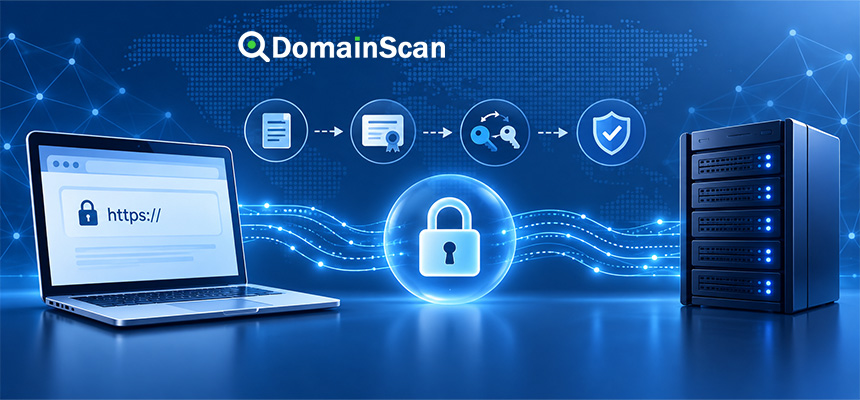
A TLS handshake is the process used by a client and server to establish the security settings required for an encrypted connection.
When you visit:
https://example.com
the browser does not immediately begin sending normal encrypted web traffic.
Before that can happen, the browser and server need to agree on how the connection will be secured.
That negotiation is called the TLS handshake.
During the handshake, the client and server can negotiate protocol parameters, authenticate the server using its certificate, establish shared cryptographic keys, and confirm that both sides can begin encrypted communication.
A simplified HTTPS connection looks like this:
Browser
   ↓
DNS lookup
   ↓
Server IP
   ↓
TCP connection
   ↓
TLS handshake
   ↓
Certificate validation
   ↓
Shared session keys
   ↓
Encrypted HTTPS traffic
What Does TLS Mean?
TLS stands for:
Transport Layer Security
TLS is the modern cryptographic protocol used to secure many internet connections, including HTTPS.
You may still see the term SSL used in phrases such as:
- SSL certificate
- SSL checker
- SSL handshake
However, modern secure web connections use TLS rather than the obsolete SSL protocol versions.
What Is the Purpose of a TLS Handshake?
The TLS handshake has several important jobs.
It allows the client and server to:
- Agree on a TLS protocol version.
- Select compatible cryptographic parameters.
- Authenticate the server.
- Establish shared encryption keys.
- Confirm the integrity of the handshake.
- Begin encrypted application traffic.
Without this process, the browser would not know how to create a secure session with the server.
What Happens Before the TLS Handshake?
Before the browser can begin TLS, it normally needs to find and reach the server.
The process usually begins with DNS.
For example:
example.com → 192.0.2.10
The browser then attempts a network connection to the server.
For standard HTTPS, this commonly means:
TCP port 443
Only after the network connection is established can the TLS handshake begin.
Step 1: The Client Starts the Handshake
The browser begins by sending a message commonly known as the ClientHello.
This message tells the server about the security capabilities the client supports.
Depending on the TLS version, the ClientHello can include information such as:
- Supported TLS versions
- Supported cipher suites
- Supported key exchange groups
- Signature algorithms
- Random data
- Server Name Indication
- Application protocol information
A simplified ClientHello might conceptually say:
I support:
TLS 1.3
TLS 1.2

I support these cryptographic options.

I want to connect to:
example.com
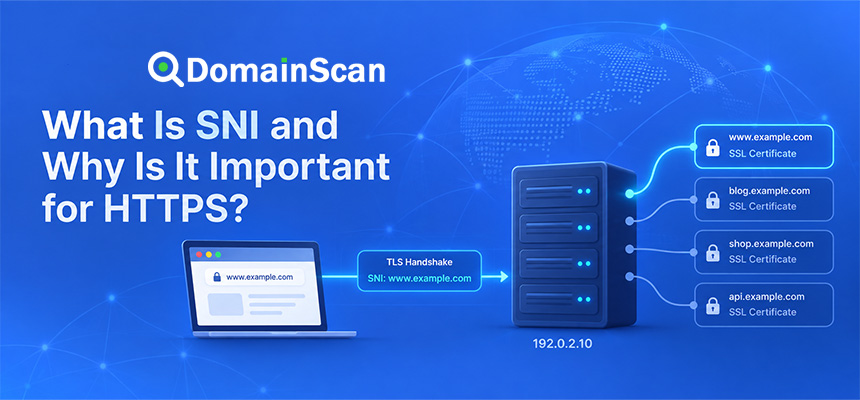
What Is Server Name Indication?
Server Name Indication, or SNI, allows the client to indicate which hostname it wants to reach.
This is important because several HTTPS websites can share one IP address.
For example:
site-a.example → 192.0.2.10
site-b.example → 192.0.2.10
site-c.example → 192.0.2.10
The browser can include the requested hostname in the handshake.
The server or reverse proxy can then select the appropriate certificate and website configuration.
Why Is SNI Important for SSL Certificates?
Without knowing the requested hostname, a server hosting several secure websites would have difficulty determining which certificate to present.
For example:
Requested:
shop.example.com
The server should present a certificate valid for:
shop.example.com
If SNI or the virtual host configuration is incorrect, the server may return a default certificate for another hostname.
Step 2: The Server Responds
The server examines the ClientHello and selects compatible settings.
It sends its response and continues the handshake.
Depending on the TLS version, this may include:
- The selected TLS version
- Selected cryptographic parameters
- Key exchange information
- The server certificate
- Additional handshake authentication data
What Is the ServerHello?
The ServerHello tells the client which compatible connection settings the server selected.
Conceptually:
Client:
I support TLS 1.3 and TLS 1.2.

Server:
We will use TLS 1.3.
If the client and server have no acceptable protocol or cryptographic configuration in common, the handshake can fail.
Step 3: The Server Presents Its Certificate
For normal public HTTPS, the server sends its website certificate as part of the handshake.
The certificate may contain information such as:
- Covered domain names
- Certificate issuer
- Public key
- Validity dates
- Digital signature
- Key usage information
The server may also send intermediate certificates needed to help the client build a trusted certificate chain.
What Does the Browser Check in the Certificate?
The browser does not simply accept the certificate because the server sent it.
It performs validation checks.
These can include:
- Does the certificate cover the requested hostname?
- Has the certificate expired?
- Is the certificate not yet valid?
- Can the certificate chain reach a trusted root?
- Are the digital signatures valid?
- Is the certificate suitable for server authentication?
Certificate Validation Example
The browser visits:
https://www.example.com
The certificate contains:
Subject Alternative Names:
example.com
www.example.com
The hostname matches.
The browser then checks the certificate chain:
www.example.com Certificate
        ↓
Intermediate CA
        ↓
Trusted Root CA
If the complete validation succeeds, the browser can continue the handshake.
What Happens If Certificate Validation Fails?
The browser may stop the connection and display an error.
Common causes include:
- Expired certificate
- Hostname mismatch
- Incomplete certificate chain
- Untrusted certificate authority
- Incorrect system time
- Invalid certificate signature
This happens before normal HTTPS page content is exchanged.
Step 4: The Client and Server Establish Shared Keys
Encryption of normal web traffic uses shared symmetric keys.
During the TLS handshake, the client and server establish the key material needed to derive those session keys.
Modern TLS commonly uses ephemeral key exchange mechanisms.
The important result is:
Browser
   ↓
Shared secret
   ↑
Server
Both sides independently derive compatible encryption keys without simply transmitting the final session key in plain text.
Why Does TLS Use Symmetric Encryption for the Session?
Public-key cryptography is useful for authentication and key establishment, but symmetric cryptography is much more efficient for encrypting large amounts of application traffic.
TLS therefore uses the handshake to establish keys and then uses symmetric encryption for the actual connection.
This allows HTTPS to remain secure without making every HTTP request computationally expensive.
What Is a Session Key?
A session key is temporary cryptographic key material used to protect traffic during a TLS connection.
It is not the same as:
- The certificate public key
- The server private key
- The certificate authority key
Session keys are created for the connection and are used to encrypt application data after the handshake succeeds.
Step 5: Both Sides Confirm the Handshake
The client and server exchange cryptographically protected handshake confirmation data.
This helps verify that both sides derived the correct security context and that the handshake was not modified unexpectedly.
Once this succeeds, the secure session is established.
Step 6: HTTPS Traffic Begins
After the handshake, the browser can send ordinary HTTP requests through the encrypted TLS connection.
For example:
GET / HTTP/1.1
Host: example.com
The HTTP request is protected by TLS before traveling across the network.
The server sends the HTTPS response through the same encrypted connection.
What Information Does TLS Protect?
TLS can protect application data transmitted after the secure session is established.
This includes:
- Web page content
- Login credentials
- Cookies
- API requests
- Form submissions
- Uploaded data
- Downloaded content
The exact metadata visible to network observers depends on the protocol, DNS configuration, TLS version, and surrounding network technologies.
TLS 1.2 vs TLS 1.3
TLS 1.3 simplified and modernized the handshake compared with TLS 1.2.
Among other changes, TLS 1.3 removed several obsolete cryptographic options and reduced the number of connection steps required for a normal new session.
A highly simplified comparison is:
TLS 1.2:
More negotiation steps

TLS 1.3:
Simplified and generally faster handshake
Modern web servers should normally support TLS 1.3 where practical while maintaining appropriate compatibility for supported clients.
Why Is TLS 1.3 Faster?
A normal TLS 1.3 handshake can establish a secure connection with fewer round trips than many TLS 1.2 handshakes.
This reduces latency, particularly when the browser and server are geographically far apart.
Connection performance still depends on:
- Network latency
- DNS lookup time
- TCP or transport setup
- Server response time
- Certificate size
- Protocol behavior
What Is a Round Trip?
A network round trip is the time required for data to travel from the client to the server and for a response to return.
For example:
Browser → Server
Server → Browser
Each required round trip adds latency before application data can begin flowing.
Reducing handshake round trips therefore improves connection startup performance.
What Is TLS Session Resumption?
A client that previously connected to a server may be able to resume a secure session using previously established information.
This can reduce the amount of work needed for later connections.
Conceptually:
First connection:
Full TLS handshake

Later connection:
Resumed TLS session
The exact mechanism depends on the TLS version and server configuration.
What Is 0-RTT in TLS 1.3?
TLS 1.3 supports an optional feature commonly known as 0-RTT data for resumed connections.
It can allow certain application data to be sent very early in the connection process.
This can improve latency, but it introduces replay considerations.
Applications and infrastructure should only use 0-RTT when they understand those security implications.
What Is Perfect Forward Secrecy?
Modern ephemeral key exchange can provide forward secrecy.
This means that compromising a server's long-term private key later should not automatically reveal the session keys of previously recorded connections.
This is an important improvement over older designs that depended directly on long-term keys for session key recovery.
What Is ECDHE?
ECDHE stands for:
Elliptic Curve Diffie-Hellman Ephemeral
It is a key exchange mechanism commonly associated with modern TLS deployments.
The “ephemeral” part is important because temporary key material is created for connections rather than relying entirely on long-term static secrets.
What Is a Cipher Suite?
A cipher suite identifies a set of cryptographic choices used by TLS.
Historically, cipher-suite names could include information about:
- Key exchange
- Authentication
- Encryption
- Integrity
TLS 1.3 simplified how these selections are represented.
Administrators should generally use current platform defaults or carefully reviewed security configurations rather than creating overly restrictive custom cipher lists without a clear reason.
Why Can Cipher Configuration Break HTTPS?
If the server enables only algorithms that the client does not support, the two sides cannot agree on a secure configuration.
The handshake fails.
For example:
Browser:
Supports A, B, C

Server:
Allows only D

Result:
No compatible option
This can produce TLS handshake or protocol errors.
What Is ALPN?
ALPN stands for:
Application-Layer Protocol Negotiation
It allows the client and server to negotiate which application protocol should run over the secure connection.
For web traffic, this can help select protocols such as:
- HTTP/1.1
- HTTP/2
Newer transport architectures such as HTTP/3 use different underlying transport behavior but still involve TLS security concepts.
How Does HTTP/2 Relate to the TLS Handshake?
For typical browser HTTPS connections, the client and server can use ALPN during TLS negotiation to agree on HTTP/2.
A simplified process is:
TLS handshake
    ↓
ALPN negotiation
    ↓
HTTP/2 selected
    ↓
Encrypted HTTP/2 traffic
How Does HTTP/3 Differ?
HTTP/3 runs over QUIC rather than traditional TCP.
QUIC integrates TLS 1.3 into its connection establishment process.
This changes the transport architecture, but the fundamental goal remains similar: authenticate the connection and establish encryption before normal application traffic proceeds.
What Is a TLS Handshake Error?
A TLS handshake error occurs when the client and server cannot complete the negotiation successfully.
Possible causes include:
- No compatible TLS version
- No compatible cryptographic settings
- Invalid certificate
- Certificate hostname mismatch
- Incomplete certificate chain
- Wrong certificate or private key
- Incorrect SNI configuration
- Reverse proxy problems
- Firewall interference
TLS Handshake Failure vs DNS Failure
A DNS failure occurs earlier.
For example:
example.com
    ↓
DNS lookup fails
    ↓
No server address
A TLS failure generally means the client obtained or reached an address but could not establish the secure session.
example.com
    ↓
192.0.2.10
    ↓
Port 443 reached
    ↓
TLS handshake fails
TLS Handshake Failure vs Certificate Name Mismatch
A hostname mismatch is one specific certificate-validation problem.
The client may successfully receive the certificate but reject it because:
Requested:
shop.example.com

Certificate:
www.example.com
This is part of the wider TLS connection process.
TLS Handshake Failure vs ERR_SSL_PROTOCOL_ERROR
ERR_SSL_PROTOCOL_ERROR is a browser-facing error that can appear when the TLS connection cannot be established correctly.
It may be caused by a handshake problem, but it does not identify one single root cause.
Further diagnosis is required.
Why Port 443 Matters
Standard HTTPS normally uses TCP port 443.
The endpoint should speak TLS.
If a server listens on port 443 but responds with ordinary HTTP:
Browser expects:
TLS

Server returns:
HTTP/1.1 200 OK
the connection fails because the protocols do not match.
How a Reverse Proxy Affects TLS
A reverse proxy may terminate TLS before forwarding the request internally.
For example:
Browser
   ↓ HTTPS / TLS
Reverse Proxy
   ↓ HTTP
Application Server
In this design, the public TLS handshake occurs with the reverse proxy rather than the application server.
The proxy must therefore have the correct:
- Certificate
- Private key
- TLS configuration
- SNI configuration
How a Load Balancer Affects TLS
A load balancer can also terminate TLS.
For example:
User
  ↓ TLS
Load Balancer
  ↓
Backend Servers
If the load balancer has an invalid certificate or unsupported TLS configuration, fixing the backend web server certificate will not solve the public handshake problem.
How a CDN Affects TLS
A CDN can create two separate secure connections:
Visitor
   ↓ TLS connection 1
CDN Edge
   ↓ TLS connection 2
Origin Server
The two connections can use different certificates and security configurations.
A website can therefore have:
- A valid edge TLS connection
- A broken origin TLS connection
or the reverse.
Why Does TLS Work on One Network but Not Another?
Different users can reach different endpoints because of:
- Different DNS resolver caches
- Different CDN edges
- Different IPv4 and IPv6 routes
- Different network security devices
A TLS problem may therefore affect only part of the user base.
IPv4 and IPv6 TLS Differences
A domain can return:
A:
192.0.2.10

AAAA:
2001:db8::10
Both addresses need correct HTTPS configuration.
If the IPv6 server uses an old certificate or does not support TLS properly, users on IPv6-capable networks may fail while IPv4 users succeed.
Can DNS Cause a TLS Handshake Error?
Indirectly, yes.
DNS can direct the browser to the wrong endpoint.
For example:
Expected:
example.com → 192.0.2.10

Actual:
example.com → 198.51.100.20
The second server may have:
- The wrong certificate
- No TLS service
- An incompatible server configuration
Always verify DNS before changing a server that may already be correct.
How to Check a TLS Connection
Several parts of the connection should be checked separately.
Start with:
- Hostname
- DNS destination
- Port 443
- Certificate
- Certificate chain
- TLS endpoint
Then continue into deeper protocol configuration if needed.
How DomainScan SSL Checker Helps
DomainScan SSL Checker can help inspect the certificate presented during the TLS connection.
Useful information includes:
- Certificate issuer
- Validity period
- Hostname coverage
- Certificate chain
- Signature algorithm
If the certificate cannot be retrieved at all, the problem may occur before or during the handshake rather than being a simple certificate-expiration issue.
How DomainScan DNS Lookup Helps
Use DNS Lookup to verify:
A
AAAA
CNAME
before assuming that the server being tested is the one users are actually reaching.
How Open Ports Lookup Helps
Use Open Ports Lookup to help determine whether the expected HTTPS endpoint is reachable on the network.
A valid certificate stored on a server does not help users if port 443 is inaccessible.
Common TLS Handshake Problems
No common TLS version
The server or client supports only incompatible protocol versions.
No compatible cryptographic configuration
The available algorithms do not overlap sufficiently.
Expired certificate
The server certificate is outside its validity period.
Hostname mismatch
The requested hostname is not included in the certificate.
Incomplete certificate chain
The client cannot build a trusted certification path.
Wrong SNI certificate
The server returns the default certificate instead of the certificate for the requested hostname.
Port 443 is serving HTTP
The browser expects TLS but receives ordinary HTTP data.
Wrong private key
The configured certificate and private key do not belong together.
Broken proxy configuration
The TLS endpoint or backend protocol is configured incorrectly.
IPv6 endpoint is outdated
The AAAA destination does not have the same TLS configuration as IPv4.
How to Troubleshoot a TLS Handshake Failure
Step 1: Confirm DNS
Check that the hostname resolves to the expected IP addresses.
Step 2: Check port 443
Confirm that the secure service is reachable.
Step 3: Inspect the certificate
Check expiration, hostname coverage, issuer, and chain.
Step 4: Test IPv4 and IPv6 separately
Do not assume both paths behave identically.
Step 5: Identify the TLS termination point
Determine whether TLS is handled by:
- The web server
- Nginx or another reverse proxy
- A load balancer
- A CDN
Step 6: Check SNI configuration
Confirm that the requested hostname maps to the correct certificate.
Step 7: Check TLS versions
Make sure the server supports modern protocol versions suitable for the intended clients.
Step 8: Review cryptographic configuration
Look for overly restrictive or obsolete settings.
Step 9: Check logs
TLS and proxy logs may reveal handshake failures, certificate errors, or unsupported parameters.
Step 10: Test from another network
This helps determine whether the problem is global or specific to one network path.
Why TLS Handshakes Sometimes Feel Slow
A secure connection has several setup costs.
These can include:
- DNS lookup
- Network connection setup
- TLS handshake round trips
- Certificate transmission
- Certificate validation
Modern TLS and connection reuse reduce much of this overhead.
How CDNs Can Improve TLS Performance
A CDN places TLS endpoints closer to users.
Instead of a visitor in Singapore establishing every new connection directly with a server in North America, the browser may connect to a nearby CDN edge.
Lower network latency can reduce handshake time.
Does a Larger Certificate Chain Slow Down TLS?
Larger certificate chains increase the amount of handshake data that must be transmitted.
The impact is usually small on good networks, but unnecessary certificates should not be sent.
A server should provide the intermediates needed for validation without adding unrelated certificates.
Can TLS Handshake Data Be Cached?
Certain connection information can be reused through session resumption mechanisms.
This is different from ordinary browser content caching.
The goal is to reduce the work required for later secure connections.
Does TLS Protect DNS?
Not necessarily.
The website TLS connection begins after the browser has usually resolved the hostname.
DNS privacy is addressed through technologies such as:
- DNS over HTTPS
- DNS over TLS
DNSSEC addresses DNS data authenticity and integrity rather than encrypting the website's HTTPS session.
TLS vs DNSSEC
These technologies operate at different layers.
DNSSEC
Helps validate DNS data.
TLS
Authenticates and encrypts the connection between client and server.
A complete secure path may look like:
DNSSEC validation
      ↓
Server address
      ↓
TLS handshake
      ↓
Certificate validation
      ↓
Encrypted HTTPS
TLS vs HSTS
TLS provides the secure connection.
HSTS tells the browser that the hostname should use HTTPS.
HSTS cannot replace a working TLS handshake.
TLS vs Mixed Content
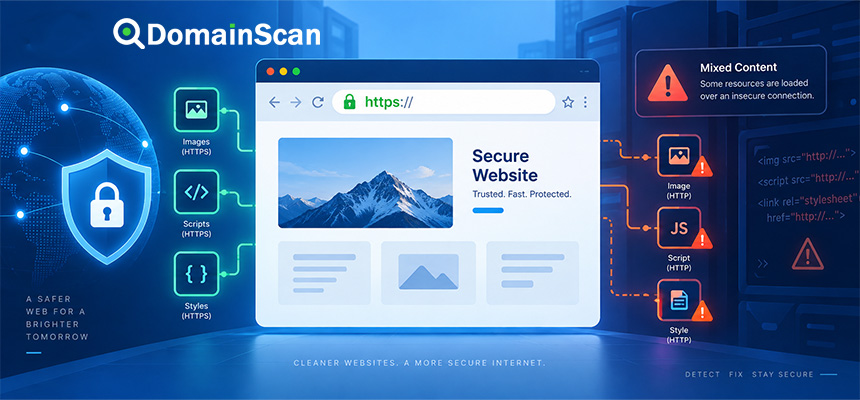
The main HTTPS page may have a perfectly valid TLS connection while still requesting insecure HTTP resources.
That is a mixed-content problem.
TLS protects only connections that actually use it.
Does a Successful TLS Handshake Mean the Website Is Safe?
No.
A successful handshake means that the connection met the required TLS security conditions.
It does not prove that:
- The website has no malware.
- The business is legitimate.
- The application has no vulnerabilities.
- User accounts cannot be compromised.
TLS protects the connection, not every aspect of the website.
A Practical TLS Handshake Checklist
- Confirm the correct hostname.
- Check A records.
- Check AAAA records.
- Check CNAME records.
- Confirm port 443 is reachable.
- Inspect the server certificate.
- Verify hostname coverage.
- Check certificate expiration.
- Check the certificate chain.
- Identify the TLS termination point.
- Check SNI configuration.
- Check supported TLS versions.
- Check proxy and CDN settings.
- Test IPv4 and IPv6 independently.
- Review server logs when the handshake fails.
Frequently Asked Questions
What is a TLS handshake?
A TLS handshake is the process where a client and server negotiate security settings, authenticate the server, establish shared cryptographic keys, and prepare an encrypted connection.
What happens during a TLS handshake?
The client and server exchange capability information, agree on security parameters, validate certificates, establish session keys, and confirm the secure session.
Is TLS the same as SSL?
No. TLS replaced the older SSL protocols, although the term SSL is still commonly used for certificates and HTTPS security.
Does HTTPS use TLS?
Yes. Modern HTTPS uses TLS to secure HTTP traffic.
When does certificate validation happen?
Certificate validation occurs during the process of establishing the secure TLS connection before normal protected HTTPS traffic begins.
What is ClientHello?
It is the initial TLS message in which the client provides supported protocol and cryptographic capabilities and other connection information.
What is ServerHello?
It is the server's response selecting compatible TLS connection parameters.
What is SNI?
SNI allows the client to indicate which hostname it wants so a multi-domain server can select the appropriate certificate and configuration.
What causes a TLS handshake failure?
Common causes include certificate errors, incompatible TLS versions, unsupported cryptographic settings, incorrect SNI, proxy problems, wrong ports, and broken server configuration.
Why does TLS work over IPv4 but fail over IPv6?
The A and AAAA records may lead to different servers with different certificates, firewall rules, or TLS configurations.
What port does HTTPS use?
Standard HTTPS normally uses TCP port 443.
Does TLS encrypt the entire website connection?
After the secure session is established, TLS protects the application data exchanged through that connection.
Final Thoughts
The TLS handshake is the foundation of a secure HTTPS connection.
Before a browser can send protected web traffic, it must reach the server, negotiate compatible security settings, validate the server's certificate, establish shared session keys, and confirm that the handshake completed successfully.
When HTTPS fails, understanding this sequence makes troubleshooting much easier.
A problem can occur before TLS because of DNS or port connectivity, during TLS because of protocol or certificate configuration, or after the handshake because of application issues such as mixed content.
The most effective troubleshooting approach is therefore to follow the connection in order: DNS, network endpoint, TLS handshake, certificate, and finally the application.
Use DomainScan SSL Checker to inspect the certificate presented during the secure connection, DNS Lookup to verify where the hostname resolves, DNS Propagation Check when recent changes return different destinations, and Open Ports Lookup when you need to confirm that the expected HTTPS endpoint is reachable.