What Is SNI and Why Is It Important for HTTPS?
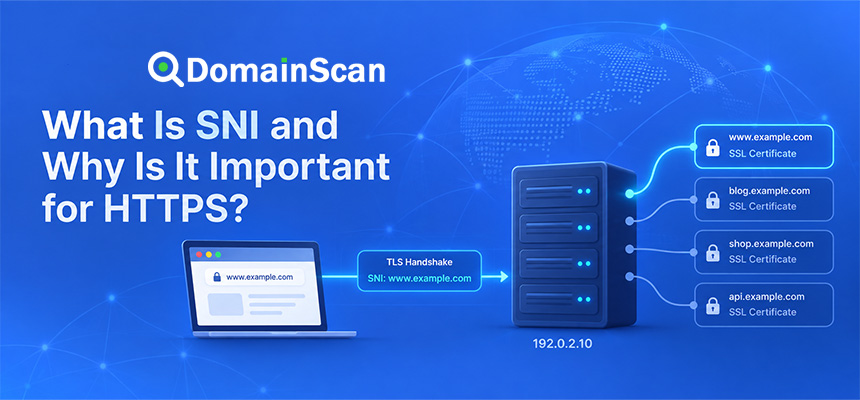
SNI is a TLS feature that allows a client to tell a server which hostname it wants to connect to before the server selects an SSL/TLS certificate.
SNI stands for:
Server Name Indication
It is especially important because a single IP address can host many different HTTPS websites.
For example:
site-a.example → 192.0.2.10
site-b.example → 192.0.2.10
site-c.example → 192.0.2.10
All three domains point to the same server.
Each site may use a different SSL certificate.
When a browser connects to 192.0.2.10, the server needs to know which hostname the browser requested before choosing the certificate to present.
SNI provides that hostname during the TLS handshake.
Why Is SNI Needed?
HTTP itself already includes a Host header that tells a web server which website the client wants.
For example:
GET / HTTP/1.1
Host: site-a.example
This works well for ordinary HTTP because the server can read the Host header before deciding which website should handle the request.
HTTPS creates a different problem.
The TLS connection needs to be established before the encrypted HTTP request can be read.
The sequence is roughly:
Browser
   ↓
Connect to IP address
   ↓
TLS handshake
   ↓
Certificate presented
   ↓
Encrypted connection established
   ↓
HTTP request sent
The server needs to choose a certificate before it can read the normal HTTP Host header.
SNI solves this by including the requested hostname earlier during the TLS handshake.
How Does SNI Work?
Suppose a browser opens:
https://shop.example.com
DNS returns:
shop.example.com → 192.0.2.10
The browser connects to the server and begins a TLS handshake.
Inside the ClientHello message, the browser can include:
Server Name:
shop.example.com
The server now knows which site the browser wants.
It can select the correct certificate:
Certificate:
shop.example.com
and continue the TLS handshake.
A Simple SNI Connection Flow
The process can be visualized as:
Browser requests:
https://shop.example.com
        ↓
DNS returns:
192.0.2.10
        ↓
TLS ClientHello
SNI = shop.example.com
        ↓
Server checks hostname
        ↓
Server selects matching certificate
        ↓
TLS handshake completes
        ↓
HTTPS traffic begins
What Part of TLS Contains SNI?
SNI is sent as an extension in the TLS ClientHello message.
The ClientHello is the message where the client tells the server about the TLS capabilities and connection parameters it supports.
It can include information such as:
- Supported TLS versions
- Supported cipher suites
- Key exchange capabilities
- Signature algorithms
- Application protocol information
- Server Name Indication
The server reads the SNI hostname before selecting the certificate.
Why Can Many HTTPS Sites Share One IP Address?
Before SNI became widely supported, hosting several HTTPS websites on one IP address was more difficult because the server had to select a certificate before knowing which hostname the user wanted.
SNI makes this practical.
For example:
www.example.com   → 192.0.2.10
shop.example.com  → 192.0.2.10
api.example.net   → 192.0.2.10
customer-site.org → 192.0.2.10
The server can host all four domains on one address.
During each connection, SNI indicates which hostname was requested.
The server then chooses the corresponding TLS configuration.
SNI and Virtual Hosts
Web servers often use virtual hosts to serve several websites from one machine.
A simplified HTTPS configuration may conceptually contain:
Host: site-a.example
Certificate: site-a-certificate.pem

Host: site-b.example
Certificate: site-b-certificate.pem

Host: site-c.example
Certificate: site-c-certificate.pem
SNI allows the TLS layer to select the correct virtual host before normal HTTP traffic begins.
SNI and SSL Certificates
SNI does not replace an SSL certificate.
It only helps the server decide which certificate to use.
The certificate still needs to pass normal validation checks.
The browser checks whether:
- The certificate covers the requested hostname.
- The certificate has not expired.
- The certificate chain is trusted.
- The certificate is valid for server authentication.
What Happens If SNI Is Missing?
If the client does not provide SNI, the server does not know which hostname is being requested during the early TLS handshake.
The server may respond with a default certificate.
For example:
Requested:
shop.example.com

Default server certificate:
hosting.example.net
The browser then sees a hostname mismatch.
What Is a Default Certificate?
A web server, proxy, CDN, or load balancer may have a fallback certificate used when no hostname-specific configuration matches.
For example:
Default certificate:
server01.hosting-provider.net
If SNI is missing or incorrect, a user visiting:
https://example.com
might unexpectedly receive that provider certificate.
This often indicates that the TLS endpoint could not match the requested hostname to the intended configuration.
How SNI Causes Certificate Name Mismatch Errors
SNI itself does not create the mismatch.
The problem occurs when the server selects the wrong certificate based on missing, incorrect, or incomplete hostname configuration.
For example:
Requested hostname:
shop.example.com

Server has:
www.example.com certificate
api.example.com certificate

Missing:
shop.example.com configuration
The server may fall back to the certificate for www.example.com.
The browser then reports a hostname mismatch.
Common Signs of an SNI Problem
An SNI-related problem can produce symptoms such as:
- The wrong SSL certificate is displayed.
- The browser reports a certificate name mismatch.
- One domain works while another domain on the same IP fails.
- The site works through one proxy but not another.
- A default hosting certificate appears unexpectedly.
- A certificate checker reports a different certificate than expected.
SNI and Shared Hosting
Shared hosting providers may host hundreds or thousands of domains on the same infrastructure.
For example:
customer-a.com
customer-b.com
customer-c.com
customer-d.com
can all resolve to:
203.0.113.50
SNI allows the shared server to select the certificate associated with each individual customer hostname.
This is one reason modern HTTPS does not require every domain to have a dedicated IP address.
Does Every HTTPS Website Need a Dedicated IP?
No.
Modern SNI support allows multiple HTTPS domains to share an IP address.
A dedicated IP may still be used for operational, network, routing, reputation, or infrastructure reasons, but it is not generally required simply because the website uses HTTPS.
SNI and CDNs
Content delivery networks rely heavily on hostname-based routing.
A CDN edge address can serve many customer domains.
For example:
site-a.example → CDN
site-b.example → CDN
site-c.example → CDN
When a browser connects to the CDN, SNI tells the edge system which customer hostname is being requested.
The CDN can then choose the correct edge certificate and routing configuration.
What Happens If a CDN Hostname Is Not Configured?
Suppose DNS already points:
www.example.com
to the CDN.
However, the CDN account has not been configured for:
www.example.com
When the browser sends:
SNI = www.example.com
the CDN may not find a matching certificate configuration.
It may return:
- A default CDN certificate
- A TLS error
- A hostname mismatch
- A connection failure
Why CDN Certificates Should Be Ready Before DNS Changes
During a CDN migration, prepare the custom hostname and certificate before directing traffic to the CDN.
A safer order is:
- Add the domain to the CDN.
- Verify domain ownership.
- Provision the edge certificate.
- Confirm the hostname is active.
- Test HTTPS.
- Then update DNS.
SNI and Reverse Proxies
A reverse proxy may terminate TLS on behalf of multiple websites.
For example:
Browser
   ↓ HTTPS
Reverse Proxy
   ↓
Application Servers
The reverse proxy reads SNI and determines which certificate and backend configuration should be used.
A proxy with incorrect hostname mapping can present the wrong certificate even when the application server itself is configured correctly.
SNI and Load Balancers
A load balancer can also host many TLS certificates.
For example:
example.com
api.example.com
shop.example.net
may all terminate HTTPS on the same load balancer.
The load balancer can use SNI to select the certificate associated with the incoming hostname.
What Is TLS Termination?
TLS termination means that a system decrypts the incoming HTTPS connection before forwarding traffic elsewhere.
For example:
Browser
   ↓ TLS
Load Balancer
   ↓ HTTP
Application
or:
Browser
   ↓ TLS connection 1
CDN
   ↓ TLS connection 2
Origin Server
SNI normally applies to the TLS endpoint handling each encrypted connection.
SNI Between a CDN and an Origin Server
SNI is not only relevant between browsers and public websites.
A CDN connecting to an HTTPS origin server may also need to send the correct SNI hostname.
For example:
CDN
  ↓
SNI = origin.example.com
  ↓
Origin Server
If the CDN sends the wrong hostname, the origin may return a different certificate.
The CDN may then reject the origin connection under strict certificate validation.
Origin Hostname vs Public Hostname
A CDN may connect to:
origin.example.com
while visitors use:
www.example.com
The CDN needs to know which hostname should be used for:
- DNS resolution
- SNI
- HTTP Host headers
- Certificate validation
These settings are often related but are not always identical.
SNI and the HTTP Host Header Are Not the Same Thing
This distinction is important.
SNI is part of TLS and is sent before encrypted HTTP traffic begins.
The Host header is part of HTTP and is sent after TLS has already been established.
The sequence is:
SNI hostname
     ↓
TLS certificate selected
     ↓
TLS connection established
     ↓
HTTP Host header sent
     ↓
Website request handled
Can SNI and the Host Header Be Different?
Technically, different values can be sent at different layers.
For normal browser traffic they are generally expected to correspond to the website being visited.
In proxy and testing environments, however, administrators may configure them differently.
Incorrect combinations can cause routing and certificate-validation problems.
SNI and DNS
DNS and SNI perform different tasks.
DNS answers:
Where should I connect?
SNI tells the TLS endpoint:
Which hostname am I trying to reach?
For example:
DNS:
shop.example.com → 192.0.2.10

SNI:
shop.example.com
Both pieces are needed in many shared-hosting architectures.
Can DNS Cause an Apparent SNI Problem?
Yes.
Suppose the correct server is:
shop.example.com → 192.0.2.10
but DNS incorrectly points to:
shop.example.com → 198.51.100.20
The browser sends the correct SNI:
shop.example.com
but the wrong server may not have any TLS configuration for that hostname.
It then presents its default certificate.
The visible result looks like a certificate or SNI problem, but the actual root cause is DNS.
SNI and IPv4 vs IPv6
A domain can have both:
A:
192.0.2.10

AAAA:
2001:db8::10
The browser sends the same hostname using SNI regardless of whether it connects over IPv4 or IPv6.
However, the two IP addresses may reach different servers.
If the IPv6 server lacks the correct SNI configuration, only IPv6 users may receive the wrong certificate.
Why Does HTTPS Work on Wi-Fi but Fail on Mobile Data?
One possible explanation is that the two networks use different IP paths.
For example:
Wi-Fi:
IPv4 → correct TLS server

Mobile:
IPv6 → outdated TLS server
The SNI value can be correct in both cases, while one endpoint still has broken certificate mapping.
SNI and Multiple Certificates
A server may store many certificates:
certificate-a.pem
certificate-b.pem
certificate-c.pem
The TLS configuration maps hostnames to those certificates.
For example:
site-a.example → certificate-a.pem
site-b.example → certificate-b.pem
site-c.example → certificate-c.pem
SNI allows the server to choose the right one for each incoming connection.
Can One Certificate Cover Multiple SNI Hostnames?
Yes.
A single certificate can contain several Subject Alternative Names.
For example:
example.com
www.example.com
shop.example.com
api.example.com
The server may use that one certificate for several hostname configurations.
SNI With Wildcard Certificates
A wildcard certificate such as:
*.example.com
can normally cover one-level subdomains such as:
www.example.com
shop.example.com
api.example.com
SNI still tells the server which hostname is being requested.
The server can then select a wildcard certificate that covers the name.
Does SNI Encrypt the Hostname?
Traditional SNI is sent early in the TLS handshake and has historically exposed the requested hostname to network observers.
This means HTTPS can encrypt the later application traffic while the hostname used for SNI may still be visible.
Modern TLS work has introduced mechanisms intended to improve privacy around information exposed during the ClientHello.
What Is Encrypted ClientHello?
Encrypted ClientHello, commonly abbreviated ECH, is designed to encrypt more of the TLS ClientHello information that would otherwise be visible to network observers.
This includes information associated with the requested server name when the deployment supports ECH.
ECH requires cooperation between clients, DNS configuration, and the server or edge infrastructure.
It should not be confused with ordinary SNI, which remains widely used.
SNI vs ECH
A simplified comparison is:
Traditional SNI
The requested hostname is provided in the TLS ClientHello in a form that can be visible on the network.
ECH
Attempts to protect sensitive ClientHello information through encryption when both sides support the required configuration.
The fundamental need to route the client to the correct TLS service still remains.
Does HTTPS Hide the Domain Name?
Not completely in every configuration.
Even though HTTPS encrypts page content, domain information may be exposed through several surrounding mechanisms, including:
- DNS queries when unencrypted DNS is used
- Traditional SNI
- IP address information
HTTPS should therefore not be understood as making every aspect of a connection invisible.
SNI and TLS 1.2
SNI has been widely used with TLS 1.2 deployments to support shared HTTPS hosting.
The client provides the server name during the initial handshake so the server can select the intended certificate.
SNI and TLS 1.3
SNI continues to be important in TLS 1.3.
The server still needs to know which hostname-specific configuration to use when multiple websites share infrastructure.
TLS 1.3 changed many handshake details but did not eliminate the need for virtual hosting based on server names.
SNI and HTTP/2
HTTP/2 is typically used over HTTPS in browsers.
SNI remains part of the TLS connection setup before HTTP/2 application traffic begins.
A simplified flow is:
SNI
 ↓
TLS handshake
 ↓
ALPN selects HTTP/2
 ↓
Encrypted HTTP/2 traffic
SNI and HTTP/3
HTTP/3 uses QUIC and TLS 1.3 rather than the traditional TCP-plus-TLS structure.
Hostname and certificate selection are still necessary when many domains share edge infrastructure.
Modern CDN and HTTP/3 systems therefore continue to rely on hostname-aware TLS configuration.
What Is SNI Routing?
Some load balancers and proxies can route TLS traffic based on the SNI hostname.
For example:
SNI = site-a.example
        ↓
Backend A

SNI = site-b.example
        ↓
Backend B
This allows routing decisions to be made before HTTP traffic is processed.
What Is SNI Passthrough?
In some architectures, a proxy does not decrypt the TLS connection.
Instead, it examines enough information to route the connection and passes the encrypted TLS traffic to a backend server.
A simplified design looks like:
Browser
   ↓ TLS
Proxy reads SNI
   ↓
Correct Backend
   ↓
Backend completes TLS
This is sometimes called TLS or SNI passthrough.
SNI Passthrough vs TLS Termination
TLS termination
The proxy handles the certificate and decrypts the connection.
Browser
   ↓ TLS
Proxy
   ↓ HTTP or new TLS
Backend
SNI passthrough
The proxy routes the encrypted connection to another server based on the hostname information.
Browser
   ↓ TLS
Routing Proxy
   ↓ TLS
Backend
The backend presents the certificate.
Common SNI Problems
Hostname not configured
The TLS endpoint has no matching virtual host for the requested SNI name.
Wrong certificate mapping
The hostname exists but is associated with the wrong certificate.
Default certificate returned
No matching configuration was found.
CDN hostname not activated
The domain points to a CDN before its custom-hostname certificate is ready.
Origin SNI is wrong
A CDN or reverse proxy sends an incorrect SNI value to the origin server.
IPv6 endpoint is outdated
The AAAA address reaches an older server without the correct hostname configuration.
DNS points to the wrong infrastructure
The browser sends correct SNI to a server that does not host the domain.
How to Troubleshoot an SNI Problem
Step 1: Confirm the exact hostname
Record the failing hostname:
shop.example.com
Step 2: Check DNS
Use DomainScan DNS Lookup to check:
A
AAAA
CNAME
Confirm that the hostname reaches the intended TLS infrastructure.
Step 3: Inspect the public certificate
Use DomainScan SSL Checker and check which certificate is actually presented.
If you expect:
shop.example.com
but receive:
hosting-provider.example
the server may be returning a default certificate.
Step 4: Check the certificate SAN list
Confirm the certificate covers the hostname.
Step 5: Identify the TLS termination point
Determine whether TLS is handled by:
- The web server
- A reverse proxy
- A load balancer
- A CDN
Step 6: Check virtual host configuration
Verify the hostname maps to the intended certificate.
Step 7: Test IPv4 and IPv6
Both endpoints should provide consistent hostname routing.
Step 8: Check CDN origin settings
If a CDN connects to an HTTPS origin, verify the SNI hostname sent to the origin.
Example: Wrong Default Certificate
DNS:
shop.example.com → 192.0.2.10
Browser sends:
SNI = shop.example.com
Server configuration contains only:
www.example.com
api.example.com
The server returns:
Default certificate:
server.example.net
The browser reports a certificate mismatch.
Fix:
Add a TLS virtual host for shop.example.com with the appropriate certificate.
Example: CDN Origin SNI Problem
Public user connects to:
www.example.com
The CDN edge certificate is correct.
The CDN connects to:
origin.example.com
but sends:
SNI = www.example.com
The origin is configured only for:
origin.example.com
The origin returns another certificate.
If strict validation is enabled, the CDN may reject the connection.
Example: IPv6 SNI Configuration Missing
DNS:
A:
192.0.2.10

AAAA:
2001:db8::10
IPv4 server:
SNI configuration correct
IPv6 server:
Only default certificate configured
Some visitors see a valid site while others receive a mismatch.
How to Prevent SNI Problems
Good operational practices include:
- Configure all production hostnames before changing DNS.
- Verify certificate SAN coverage.
- Check the default TLS virtual host.
- Test every public IP address.
- Test IPv4 and IPv6 separately.
- Confirm CDN custom hostnames are active.
- Verify load balancer certificate mappings.
- Check origin SNI settings after migrations.
- Test from the public internet rather than only locally.
SNI During a Server Migration
A new server should be fully configured before users are sent to it.
A safe sequence is:
- Create the new virtual host.
- Install the certificate.
- Confirm SNI certificate selection.
- Test HTTPS directly.
- Check IPv4 and IPv6.
- Then update public DNS.
SNI During a CDN Migration
Before moving DNS to a CDN:
- Add the custom hostname.
- Complete domain validation.
- Confirm the edge certificate is active.
- Configure the origin.
- Check origin SNI.
- Test the complete HTTPS path.
- Then change DNS.
SNI During Certificate Renewal
Certificate renewal normally does not change the SNI hostname.
However, deployment mistakes can associate the new certificate with the wrong virtual host.
After renewal, check the public hostname rather than only confirming that the new certificate file exists on the server.
Can SNI Cause ERR_SSL_PROTOCOL_ERROR?
Incorrect SNI-related configuration can contribute to TLS failures.
However, ERR_SSL_PROTOCOL_ERROR has many possible causes.
A wrong certificate usually produces a more specific certificate validation error, while badly configured TLS routing can cause broader handshake failures.
Can SNI Cause “Not Secure”?
Indirectly, yes.
If SNI causes the wrong certificate to be selected, the browser may reject the secure connection or display a security warning.
Does SNI Affect Certificate Chains?
Yes in the sense that the selected certificate determines which certificate chain the server presents.
If the server selects the wrong virtual host, it may send:
- The wrong leaf certificate
- The wrong intermediate chain
This can result in hostname or trust errors.
Does SNI Affect HSTS?
HSTS and SNI operate at different layers.
HSTS tells the browser to use HTTPS.
SNI helps the HTTPS endpoint choose the correct hostname-specific TLS configuration.
If HSTS forces HTTPS but the SNI configuration is broken, the user can experience a hard certificate failure.
Does SNI Affect Mixed Content?
Not directly.
Mixed content occurs after the main secure page is loaded and then requests insecure HTTP resources.
SNI is used earlier while establishing TLS connections to HTTPS hostnames.
How DomainScan Can Help Diagnose SNI Problems
SSL Checker
Use DomainScan SSL Checker to see which certificate is presented for the exact hostname.
This is useful for identifying:
- Default certificates
- Wrong hostname certificates
- Unexpected CDN certificates
- Certificate-chain differences
DNS Lookup
Use DNS Lookup to verify:
A
AAAA
CNAME
and confirm that the hostname is connecting to the intended TLS system.
DNS Propagation Check
Use it after migrations when different resolvers may still send users to different infrastructure.
Open Ports Lookup
Use it to help verify that the expected HTTPS network endpoint is reachable.
A Practical SNI Troubleshooting Checklist
- Identify the exact failing hostname.
- Check A records.
- Check AAAA records.
- Check CNAME records.
- Inspect the certificate presented publicly.
- Compare its SAN names with the requested hostname.
- Identify the TLS termination point.
- Check the hostname's virtual host configuration.
- Check the default certificate.
- Check CDN custom-hostname configuration.
- Check load balancer certificate mapping.
- Check origin SNI when a proxy is involved.
- Test IPv4 and IPv6 independently.
- Test every server in a multi-IP environment.
- Retest from the public internet after changes.
Frequently Asked Questions
What is SNI?
SNI, or Server Name Indication, is a TLS feature that allows a client to tell the server which hostname it wants during the TLS handshake.
Why is SNI needed?
It allows a server to select the correct SSL certificate when several HTTPS websites share the same IP address.
Is SNI part of TLS?
Yes. SNI is carried as an extension in the TLS ClientHello.
Does SNI happen before HTTP?
Yes. SNI is provided during the TLS handshake before normal encrypted HTTP traffic begins.
Is SNI the same as the HTTP Host header?
No. SNI is part of TLS, while the Host header is part of HTTP and is normally transmitted after the secure connection is established.
Can multiple SSL websites share one IP address?
Yes. Modern SNI support allows many HTTPS hostnames to share one IP address.
What happens if SNI is wrong?
The server may present the wrong or default certificate, causing hostname mismatch or TLS connection errors.
Why am I seeing my hosting provider's SSL certificate?
The hostname may not be configured correctly on the TLS endpoint, causing the server to present its default certificate. Incorrect DNS can also send users to the wrong server.
Can a CDN have an SNI problem?
Yes. Problems can occur at the public CDN edge or when the CDN connects to an HTTPS origin using the wrong server name.
Does SNI work with IPv6?
Yes. SNI is part of the TLS connection and works regardless of whether the underlying connection uses IPv4 or IPv6.
Is SNI encrypted?
Traditional SNI has historically been visible during the initial TLS handshake. Newer mechanisms such as Encrypted ClientHello are designed to improve privacy for ClientHello information when supported.
How can I check an SNI problem?
Check the exact hostname's public certificate, DNS records, TLS termination system, and virtual-host configuration.
Final Thoughts
SNI is one of the technologies that made modern shared HTTPS hosting practical.
It allows a browser to identify the hostname it wants during the TLS handshake so the server, CDN, proxy, or load balancer can select the correct certificate before encrypted HTTP traffic begins.
When SNI configuration is correct, many unrelated websites can securely share the same IP address without certificate conflicts.
When it is wrong, users may receive a default hosting certificate, a certificate for another domain, or a TLS connection failure.
The most effective troubleshooting approach is to follow the complete path: confirm DNS, identify the exact TLS endpoint, inspect the certificate actually presented for the requested hostname, and verify that the SNI hostname maps to the intended virtual host and certificate.
Use DomainScan SSL Checker to inspect the certificate returned for a hostname, DNS Lookup and DNS Propagation Check to confirm where the domain resolves, and Open Ports Lookup when checking whether the intended HTTPS endpoint is reachable.