What Is an MX Record and How Does It Work?
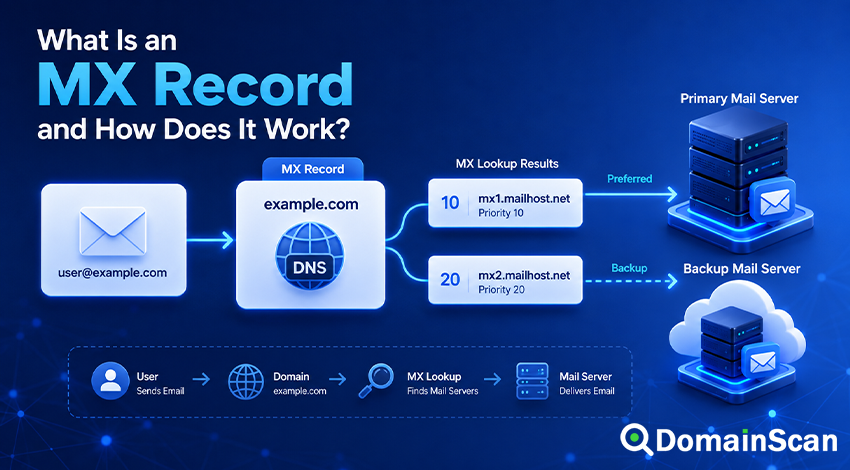
An MX record is a DNS record that identifies the mail servers responsible for receiving email on behalf of a domain.
When someone sends a message to an address such as [email protected], the sending mail server needs to determine where that message should be delivered. It normally does this by looking up the MX records published for example.com.
A basic MX record looks like this:
example.com. 3600 IN MX 10 mail.example.com.
This record tells sending mail systems that mail.example.com accepts email for example.com. The number 10 is the preference value, sometimes called the priority.
MX records do not contain email addresses, passwords, inbox locations, or server IP addresses. They provide hostnames that sending mail servers can resolve and contact using SMTP.
A correct MX configuration is therefore an essential part of receiving email. However, it is only one part of the complete mail system. The destination server must also be online, reachable, configured for the domain, and prepared to accept the intended recipients.
What Does MX Mean?
MX stands for Mail Exchanger.
The record identifies a host that is willing to accept mail for a domain. In the following example:
example.com. 3600 IN MX 10 mail.example.com.
example.comis the domain receiving email.3600is the Time to Live, measured in seconds.INis the Internet record class.MXis the record type.10is the preference value.mail.example.comis the mail exchanger hostname.
The target must be a hostname. It should not be an IP address, email address, web URL, or server port.
This is valid:
example.com. 3600 IN MX 10 mail.example.com.
This is not a valid MX target:
example.com. 3600 IN MX 10 192.0.2.50
The mail exchanger hostname must separately resolve to one or more usable IP addresses.
How Does an MX Record Work?
Suppose a mail server needs to deliver a message to:
[email protected]
The part after the @ symbol identifies the receiving domain:
example.com
A simplified delivery process works as follows:
- The sending server queries DNS for the MX records of
example.com. - DNS returns one or more mail exchanger hostnames and preference values.
- The sending server selects the most preferred available exchanger.
- It resolves that exchanger hostname to an IPv4 or IPv6 address.
- It attempts to connect to the destination mail server using SMTP.
- The receiving server decides whether to accept, defer, or reject the message.
For example, DNS may return:
example.com. 3600 IN MX 10 mail1.example.com.
example.com. 3600 IN MX 20 mail2.example.com.
The sending server normally tries mail1.example.com first because it has the lower preference value.
If that server cannot be reached or temporarily rejects the delivery attempt, the sender may try mail2.example.com.
How Do MX Priority Values Work?
Each MX record contains a preference value. Lower numbers are preferred over higher numbers.
Consider this configuration:
example.com. 3600 IN MX 10 primary.example.com.
example.com. 3600 IN MX 20 backup.example.com.
example.com. 3600 IN MX 30 emergency.example.com.
The usual delivery order is:
primary.example.combackup.example.comemergency.example.com
The numbers do not represent percentages, response times, server capacity, or the number of messages a server can receive. They only establish relative preference.
The values do not need to begin with zero or increase by ten. This configuration is also valid:
example.com. 3600 IN MX 5 mx1.example.com.
example.com. 3600 IN MX 50 mx2.example.com.
Administrators often leave gaps between values so that another mail exchanger can be inserted later without renumbering all existing records.
What Happens When MX Records Have the Same Priority?
A domain can publish multiple MX records with the same preference value:
example.com. 3600 IN MX 10 mx1.example.com.
example.com. 3600 IN MX 10 mx2.example.com.
Both servers are equally preferred.
A sending mail system may choose between them according to its own implementation and the order of the DNS response. This arrangement can distribute deliveries across multiple mail servers and provide redundancy.
Equal-priority MX records should all be prepared to receive mail for the domain. Publishing a server at the same priority does not guarantee that traffic will be divided evenly.
Does a Lower MX Number Mean a Faster Server?
No. A lower preference number does not describe performance.
An MX value of 10 does not mean the server is faster than one with a value of 20. It only means the first server should be attempted before the second when both are part of the same MX set.
The actual delivery speed depends on factors such as:
- Network latency
- Server availability
- SMTP response time
- Spam filtering
- Queue size
- Temporary rate limits
- Greylisting
- Recipient validation
How Does an MX Target Resolve to an IP Address?
An MX record returns a hostname, not an address. The sending server must then resolve the hostname using A or AAAA records.
For example:
example.com.      3600 IN MX 10 mail.example.com.
mail.example.com. 3600 IN A     192.0.2.50
mail.example.com. 3600 IN AAAA  2001:db8::50
The MX lookup identifies mail.example.com. The A and AAAA lookups provide the addresses that can be used to contact it.
If the MX target has no usable address records, mail delivery may fail even though the MX record itself appears in DNS.
Can an MX Record Point Directly to an IP Address?
No. A standard MX record must point to a domain name.
This configuration is incorrect:
example.com. 3600 IN MX 10 192.0.2.50
The correct configuration uses a hostname:
example.com.      3600 IN MX 10 mail.example.com.
mail.example.com. 3600 IN A     192.0.2.50
Most DNS control panels expect only the mail server hostname in the MX destination field.
Should an MX Record Point to a CNAME?
An MX target should resolve directly to address records rather than depend on a CNAME alias.
A recommended configuration looks like this:
example.com.      3600 IN MX 10 mail.example.com.
mail.example.com. 3600 IN A     192.0.2.50
This configuration should be avoided:
example.com.      3600 IN MX    10 mail.example.com.
mail.example.com. 3600 IN CNAME server.provider.net.
Some mail systems may follow the alias, but relying on that behavior can create compatibility problems and unnecessary dependencies.
If a mail provider supplies an MX hostname, use that exact hostname as the MX target. Do not create another alias unless the provider specifically documents that configuration.
Can an MX Record Contain a Port Number?
No. An MX record cannot contain a port number.
This is invalid:
example.com. 3600 IN MX 10 mail.example.com:2525
Standard server-to-server SMTP delivery normally uses TCP port 25. DNS MX records do not provide a mechanism for changing that destination port.
Ports such as 587 and 465 are commonly associated with authenticated mail submission by users or applications. They are not selected through MX records.
MX Records and Outgoing Email Are Different
MX records primarily tell other mail systems where to deliver incoming email for a domain.
They do not normally determine which server a user’s email application should use to send outgoing messages.
For example, a mail client may be configured with:
smtp.example.com
That outgoing submission server does not have to match the domain’s MX target.
A company may receive mail through one provider while sending authenticated messages through another service. The relevant settings are supplied by the email provider or administrator.
What Happens When a Domain Has No MX Record?
Under traditional SMTP behavior, a sending system may attempt to deliver mail using the domain’s address records when no MX record exists.
For example, if example.com has no MX record but has this A record:
example.com. 3600 IN A 192.0.2.10
a sender may try to deliver mail to that address as though the domain had an implicit MX record.
This fallback should not be treated as a substitute for a proper mail configuration. A domain intended to receive email should publish explicit MX records.
An explicit MX setup is easier to understand, easier to migrate, and less likely to behave differently across mail systems.
What Is a Null MX Record?
A Null MX record explicitly states that a domain does not accept email.
It is written with a preference value of zero and a target represented by a single dot:
example.com. 3600 IN MX 0 .
This is different from simply omitting MX records.
Without an MX record, sending systems may attempt address-record fallback. A Null MX tells compliant senders that there is no mail exchanger for the domain and that delivery should not be attempted.
A Null MX can be useful for domains used only for websites, redirects, infrastructure, or other purposes that never require incoming email.
A domain using Null MX should not publish additional ordinary MX records at the same time.
Can a Subdomain Have Its Own MX Records?
Yes. A subdomain can publish MX records independently from its parent domain.
For example:
example.com.         3600 IN MX 10 mail.example.com.
support.example.com. 3600 IN MX 10 inbound.helpdesk.net.
Messages addressed to:
[email protected]
would use the MX records for example.com, while messages addressed to:
[email protected]
would use the MX records for support.example.com.
This can be useful when different departments, services, or platforms manage separate email namespaces.
Can Different Domains Use the Same MX Server?
Yes. One mail platform can receive messages for many domains.
For example:
example.com.     3600 IN MX 10 mx.provider.net.
example.org.     3600 IN MX 10 mx.provider.net.
another-site.net. 3600 IN MX 10 mx.provider.net.
The receiving server uses the SMTP recipient domain and its own configuration to decide how each message should be handled.
The provider must add and verify each customer domain before it can accept mail correctly. Publishing an MX record alone does not automatically create inboxes or authorize the domain on the destination platform.
What Is TTL in an MX Record?
TTL stands for Time to Live. It tells recursive DNS resolvers how long they may cache the MX response.
In this record:
example.com. 3600 IN MX 10 mail.example.com.
the TTL is 3600 seconds, or one hour.
If the domain owner later changes the MX target, resolvers that already cached the previous record may continue returning it until the original cache period expires.
This matters during email provider migrations. Some sending systems may continue delivering to the previous provider while others already use the new MX records.
How to Change MX Records Safely
An email migration should be planned carefully because messages may arrive through both the old and new systems during the DNS transition.
A typical process includes:
- Set up and verify the new mail service.
- Create users, aliases, forwarding rules, and required domains.
- Confirm that the new provider is ready to receive mail.
- Reduce the MX TTL before the migration when practical.
- Wait for the previous, longer TTL to expire.
- Replace the old MX records with the new provider’s records.
- Check DNS responses from multiple resolvers.
- Monitor both the old and new systems during the transition.
- Keep the previous service active until delayed deliveries have stopped.
Reducing the TTL after changing the records does not shorten the lifetime of responses that were already cached using the old TTL.
Should Old MX Records Remain During a Migration?
Usually, you should not leave an old mail provider in the MX set unless it is still intended to receive and process messages.
Consider this configuration:
example.com. 3600 IN MX 10 new-provider.example.
example.com. 3600 IN MX 20 old-provider.example.
If the preferred server is temporarily unreachable, a sender may deliver mail to the old provider. That can split messages between two systems.
A safer migration normally prepares the new provider completely, changes the MX records, and keeps the old service available only to receive deliveries caused by previously cached DNS data.
The old provider does not need to remain publicly listed as a backup MX unless it is deliberately configured for that role.
What Is a Backup MX Server?
A backup MX server has a higher preference number than the primary exchanger.
For example:
example.com. 3600 IN MX 10 primary.example.com.
example.com. 3600 IN MX 20 backup.example.com.
If the primary server cannot accept the message, the sender may try the backup.
A backup exchanger must be configured carefully. It should:
- Know which domains it is permitted to receive mail for
- Reject unauthorized relay attempts
- Queue messages securely
- Forward messages to the correct primary system
- Apply suitable spam and abuse controls
- Avoid accepting invalid recipients without verification
A server should not be added as a backup MX merely because it is available. An incorrectly configured backup can become a spam target or an open relay risk.
Do MX Records Protect Against Spam?
No. MX records direct email delivery, but they do not authenticate senders or determine whether a message is trustworthy.
Email security and reputation rely on additional systems, including:
- SPF
- DKIM
- DMARC
- Reverse DNS
- IP and domain reputation
- Content filtering
- Blocklists
- Connection and rate controls
A domain can have perfectly valid MX records and still experience spam, spoofing, or delivery problems.
MX Records vs SPF, DKIM, and DMARC
These DNS records have different responsibilities.
MX
Identifies the servers that receive email for the domain.
SPF
Publishes a policy describing which systems are authorized to send mail using the domain in the relevant SMTP identity.
DKIM
Publishes public keys used to verify cryptographic signatures added to outgoing messages.
DMARC
Defines how receiving systems should handle messages that fail aligned SPF or DKIM checks and provides a reporting mechanism.
Changing MX records does not automatically update SPF, DKIM, or DMARC. During a provider migration, all required email DNS records should be reviewed separately.
How to Check an MX Record
You can use the DomainScan DNS Lookup tool to inspect the MX records currently published for a domain.
A basic check involves:
- Enter the domain name without an email username.
- Select the MX record type.
- Run the lookup.
- Review every returned mail exchanger.
- Check the preference values.
- Resolve each target hostname to confirm that it has address records.
- Compare the results with the records supplied by the email provider.
To check the address in:
[email protected]
query the MX records for:
example.com
Do not enter the complete email address into a standard MX lookup.
How to Read Multiple MX Results
Suppose a lookup returns:
example.com. 3600 IN MX 1  mx1.mail-provider.net.
example.com. 3600 IN MX 5  mx2.mail-provider.net.
example.com. 3600 IN MX 10 mx3.mail-provider.net.
This means:
mx1.mail-provider.netis the most preferred server.mx2.mail-provider.netis attempted after the first server when necessary.mx3.mail-provider.nethas the lowest preference in this set.
All three records may be valid and necessary. Do not remove higher-numbered MX records simply because they are not used first.
Common MX Record Problems
No MX records are returned
Possible causes include:
- The domain has not been configured for email.
- The records were added to the wrong DNS provider.
- The DNS changes have not been published correctly.
- The domain uses address-record fallback.
- The domain intentionally publishes a Null MX.
Check the authoritative name servers and confirm whether the domain is intended to receive mail.
The MX target does not resolve
An MX hostname must ultimately return usable A or AAAA records.
For example:
example.com. 3600 IN MX 10 missing.example.net.
If missing.example.net returns NXDOMAIN or has no address records, senders may be unable to connect.
The MX record contains an IP address
Replace the IP value with a hostname and publish a separate A or AAAA record for that hostname.
The record was added to the wrong DNS account
A domain can be registered with one company while using authoritative name servers from another provider.
Changes made in the registrar’s DNS panel will have no effect if the domain is delegated elsewhere. Check the NS records to identify the active DNS service.
The priority values are misunderstood
Lower values are preferred. Setting the backup server to a lower number can cause it to receive messages before the intended primary server.
Old provider records remain in DNS
Old MX records can continue receiving mail when the preferred service is unavailable. Remove obsolete records after confirming that they are no longer needed.
Different DNS resolvers return different MX records
This may occur shortly after a change because older responses remain cached.
It can also indicate that authoritative name servers contain inconsistent zone data. Compare public resolver results, and then query each authoritative server directly.
MX records are correct but mail is still not received
DNS may be working while the mail system fails for another reason.
Possible causes include:
- The SMTP server is offline.
- TCP port 25 is blocked.
- The domain has not been added to the mail platform.
- The recipient mailbox does not exist.
- The server rejects the sender.
- The message is quarantined or filtered as spam.
- The provider has suspended the account.
- The receiving server has a TLS or certificate problem.
- The sender is still using an older cached MX response.
Check the SMTP response or bounce message for a specific error rather than assuming that every email problem is caused by DNS.
Why Email May Work for Some Senders but Not Others
Different sending systems may use different DNS resolvers, caches, routes, retry schedules, and reputation policies.
After an MX change:
- One sender may retrieve the new records immediately.
- Another may continue using a cached record.
- A third may have queued the message for later delivery.
- Some providers may reject or defer mail for policy reasons unrelated to MX.
This is why a migration should be monitored over time rather than tested using only one sender.
MX Records and DNS Propagation
When an MX record is changed, the authoritative DNS provider may publish the new response quickly. Recursive resolvers can still retain the old response according to its previous TTL.
During the transition, different senders may deliver to different providers.
Use the DomainScan DNS Propagation Check to compare MX responses from multiple locations. If public resolvers differ but the authoritative servers all return the new records, normal caching is the likely cause.
If the authoritative servers return different MX sets, the DNS zone may not be synchronized correctly.
Frequently Asked Questions
Do I need an MX record for a website?
No. A website can operate without an MX record.
MX records are needed when the domain is intended to receive email. Website traffic normally relies on A, AAAA, or CNAME records.
Can one domain have multiple MX records?
Yes. Multiple MX records can provide redundancy, distribute delivery attempts, or represent a mail provider’s required architecture.
Which MX priority is highest?
The lowest numerical preference value is tried first.
An MX record with priority 10 is preferred over one with priority 20.
Can I use zero as an MX priority?
Yes. Zero can be used as an ordinary preference value when the target is a mail server hostname.
example.com. 3600 IN MX 0 mail.example.com.
A Null MX also uses preference zero, but its target is a single dot:
example.com. 3600 IN MX 0 .
These configurations have very different meanings.
Does an MX record create an email account?
No. An MX record only directs delivery toward a mail server.
Mailboxes, aliases, passwords, forwarding rules, and user accounts must be created separately in the receiving mail system.
Can changing MX records delete existing email?
Changing DNS does not directly delete stored messages. However, new mail may begin arriving at a different provider.
Existing messages remain on the previous system unless they are migrated, synchronized, downloaded, or deleted separately.
How long does an MX change take?
The authoritative provider may publish the change almost immediately, but cached responses can remain until their previous TTL expires.
The visible transition may take minutes or hours depending on the old TTL and resolver behavior.
Why does my mail provider give me several MX records?
Multiple records provide alternative delivery destinations and may support redundancy, regional routing, maintenance, or load distribution.
Enter every record exactly as provided, including its assigned priority.
Can MX records point to a server on another domain?
Yes. This is common with hosted email services.
example.com. 3600 IN MX 10 mx.mail-provider.net.
The mail exchanger does not need to be a subdomain of the domain receiving email.
Final Thoughts
An MX record tells sending mail servers where email for a domain should be delivered. Each record contains a mail exchanger hostname and a preference value, with lower values receiving higher priority.
A valid MX target must be a hostname that resolves to usable IP addresses. It should not be an IP address, URL, port number, or unnecessary CNAME alias.
Correct MX records are essential, but they do not guarantee successful email delivery. The receiving server must also be reachable, configured for the domain, prepared to accept recipients, and protected by appropriate authentication and filtering policies.
When troubleshooting, inspect the complete delivery path: the MX records, their priority values, the target hostnames, the corresponding A and AAAA records, SMTP connectivity, server responses, and any relevant bounce messages.
Use the DomainScan DNS Lookup tool to inspect a domain’s current MX records, and use the DNS Propagation Check to compare results when a recent mail provider change is still appearing differently across networks.