How to Fix ERR_SSL_PROTOCOL_ERROR: Common Causes and Solutions
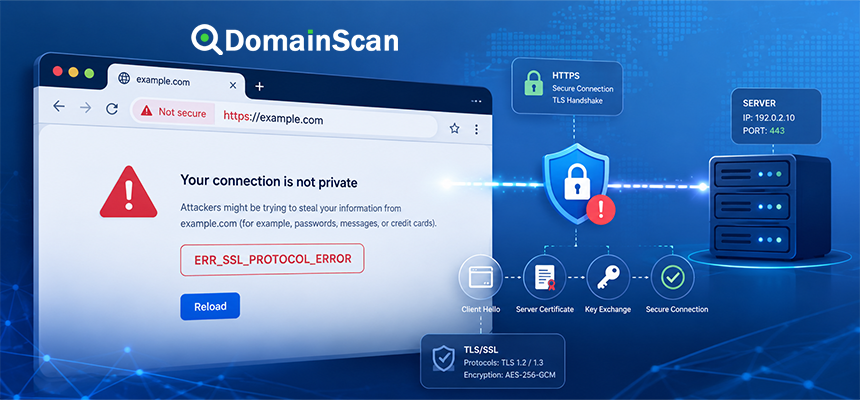
ERR_SSL_PROTOCOL_ERROR is a browser error that usually appears when an HTTPS connection cannot be established correctly.
The browser reaches the server, attempts to start a TLS connection, but something in the connection process fails before a valid secure session is created.
This makes the error different from a simple DNS failure.
With a DNS problem, the browser may not be able to find the server at all. With an SSL protocol error, the browser often reaches an IP address but cannot complete the HTTPS negotiation successfully.
The cause can be related to the SSL certificate, TLS configuration, port 443, reverse proxies, CDNs, firewalls, DNS, or even a server accidentally responding with plain HTTP on an HTTPS port.
What Does ERR_SSL_PROTOCOL_ERROR Mean?
The error generally means that the browser expected a valid TLS conversation but received something it could not process as a proper secure connection.
A normal HTTPS connection looks like this:
Browser
   ↓
DNS lookup
   ↓
Server IP
   ↓
TCP connection to port 443
   ↓
TLS handshake
   ↓
Certificate validation
   ↓
Encrypted HTTPS session
If the TLS stage fails, the browser may report a protocol error.
Is ERR_SSL_PROTOCOL_ERROR a Certificate Error?
Sometimes, but not always.
A certificate problem can prevent HTTPS from working, but protocol errors can also occur before or around certificate validation.
Possible causes include:
- The server is not speaking TLS on port 443.
- The TLS configuration is broken.
- The certificate and private key do not match.
- The reverse proxy is misconfigured.
- A load balancer sends traffic to the wrong backend.
- The client and server cannot agree on supported TLS settings.
- The HTTPS port is being intercepted or redirected incorrectly.
Cause 1: Port 443 Is Serving Plain HTTP
One of the clearest protocol errors occurs when a browser connects to port 443 expecting TLS, but the server returns ordinary HTTP.
For example, the browser expects:
TLS handshake
but the server responds with something like:
HTTP/1.1 200 OK
without establishing TLS first.
The browser cannot interpret that as a valid HTTPS session.
How This Misconfiguration Happens
Common causes include:
- Port 443 forwarded to an HTTP-only application.
- A reverse proxy listener configured without TLS.
- Incorrect container port mapping.
- A load balancer using the wrong backend protocol.
- A web server virtual host configured on the wrong port.
How to Fix HTTP Running on Port 443
Confirm that the service listening on port 443 is configured for TLS.
The correct connection should conceptually be:
Client
  ↓
TCP 443
  ↓
TLS-enabled web server
  ↓
HTTPS application
If TLS terminates at a load balancer or reverse proxy, the backend may still use HTTP internally. That is acceptable as long as the public port 443 endpoint performs the TLS handshake correctly.
Cause 2: Nothing Is Listening on Port 443
If the website has a certificate but the HTTPS service is not actually running, users cannot establish a secure connection.
Possible causes include:
- The web server is stopped.
- The HTTPS virtual host was never enabled.
- The server listens only on port 80.
- A firewall blocks port 443.
- A cloud security rule does not allow HTTPS traffic.
Use the DomainScan Open Ports Lookup to help verify whether the expected service is reachable.
Cause 3: The SSL Certificate and Private Key Do Not Match
An SSL/TLS certificate is associated with a corresponding private key.
If a server is configured with:
Certificate A
Private Key B
and they do not belong together, the TLS service may fail to start or behave incorrectly.
This often happens after:
- Manual certificate replacement
- Server migration
- Certificate renewal
- Copying files from another server
How to Prevent Certificate and Key Mismatches
Keep certificate material organized and avoid mixing files from different issuance requests.
A typical setup includes:
Certificate
Private Key
Intermediate Chain
The certificate and private key must belong to the same key pair.
Cause 4: The Certificate Chain Is Configured Incorrectly
An incomplete or incorrect certificate chain can produce HTTPS failures.
A normal chain may look like:
Website Certificate
        ↓
Intermediate CA
        ↓
Trusted Root CA
If the server sends the wrong intermediate certificate or an invalid chain, some clients may fail the connection.
Use DomainScan SSL Checker to inspect the certificate chain presented by the public hostname.
Cause 5: Unsupported TLS Versions
Client and server need to agree on a compatible TLS protocol version.
Modern servers should normally support current TLS versions while avoiding obsolete SSL protocols.
A connection problem can occur if a server is configured to allow only legacy protocols that a modern browser refuses to use.
The reverse can also affect old clients if the server supports only newer protocol versions.
SSL vs TLS
Although the browser error contains “SSL,” modern HTTPS uses TLS.
Older SSL versions are obsolete.
The modern connection is conceptually:
HTTPS
  ↓
TLS
  ↓
Encrypted transport
The term SSL remains common in user-facing error messages and hosting dashboards.
Cause 6: Cipher Suite Configuration Is Too Restrictive
TLS also requires the client and server to agree on suitable cryptographic parameters.
If a server allows only unusual or unsupported cipher suites, the handshake may fail.
This is more likely on:
- Old servers
- Custom security configurations
- Legacy appliances
- Incorrectly hardened TLS configurations
Security hardening should remove obsolete algorithms without accidentally removing every option supported by the intended clients.
Cause 7: A Reverse Proxy Is Misconfigured
Modern websites frequently place a reverse proxy in front of the application server.
For example:
Browser
   ↓ HTTPS
Nginx / Proxy
   ↓ HTTP or HTTPS
Application Server
If the proxy listener, certificate, upstream protocol, or port configuration is wrong, visitors can receive SSL protocol errors.
Common Reverse Proxy Mistakes
- Listening on 443 without enabling TLS.
- Forwarding HTTPS to the wrong backend port.
- Using HTTPS to a backend that accepts only HTTP.
- Using HTTP where the backend expects TLS.
- Loading the wrong certificate.
Cause 8: Load Balancer TLS Configuration Is Wrong
A load balancer may terminate TLS before forwarding traffic to the application.
A typical architecture looks like:
Visitor
   ↓ HTTPS
Load Balancer
   ↓
Application Servers
If the load balancer is configured with the wrong listener protocol, certificate, or backend mode, HTTPS can fail even though the origin servers are healthy.
Cause 9: CDN SSL Mode Is Misconfigured
A CDN introduces another connection layer:
User
 ↓ HTTPS
CDN
 ↓ HTTPS or HTTP
Origin Server
The edge connection and origin connection are separate.
A protocol error can occur if:
- The CDN expects HTTPS from the origin but the origin supports only HTTP.
- The origin HTTPS port is incorrect.
- The origin certificate is invalid under strict validation.
- The CDN is configured to use an unsupported protocol.
Cause 10: DNS Points to the Wrong Server
SSL protocol problems can begin with DNS.
Suppose the expected address is:
example.com → 192.0.2.10
but DNS returns:
example.com → 198.51.100.20
The second server may not even run HTTPS correctly.
Before changing TLS configuration, confirm the A, AAAA, and CNAME records.
Cause 11: An Old AAAA Record Points to Broken IPv6
A website may work perfectly over IPv4 but fail over IPv6.
For example:
A:
example.com → 192.0.2.10

AAAA:
example.com → 2001:db8::20
The IPv4 endpoint is correctly configured.
The IPv6 endpoint may:
- Have no TLS service
- Use the wrong certificate
- Have port 443 blocked
- Run another application
Users whose devices prefer IPv6 may receive a protocol error while other users see a normal website.
Why Testing IPv4 and IPv6 Separately Matters
A single successful browser test does not prove that every address behind a hostname works.
If a domain has both A and AAAA records, verify both paths.
Cause 12: One Server in a Cluster Is Broken
A domain may return multiple IP addresses:
example.com → 192.0.2.10
example.com → 192.0.2.11
example.com → 192.0.2.12
If only one server has a broken TLS configuration, the error may appear random.
Some requests succeed while others fail.
Check every endpoint individually.
Cause 13: Firewall or Security Software Interferes With TLS
Firewalls and security appliances can inspect or modify network connections.
A misconfigured rule may:
- Block port 443.
- Reset TLS connections.
- Intercept HTTPS incorrectly.
- Route traffic to the wrong service.
If the server configuration appears correct but TLS fails only through a certain network path, inspect firewalls, WAFs, proxies, and network security devices.
Cause 14: Local Antivirus or HTTPS Inspection
Some endpoint security software performs HTTPS inspection by acting as an intermediary between the browser and remote websites.
If that inspection system is broken or its local certificate configuration is invalid, users may experience TLS errors that are not caused by the website itself.
This is more likely when:
- The site works on other devices.
- Only one computer reports the error.
- Multiple unrelated HTTPS websites fail.
Cause 15: Browser Cache or SSL State Problems
Most protocol errors are server-side, but local state can occasionally contribute to confusing behavior.
Useful tests include:
- Try another browser.
- Try a private browsing window.
- Test another device.
- Test another network.
If every user receives the same error, focus on the server infrastructure rather than the browser cache.
Cause 16: Incorrect System Time
An incorrect client clock more commonly causes certificate date errors, but time should still be checked when HTTPS failures appear only on one device.
TLS certificates have defined validity periods.
Cause 17: HSTS Exposes an Existing HTTPS Problem
HSTS instructs browsers to use HTTPS for a domain.
If the site's HTTPS configuration becomes broken, the browser cannot simply fall back to HTTP.
The result is a visible outage rather than an insecure fallback.
This does not mean HSTS caused the TLS problem. It means HSTS prevents bypassing it.
Cause 18: Wrong Port in the URL
A user may explicitly request an unusual port:
https://example.com:8080
If port 8080 serves ordinary HTTP instead of TLS, the browser can produce a protocol error.
Compare:
http://example.com:8080
with:
https://example.com:8080
The protocol and service listening on the port must match.
Cause 19: Container Port Mapping Is Incorrect
Containerized environments introduce additional port mapping.
For example:
Public 443
   ↓
Container 80
This can work if a proxy performs TLS before forwarding the request.
It fails if port 443 is forwarded directly to an HTTP-only container without TLS termination.
Cause 20: Web Server Configuration Was Changed Incorrectly
A configuration update may accidentally disable TLS or point the virtual host to the wrong certificate files.
This is common after:
- Manual Nginx changes
- Apache virtual host edits
- Control panel migrations
- Certificate renewals
- Application deployment
Always validate web-server configuration before reloading it.
ERR_SSL_PROTOCOL_ERROR After Installing a New Certificate
If the error begins immediately after replacing a certificate, check the changes made during deployment.
Possible problems include:
- Wrong private key
- Incorrect certificate file
- Broken fullchain file
- Invalid file permissions
- Server not reloaded correctly
- Wrong virtual host modified
ERR_SSL_PROTOCOL_ERROR After Moving Servers
A server migration can affect several layers simultaneously.
Check:
- A record
- AAAA record
- Port 443
- TLS virtual host
- Certificate
- Private key
- Intermediate chain
- Firewall
The new server should be fully prepared for HTTPS before DNS is switched.
ERR_SSL_PROTOCOL_ERROR After Enabling a CDN
If the site worked before enabling a CDN, inspect both sides of the CDN connection.
First check:
User ↔ CDN
Then check:
CDN ↔ Origin
A valid browser-facing certificate does not prove that the CDN can communicate correctly with the origin.
ERR_SSL_PROTOCOL_ERROR After Changing DNS
DNS changes can send visitors to a different server.
During propagation:
Resolver A → old server
Resolver B → new server
If only one of those servers supports HTTPS correctly, users experience inconsistent results.
Keep both environments correctly configured during a planned migration.
How to Troubleshoot ERR_SSL_PROTOCOL_ERROR
Step 1: Check the Exact URL
Confirm:
Hostname
Protocol
Port
For example:
https://example.com:443
Step 2: Check DNS
Use DomainScan DNS Lookup to inspect:
A
AAAA
CNAME
Make sure the hostname reaches the intended infrastructure.
Step 3: Check Port 443
Confirm that the HTTPS service is reachable.
DomainScan Open Ports Lookup can help identify whether the expected port appears open.
Step 4: Check the SSL Certificate
Use DomainScan SSL Checker to review:
- Certificate validity
- Hostname coverage
- Expiration
- Issuer
- Certificate chain
Step 5: Confirm the Server Is Actually Speaking TLS
This is especially important after proxy or port changes.
The public endpoint on port 443 should perform a TLS handshake rather than return raw HTTP.
Step 6: Check IPv4 and IPv6 Separately
If both A and AAAA records exist, test both.
Step 7: Test Every Server
For load-balanced or multi-IP domains, inspect each destination.
Step 8: Check the Reverse Proxy
Verify:
- HTTPS listener
- Certificate path
- Private key
- Backend protocol
- Backend port
Step 9: Check CDN or Load Balancer Configuration
Identify exactly where TLS terminates.
Step 10: Check Logs
Web-server, proxy, and load-balancer logs can often identify failed handshakes or configuration errors.
How to Determine Whether the Problem Is Local or Server-Side
Try the site from:
- Another browser
- Another computer
- A mobile network
- Another DNS resolver
If every test fails, the problem is likely on the website infrastructure.
If only one device fails, investigate local software, clock settings, network interception, or cached state.
How to Determine Whether DNS Is the Cause
Compare the DNS response with the intended server.
For example:
Expected:
192.0.2.10

Returned:
198.51.100.20
If DNS is wrong, fix DNS before modifying a correctly configured server.
How to Determine Whether IPv6 Is the Cause
Look for an AAAA record.
If one exists, check the IPv6 endpoint independently.
A common pattern is:
IPv4:
HTTPS works

IPv6:
TLS fails
Fix the IPv6 service or remove the incorrect AAAA record if IPv6 is not intended to be available.
How to Determine Whether a CDN Is the Cause
Check whether the public DNS points to a CDN or proxy network.
If the CDN is involved, inspect:
- Custom hostname status
- Edge certificate
- Origin protocol
- Origin port
- Origin certificate validation
Should You Disable HTTPS to Fix the Error?
Generally, no.
The appropriate fix is to identify why TLS is broken and repair the configuration.
Downgrading a production website to HTTP removes transport security and may also conflict with HSTS or existing HTTPS links.
Should You Disable HSTS?
HSTS normally exposes an existing HTTPS problem rather than creating it.
Fix the underlying TLS configuration first.
Changing HSTS policy should be a deliberate decision, not a generic response to a protocol error.
Should You Reissue the Certificate?
Only if the certificate itself is actually part of the problem.
Reissuing the certificate will not fix:
- Port 443 running HTTP
- Broken reverse proxy routing
- Incorrect DNS
- Blocked firewall ports
- Wrong CDN SSL mode
Inspect the certificate before replacing it unnecessarily.
Common Troubleshooting Mistakes
Assuming every SSL error means the certificate expired
Protocol errors can occur even with a perfectly valid certificate.
Testing only one IP address
Another server in the pool may be broken.
Ignoring AAAA records
IPv6 can produce failures invisible during IPv4-only testing.
Changing certificate files before checking DNS
You may be repairing a server that users are not actually reaching.
Ignoring the reverse proxy
The application server may never directly handle the public TLS connection.
Restarting everything without identifying the cause
This can temporarily hide the problem without fixing the underlying configuration.
A Practical ERR_SSL_PROTOCOL_ERROR Checklist
- Confirm the exact hostname.
- Confirm the URL uses the correct protocol.
- Confirm the expected port.
- Check A records.
- Check AAAA records.
- Check CNAME records.
- Verify port 443 is reachable.
- Inspect the public certificate.
- Check certificate hostname coverage.
- Check certificate expiration.
- Check the certificate chain.
- Confirm the certificate and private key match.
- Confirm the public endpoint speaks TLS.
- Check supported TLS versions.
- Check reverse proxy configuration.
- Check load balancer configuration.
- Check CDN settings.
- Test every public IP.
- Check server logs.
- Retest from another network.
How DomainScan Can Help
Several DomainScan tools can help narrow down the source of an SSL protocol error.
SSL Checker
Use it to inspect:
- Certificate status
- Expiration
- Hostname coverage
- Issuer
- Certificate chain
DNS Lookup
Use it to verify the destination returned by:
A
AAAA
CNAME
DNS Propagation Check
Use it when recent DNS or server changes produce different destinations across resolvers.
Open Ports Lookup
Use it to help check whether the expected HTTPS port is reachable.
Frequently Asked Questions
What is ERR_SSL_PROTOCOL_ERROR?
It is a browser error indicating that a valid HTTPS/TLS connection could not be established with the server.
Does ERR_SSL_PROTOCOL_ERROR mean the certificate expired?
Not necessarily. It can be caused by TLS configuration, port problems, proxies, DNS, unsupported protocols, or certificate issues.
Can DNS cause ERR_SSL_PROTOCOL_ERROR?
Yes. DNS can send the browser to the wrong server or an outdated IPv6 endpoint that has broken HTTPS.
Can port 443 cause the error?
Yes. If port 443 is closed, routed incorrectly, or serving plain HTTP instead of TLS, HTTPS can fail.
Can a CDN cause ERR_SSL_PROTOCOL_ERROR?
Yes. Incorrect edge SSL, origin protocol, origin port, or certificate-validation settings can break HTTPS.
Why does HTTPS work on one network but not another?
Different networks may use different DNS resolvers, IPv4 or IPv6 routes, or network security systems.
Why does HTTPS work on mobile but not Wi-Fi?
The two networks may resolve the domain differently or use different IP protocols and routes.
Will renewing the SSL certificate fix ERR_SSL_PROTOCOL_ERROR?
Only if the certificate or its deployment is actually responsible. A renewal will not fix unrelated TLS, port, proxy, or DNS problems.
Can antivirus software cause SSL protocol errors?
Yes. HTTPS inspection or interception software on a device can sometimes cause TLS failures.
Should I disable HTTPS temporarily?
For a production website, fixing the underlying TLS problem is preferable to removing HTTPS protection.
Final Thoughts
ERR_SSL_PROTOCOL_ERROR is best understood as a failure in the HTTPS connection process rather than as one specific certificate error.
The browser may already have found the server successfully, but it cannot establish a valid TLS session with the endpoint it reached.
Start troubleshooting from the outside of the connection: confirm the hostname, DNS records, server IPs, and port 443. Then inspect the certificate, TLS service, reverse proxy, load balancer, CDN, and backend configuration.
Pay particular attention to infrastructure with multiple paths. An outdated AAAA record, one broken server in a cluster, or a CDN using the wrong origin protocol can make the problem appear intermittent even though most of the system is configured correctly.
Use DomainScan SSL Checker to inspect the public certificate, DNS Lookup and DNS Propagation Check to verify where the hostname resolves, and Open Ports Lookup to help determine whether the expected HTTPS service is reachable.