SSL Certificate Name Mismatch: Causes and How to Fix It
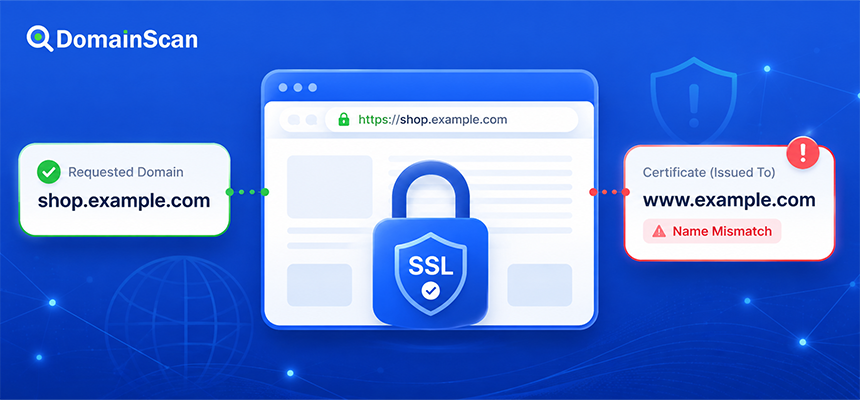
An SSL certificate name mismatch happens when the certificate presented by a server is not valid for the hostname a user is trying to visit.
For example, a visitor opens:
https://shop.example.com
but the server presents a certificate that is valid only for:
example.com
www.example.com
Because shop.example.com is not included in the certificate, the browser cannot confirm that the certificate belongs to the hostname being requested.
The result is usually a certificate warning or a failed HTTPS connection.
Name mismatch errors are common during website migrations, subdomain setup, CDN configuration, load balancer changes, certificate renewals, and DNS updates. In many cases, the certificate itself is not damaged. The wrong certificate is simply being presented for the requested hostname.
What Is an SSL Certificate Name Mismatch?
A certificate used for HTTPS contains one or more domain names that it is allowed to represent.
When a browser visits:
https://example.com
it compares the requested hostname:
example.com
with the names listed in the certificate.
If the certificate includes:
example.com
the hostname can match.
If the certificate contains only:
another-example.com
the browser detects a mismatch.
The browser does not simply ask whether the certificate is valid in general. It also asks whether that certificate is valid for the specific hostname being visited.
Where Does the Browser Find the Allowed Domain Names?
Modern certificates normally list valid hostnames in the Subject Alternative Name extension, commonly called SAN.
A certificate might contain:
Subject Alternative Names:

example.com
www.example.com
shop.example.com
This certificate can potentially be used for all three listed hostnames.
If the user visits:
api.example.com
the certificate will not automatically match unless that hostname is also covered by a SAN entry or an appropriate wildcard.
What Does SAN Mean?
SAN stands for Subject Alternative Name.
It allows one certificate to cover multiple DNS names.
For example:
example.com
www.example.com
store.example.com
api.example.com
A multi-domain website or application can therefore use one certificate for several related hostnames.
The exact names included in the SAN extension matter. Similar-looking hostnames are not treated as interchangeable.
Does a Certificate for example.com Cover www.example.com?
Not automatically.
These are separate DNS names:
example.com
www.example.com
A certificate intended to support both should normally include both:
DNS:example.com
DNS:www.example.com
This is one of the most common certificate configuration mistakes on newly deployed websites.
The root domain may work correctly while the www version produces a certificate warning, or the reverse may happen.
Does a Certificate for www.example.com Cover example.com?
No, not unless example.com is also included in the certificate.
A certificate containing only:
www.example.com
does not automatically cover:
example.com
If both names should be accessible over HTTPS, both should be included or otherwise covered by the certificate configuration.
What Does a Browser Error Look Like?
The exact warning depends on the browser and operating system.
Chromium-based browsers may show an error such as:
NET::ERR_CERT_COMMON_NAME_INVALID
Other browsers may use wording such as:
- The certificate is not valid for this domain.
- The certificate does not match the hostname.
- The server presented a certificate for another website.
- Your connection is not private.
The important diagnostic detail is whether the problem is specifically related to hostname validation rather than expiration or certificate-chain trust.
Common Causes of SSL Name Mismatch Errors
Several different infrastructure problems can produce the same browser warning.
The hostname was not included in the certificate
For example:
Certificate covers:
example.com
www.example.com

User visits:
shop.example.com
The solution is normally to issue or deploy a certificate that includes shop.example.com.
The wrong certificate is installed
A server may host several websites but present the certificate belonging to another virtual host.
For example:
Requested:
example.com

Certificate presented:
another-site.com
This usually points to a web-server or proxy configuration problem.
DNS points to the wrong server
The intended web server may have the correct certificate, but DNS sends users elsewhere.
For example:
Expected:

example.com → 192.0.2.10

Actual DNS:

example.com → 198.51.100.25
If 198.51.100.25 hosts another website, it may present a completely unrelated certificate.
An old AAAA record still exists
IPv4 may point to the correct server:
example.com. IN A 192.0.2.10
while IPv6 still points to older infrastructure:
example.com. IN AAAA 2001:db8::50
IPv4 users receive the correct certificate while IPv6 users reach the old server and receive another certificate.
A load balancer has the wrong certificate
The origin server may be correctly configured, but HTTPS terminates at a load balancer before traffic reaches the origin.
The connection path may be:
Visitor
   ↓
Load Balancer
   ↓
Web Server
The public certificate must therefore be installed correctly on the load balancer.
A CDN presents another certificate
When a CDN or reverse proxy is enabled, visitors may never connect directly to the origin server.
The public connection may look like:
Visitor
   ↓
CDN Edge
   ↓
Origin Server
The certificate seen by the visitor belongs to the CDN edge connection.
A correct origin certificate does not fix an incorrectly configured edge certificate.
The new certificate has not been deployed everywhere
A website may use several servers:
example.com → 192.0.2.10
example.com → 192.0.2.11
example.com → 192.0.2.12
If only two servers were updated, users reaching the third server may continue receiving an old or mismatched certificate.
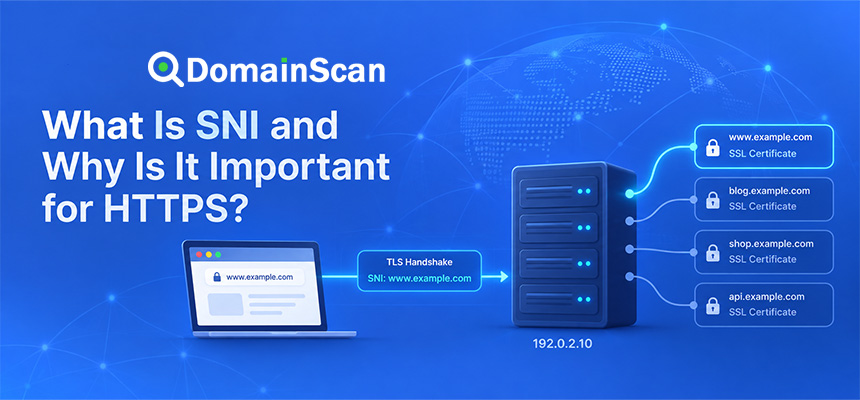
How SNI Affects Certificate Selection
SNI stands for Server Name Indication.
It allows a client to tell the server which hostname it wants during the TLS connection process.
This is important because one IP address can host many HTTPS websites.
For example:
site-a.example → 192.0.2.10
site-b.example → 192.0.2.10
site-c.example → 192.0.2.10
The server can use the requested hostname to choose the correct certificate.
If SNI or the virtual host configuration is incorrect, the server may return its default certificate instead.
What Is a Default SSL Certificate?
Web servers and reverse proxies often have a default TLS configuration.
If the requested hostname does not match a configured virtual host, the server may present the default certificate.
For example:
Requested:
shop.example.com

Configured TLS hosts:
example.com
www.example.com

Default certificate:
server-hosting.example.net
The user may then receive a certificate for server-hosting.example.net.
This is a strong sign that the requested hostname does not have the expected TLS virtual host configuration.
How Wildcard Certificates Work
A wildcard certificate can cover multiple hostnames at one subdomain level.
For example:
*.example.com
can normally cover:
www.example.com
shop.example.com
api.example.com
This is useful when many one-level subdomains need the same certificate.
Does *.example.com Cover example.com?
No, not by itself.
The wildcard:
*.example.com
matches a label before example.com.
The root domain:
example.com
contains no such label.
A certificate intended to support both typically needs:
example.com
*.example.com
Does *.example.com Cover api.shop.example.com?
No.
The wildcard normally covers only one label.
It can match:
shop.example.com
but not:
api.shop.example.com
A deeper hostname requires separate coverage, such as:
*.shop.example.com
or the exact hostname:
api.shop.example.com
Can One Certificate Cover Unrelated Domains?
Yes.
A certificate can contain several SAN entries:
example.com
example.net
another-example.org
This is commonly called a multi-domain certificate.
All required names must still be explicitly covered by the certificate.
SSL Mismatch After Moving to a New Server
Website migrations are a common source of certificate mismatch errors.
Suppose the previous server was:
192.0.2.10
and the new server is:
198.51.100.25
You update:
example.com → 198.51.100.25
but the new server has not yet been configured with an SSL certificate for example.com.
As DNS resolvers begin returning the new address, users begin receiving the new server's default certificate.
This can appear like a DNS propagation problem, but the real problem is that the new HTTPS endpoint was not fully prepared before the DNS change.
How to Avoid SSL Errors During a Server Migration
Prepare HTTPS before changing public DNS.
A safer process is:
- Configure the new web server.
- Add the required domain names.
- Install or issue the SSL certificate.
- Confirm the certificate includes every required hostname.
- Test the new server directly.
- Then change public DNS.
- Keep the old server available during the transition.
SSL Mismatch After Changing Nameservers
A nameserver migration can indirectly create certificate errors.
For example, the old DNS zone contains:
example.com → 192.0.2.10
while the new provider accidentally contains:
example.com → 198.51.100.40
After delegation begins moving to the new nameservers, some users reach 198.51.100.40.
If that server presents another certificate, those users receive a mismatch warning.
Always compare the old and new DNS zones before changing authoritative nameservers.
SSL Mismatch After Enabling a CDN
A CDN often needs to validate and provision the hostname before it can serve a correct edge certificate.
If DNS is pointed to the CDN too early, users may connect before certificate provisioning is complete.
A safer sequence is generally:
- Add the domain to the CDN.
- Complete domain verification.
- Confirm SSL/TLS is active.
- Confirm the hostname is included in the edge certificate.
- Then direct traffic to the CDN.
Origin Certificate vs Edge Certificate
When a CDN is involved, there may be two certificates.
The public certificate:
Visitor
   ↓
Edge Certificate
   ↓
CDN
and the origin certificate:
CDN
   ↓
Origin Certificate
   ↓
Web Server
A user-facing hostname mismatch usually involves the edge certificate because that is what the browser sees.
An origin hostname mismatch may instead break the connection between the CDN and the web server.
Why Does SSL Work on One Network but Fail on Another?
This can happen when different networks resolve the hostname to different IP addresses.
For example:
Resolver A:
example.com → 192.0.2.10

Resolver B:
example.com → 198.51.100.25
If only one server has the correct certificate, users experience different results.
This situation is especially common during:
- DNS migrations
- DNS propagation periods
- CDN activation
- Server migrations
Why Does SSL Work on IPv4 but Fail on IPv6?
Always inspect both record types:
A
AAAA
For example:
example.com. IN A    192.0.2.10
example.com. IN AAAA 2001:db8::50
If the IPv6 server presents:
Certificate:
old-server.example.net
IPv6 users receive a mismatch while IPv4 users see a valid certificate.
Why Does the Root Domain Work but www Fail?
The DNS or certificate configuration may differ between the two hostnames.
Check:
example.com
www.example.com
independently.
Possible configurations include:
example.com → correct server
www.example.com → old server
or:
Certificate SAN:
example.com

Missing:
www.example.com
Why Does www Work but the Root Domain Fail?
The same problem can occur in reverse.
The www hostname may have the correct CNAME and certificate while the apex domain points to another server.
Do not assume both names use identical infrastructure.
Can a Redirect Fix a Certificate Name Mismatch?
Not by itself.
Suppose you want:
https://old.example.com
to redirect to:
https://new.example.com
The browser must first establish a valid HTTPS connection to old.example.com before it can receive the HTTP redirect.
If the certificate for old.example.com is invalid, the browser may stop before the redirect occurs.
The old hostname therefore still needs a valid certificate if it accepts HTTPS traffic.
Does a 301 Redirect Replace SSL?
No.
The connection sequence is:
DNS lookup
    ↓
TLS handshake
    ↓
HTTPS connection
    ↓
HTTP request
    ↓
301 redirect
The certificate check happens before the server can send the redirect.
How to Check an SSL Certificate Name Mismatch
Use the DomainScan SSL Checker to inspect the certificate currently presented by the hostname.
Check:
- The exact hostname you entered.
- The certificate Subject Alternative Names.
- The certificate issuer.
- The expiration date.
- The certificate chain.
Then compare the requested hostname with the SAN list.
For example:
Requested:
shop.example.com

Certificate SAN:
example.com
www.example.com
The mismatch is immediately visible.
Check DNS After Finding a Mismatch
If the certificate belongs to a completely different server or provider, inspect the DNS records.
Check:
A
AAAA
CNAME
Ask:
- Does the hostname point to the intended server?
- Is an old IPv6 record still present?
- Does the CNAME point to the correct service?
- Was DNS changed recently?
How to Fix an SSL Certificate Name Mismatch
The correct fix depends on the cause.
Missing hostname in the certificate
Issue a certificate that includes the hostname.
Wrong certificate installed
Configure the correct certificate for the relevant virtual host.
Wrong DNS address
Correct the A, AAAA, or CNAME record.
Old IPv6 destination
Update or remove the incorrect AAAA record after confirming the intended IPv6 configuration.
Incorrect CDN edge certificate
Add and validate the hostname in the CDN platform and allow the correct certificate to be provisioned.
Load balancer presents the wrong certificate
Update the TLS listener or hostname-to-certificate mapping.
One server in a cluster is outdated
Deploy the correct certificate consistently across every TLS endpoint.
A Practical Troubleshooting Process
Step 1: Identify the exact hostname
Do not troubleshoot “the website” generally.
Record the actual failing address:
shop.example.com
Step 2: Inspect the public certificate
Check the certificate currently presented to users.
Step 3: Compare SAN entries
Confirm whether the failing hostname is present.
Step 4: Check A and AAAA records
Identify every public server address.
Step 5: Check CNAME
If the hostname is an alias, follow the complete DNS path.
Step 6: Test every destination
Do not test only one IP address in a multi-server environment.
Step 7: Identify where TLS terminates
Determine whether HTTPS is handled by:
- The web server
- A reverse proxy
- A load balancer
- A CDN
Step 8: Fix the responsible TLS endpoint
Installing a certificate on the wrong layer will not change what visitors receive.
Example: Missing www Certificate Coverage
DNS:
example.com → 192.0.2.10
www.example.com → 192.0.2.10
Certificate:
SAN:
example.com
Result:
https://example.com
Valid

https://www.example.com
Hostname mismatch
Fix:
Issue certificate with:

example.com
www.example.com
Example: Old IPv6 Server
DNS:
A:
192.0.2.10

AAAA:
2001:db8::20
IPv4 server certificate:
example.com
IPv6 server certificate:
old.example.net
Users connecting over IPv6 receive a name mismatch.
Fix the IPv6 server certificate or correct the AAAA record.
Example: CDN Misconfiguration
DNS:
www.example.com
        ↓
CNAME
        ↓
customer.cdn-provider.net
The CDN has not been configured for www.example.com.
It presents a default provider certificate.
DNS is technically resolving correctly, but the CDN TLS configuration is incomplete.
Example: Wrong SNI Virtual Host
A server hosts:
site-a.example
site-b.example
Both use:
192.0.2.10
If the TLS virtual host for site-b.example is missing, the server may return the certificate for site-a.example.
The solution is to configure the correct hostname and certificate mapping on the web server or proxy.
Common Mistakes When Fixing Certificate Mismatches
Renewing the same incorrect certificate
If the hostname is missing from the SAN list, renewing an identical certificate does not fix the mismatch.
Changing DNS without checking the destination server
The new server may not be ready to serve the hostname securely.
Removing IPv6 without investigating
An incorrect AAAA record can be removed as a temporary fix when appropriate, but working IPv6 should be repaired if the service is intended to support it.
Installing the certificate only on the origin
If a CDN or load balancer terminates public TLS, visitors will not see the origin certificate.
Testing only the root domain
Always test every hostname users actually visit.
How to Prevent Certificate Name Mismatch Problems
Before deploying a certificate:
- List every required hostname.
- Include both root and www names when needed.
- Include important application subdomains.
- Check wildcard limitations.
- Verify DNS destinations.
- Check IPv4 and IPv6.
- Verify CDN and load balancer configuration.
- Test the certificate from the public internet.
A Practical SSL Name Mismatch Checklist
- Identify the failing hostname.
- Run an SSL certificate check.
- Read the SAN list.
- Compare the requested hostname with the SAN entries.
- Check A records.
- Check AAAA records.
- Check CNAME records.
- Test every returned IP.
- Identify the TLS termination point.
- Check SNI and virtual host configuration.
- Check CDN or load balancer certificates.
- Deploy the corrected certificate.
- Test the public hostname again.
Frequently Asked Questions
What is an SSL certificate name mismatch?
It means the certificate presented by the server does not cover the hostname the client is trying to visit.
What causes NET::ERR_CERT_COMMON_NAME_INVALID?
A common cause is that the requested hostname does not match the domain names listed in the certificate, although server and proxy configuration can also cause the wrong certificate to be presented.
Does a certificate for example.com cover www.example.com?
Only if www.example.com is included separately or otherwise covered by the certificate.
Does *.example.com include example.com?
No. The root domain normally needs to be included separately.
Can DNS cause an SSL hostname mismatch?
Yes. Incorrect A, AAAA, or CNAME records can send users to a server that presents another certificate.
Can a CDN cause a certificate mismatch?
Yes. If the custom hostname is not properly configured or its edge certificate has not been issued, the CDN may present an incorrect certificate.
Why does the certificate mismatch happen only for some users?
Different users may reach different IP addresses, DNS results, CDN edges, IPv4 or IPv6 destinations, or servers in a load-balanced cluster.
Can a redirect fix a certificate mismatch?
No. HTTPS certificate validation happens before an HTTP redirect can be delivered.
Why does www work but the root domain fail?
The two hostnames may have different DNS records, server configurations, or certificate coverage.
Do I need a new certificate to fix a mismatch?
If the required hostname is missing from the certificate, usually yes. If the correct certificate already exists but the wrong one is being served, the fix may only require server configuration.
Final Thoughts
An SSL certificate name mismatch does not always mean the certificate itself is faulty.
The real problem is that the certificate presented during the TLS connection does not match the hostname the user requested.
The cause can be as simple as forgetting to include www in the certificate, but it can also involve incorrect DNS, stale IPv6 records, an unconfigured CDN, a load balancer, SNI, or inconsistent certificate deployment across several servers.
The most effective troubleshooting process is to start with the exact hostname, inspect the certificate actually presented to the public, compare its Subject Alternative Names, and then trace the DNS and server path responsible for that connection.
Use DomainScan SSL Checker to inspect the certificate and hostname coverage, DNS Lookup to verify A, AAAA, and CNAME records, and DNS Propagation Check when recent infrastructure changes are still returning different destinations across networks.