What Is a DNS TXT Record and What Is It Used For?
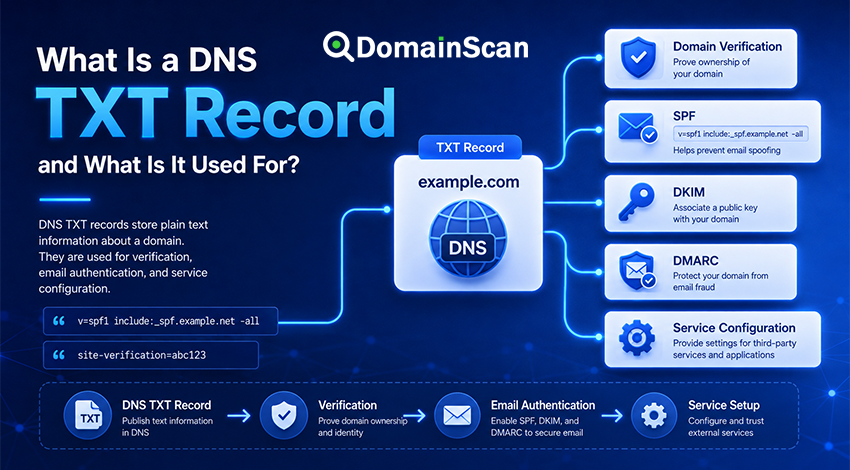
A TXT record is a type of DNS record that allows text information to be published under a domain name or hostname.
Unlike an A record, which points a hostname to an IPv4 address, or an MX record, which identifies mail servers, a TXT record does not have one single purpose. It acts as a flexible way to publish text-based information through DNS.
A simple TXT record might look like this:
example.com. 3600 IN TXT "site-verification=abc123"
This record publishes the text:
site-verification=abc123
A third-party service can query DNS, find the value, and confirm that the domain owner has added the required record.
TXT records are now commonly used for domain verification, email authentication, security policies, service configuration, and other machine-readable information.
What Does TXT Mean in DNS?
TXT stands for Text.
The TXT record type was designed to associate descriptive text with a DNS name. Over time, internet services began using it as a convenient way to publish structured information that other systems could retrieve automatically.
A TXT record normally contains:
- A hostname or domain name
- A Time to Live value
- The TXT record type
- One or more character strings
For example:
example.com. 3600 IN TXT "verification=abc123"
In this record:
example.comis the owner name.3600is the TTL.INis the Internet class.TXTis the DNS record type."verification=abc123"is the text data.
What Are TXT Records Used For?
TXT records have many different uses because DNS does not assign one fixed meaning to every TXT value.
Common uses include:
- Domain ownership verification
- SPF email authorization
- DKIM public keys
- DMARC email policies
- Search engine and webmaster verification
- Cloud service verification
- Certificate validation
- Application and API configuration
- Security policies
The exact meaning depends on the format of the value and the service that reads it.
How Does a TXT Record Work?
Suppose a service wants to confirm that you control example.com.
It may ask you to publish a value such as:
example.com. 3600 IN TXT "service-verification=7f82a91c"
After you add the record to the authoritative DNS zone, the service performs a TXT lookup for example.com.
If the expected value appears in the DNS response, the service can treat that as evidence that someone with access to the domain's DNS configuration completed the verification step.
The process is simple:
Service provides verification token
        ↓
Domain owner adds TXT record
        ↓
Authoritative DNS publishes it
        ↓
Service performs TXT lookup
        ↓
Token matches
        ↓
Domain is verified
This is why TXT records are commonly used when connecting domains to external platforms.
TXT Records for Domain Verification
Domain verification is one of the most common uses of TXT records.
A provider may ask you to create something similar to:
example.com. 3600 IN TXT "provider-verification=abc123xyz"
The value itself usually has no meaning outside that provider. It is simply a unique token used to prove control of the domain.
Verification TXT records may be required when adding a domain to:
- Email platforms
- Cloud hosting services
- Search engine tools
- Content delivery networks
- Analytics platforms
- Certificate services
- Business software
After verification, some providers allow the TXT record to be removed. Others require it to remain in DNS.
Do not delete a verification record unless the provider confirms that it is no longer needed.
TXT Records and SPF
SPF, or Sender Policy Framework, is published using DNS TXT records.
An SPF record might look like this:
example.com. 3600 IN TXT "v=spf1 include:_spf.mail-provider.net -all"
The value begins with:
v=spf1
This identifies the text as an SPF policy.
The rest of the record describes which systems are authorized to send mail using the relevant domain identity.
For example:
"v=spf1 ip4:192.0.2.10 include:_spf.example.net -all"
This policy may authorize:
- The IPv4 address
192.0.2.10 - Servers authorized by
_spf.example.net
The final -all indicates that other senders should fail the SPF check.
SPF is often described casually as a separate DNS record type, but modern SPF policies are published through TXT records.
Can a Domain Have Multiple SPF TXT Records?
A domain should not publish multiple independent SPF policies at the same owner name.
This configuration is a problem:
example.com. 3600 IN TXT "v=spf1 include:_spf.provider-a.net -all"
example.com. 3600 IN TXT "v=spf1 include:_spf.provider-b.net -all"
These are two separate SPF records.
If both providers are authorized, the mechanisms usually need to be combined into one SPF policy:
example.com. 3600 IN TXT "v=spf1 include:_spf.provider-a.net include:_spf.provider-b.net -all"
A domain can have many TXT records, but it should have only one SPF policy for a given owner name.
TXT Records and DKIM
DKIM, or DomainKeys Identified Mail, also uses DNS TXT records.
DKIM allows an email provider to add a cryptographic signature to outgoing messages. Receiving mail systems retrieve a public key from DNS and use it to verify the signature.
A DKIM record is normally published below a selector name:
selector1._domainkey.example.com.
A simplified DKIM TXT value may look like:
"v=DKIM1; k=rsa; p=MIIBIjANBgkqh..."
The p= field contains the public key.
The selector allows a domain to use multiple DKIM keys. For example:
selector1._domainkey.example.com
marketing._domainkey.example.com
transactional._domainkey.example.com
Each service can publish and rotate its own key without replacing every DKIM configuration for the domain.
TXT Records and DMARC
DMARC policies are also published using TXT records.
A DMARC record is normally located at:
_dmarc.example.com
A basic example is:
_dmarc.example.com. 3600 IN TXT "v=DMARC1; p=none; rua=mailto:[email protected]"
The record tells receiving mail systems how the domain wants messages evaluated when DMARC authentication does not pass.
DMARC builds on SPF and DKIM and also considers whether the authenticated domains align with the domain visible to the recipient.
Because DMARC affects email handling, policies should be changed carefully and tested before stricter enforcement is introduced.
TXT Records Are Not Only for Email
SPF, DKIM, and DMARC make TXT records especially important for email, but TXT records are used for many unrelated purposes.
For example, a hosting service might provide:
example.com. 3600 IN TXT "hosting-verification=a93f83"
A certificate authority might request:
_acme-challenge.example.com. 300 IN TXT "validation-token"
An application may use a dedicated hostname for configuration:
_service.example.com. 3600 IN TXT "config=value"
The TXT record type is generic. The application reading the record decides what the value means.
Can a Domain Have Multiple TXT Records?
Yes. A domain can publish multiple TXT records at the same hostname.
For example:
example.com. 3600 IN TXT "v=spf1 include:_spf.example.net -all"
example.com. 3600 IN TXT "service-verification=abc123"
example.com. 3600 IN TXT "another-verification=xyz789"
These records serve different purposes and can coexist.
However, applications usually search for values matching a specific format. An SPF processor, for example, looks for the TXT record beginning with v=spf1.
Having several general TXT records is normal. Having multiple conflicting records for the same protocol may cause errors.
Can TXT Records Exist on Subdomains?
Yes. TXT records can be published on the root domain or almost any suitable hostname.
Examples include:
example.com
_dmarc.example.com
selector1._domainkey.example.com
_acme-challenge.example.com
verify.example.com
The service providing the TXT value should specify the exact hostname where it must be added.
A very common mistake is publishing the correct value at the wrong DNS name.
The Hostname Field Can Be Confusing
DNS control panels do not all display record names in the same way.
Suppose a provider asks you to create:
_dmarc.example.com
One DNS panel may expect the Name field to contain:
_dmarc
Another may expect:
_dmarc.example.com
Some panels automatically append the zone name.
If the full domain is entered into a system that already appends it, the record could accidentally be created as:
_dmarc.example.com.example.com
When a TXT record cannot be found, always check the fully qualified name actually published in DNS.
Why Are TXT Values Shown in Quotation Marks?
DNS zone files commonly display TXT data inside quotation marks:
example.com. 3600 IN TXT "verification=abc123"
The quotation marks represent the character string in DNS zone-file syntax. They are not necessarily part of the application-level value.
DNS management interfaces usually handle this formatting automatically.
If a provider gives you a TXT value, enter it according to the DNS provider's instructions rather than manually adding extra quotation marks unless the interface requires them.
Can a TXT Record Contain Spaces?
Yes. TXT data can contain spaces.
For example:
example.com. 3600 IN TXT "This is a text value"
Structured records such as SPF and DMARC also use spaces or semicolons as part of their syntax.
An SPF record might contain:
"v=spf1 ip4:192.0.2.10 include:_spf.example.net -all"
Spaces separate SPF mechanisms, so removing them can change or break the policy.
Why Do Some Long TXT Records Appear as Multiple Strings?
A TXT resource record can contain more than one character string.
Long values may therefore appear similar to:
example.com. 3600 IN TXT "first-part-of-the-value" "second-part-of-the-value"
DNS software and applications may treat the strings as parts of the same TXT record according to the relevant protocol.
This is especially noticeable with long DKIM public keys.
Do not assume that two quoted strings automatically represent two separate TXT records. Check the DNS response structure or use a DNS lookup tool that clearly separates individual resource records.
What Is TTL in a TXT Record?
Like other DNS records, a TXT record has a Time to Live value.
For example:
example.com. 3600 IN TXT "verification=abc123"
A TTL of 3600 seconds means recursive resolvers may cache the answer for up to one hour.
If you replace or remove the record, some resolvers may continue returning the previous value until their cached copy expires.
This matters when:
- Verifying a domain
- Changing SPF policies
- Rotating DKIM keys
- Updating DMARC policies
- Completing certificate validation
If a verification system cannot see a newly added record, caching may be one explanation, but first confirm that the record exists on the authoritative DNS servers.
How Long Does a TXT Record Change Take?
The authoritative DNS provider may publish a new TXT record quickly, but there is no universal time at which every resolver will show the same result.
The visible delay depends on:
- The previous TTL
- The current TTL
- Recursive DNS caches
- Negative caching if the record previously did not exist
- Whether the record was added to the correct DNS zone
- Whether all authoritative name servers are synchronized
When troubleshooting, query the authoritative servers first. If they already return the new value but some public resolvers do not, caching is likely the cause.
How to Check a TXT Record
You can use the DomainScan DNS Lookup tool to inspect TXT records published for a domain or hostname.
A basic check involves:
- Enter the exact domain or hostname.
- Select the TXT record type.
- Run the lookup.
- Review all returned TXT records.
- Locate the value associated with the service you are troubleshooting.
- Compare it with the value supplied by the provider.
The exact hostname matters.
These queries are different:
example.com
_dmarc.example.com
selector1._domainkey.example.com
_acme-challenge.example.com
A TXT lookup for example.com will not automatically show records published under every subdomain.
Common TXT Record Problems
The TXT record was added to the wrong DNS provider
A domain can be registered with one company while using authoritative DNS from another provider.
If you edit DNS records in a panel that is not authoritative for the domain, the public DNS response will not change.
Check the domain's NS records to identify the active DNS provider.
The record was added to the wrong hostname
This is common with records such as DMARC, DKIM, and ACME validation.
For example, a DMARC record belongs at:
_dmarc.example.com
Publishing the same value directly at:
example.com
does not create a valid DMARC record.
The DNS panel duplicated the domain name
If the panel automatically appends example.com, entering the full name can create:
selector1._domainkey.example.com.example.com
Use a DNS lookup to confirm the actual published hostname.
The expected record is hidden among several TXT values
A domain may have many TXT records.
Do not assume the first result is the one you need. Identify the record by its prefix or exact verification token.
An SPF policy was split into multiple SPF records
Publishing two independent v=spf1 records at the same hostname causes SPF evaluation problems.
If multiple services need authorization, their mechanisms generally need to be combined into one policy.
There is a typo in the TXT value
Verification tokens and authentication policies are often case-sensitive or syntax-sensitive.
A missing character, extra space, incorrect separator, or copied quotation mark can make the record unusable.
Copy provider-supplied values carefully.
The record was changed but an old value is still returned
This may be caused by resolver caching.
Check the authoritative name servers directly. If they contain the correct value, wait for older cached responses to expire.
The record exists but verification still fails
Possible causes include:
- The service is checking a different hostname.
- The service cached an earlier DNS failure.
- The value does not exactly match the expected token.
- The record is published in a non-authoritative zone.
- The provider requires additional DNS records.
- The verification service has not retried the check yet.
Start by confirming the exact hostname and value using an independent DNS lookup.
Should Old TXT Records Be Removed?
Sometimes, but not automatically.
Old verification records can make a DNS zone difficult to manage, but deleting them without understanding their purpose can break existing services.
Before removing a TXT record, identify:
- Which service created it
- Whether the service is still in use
- Whether continued verification is required
- Whether the record participates in email authentication
- Whether another administrator or application depends on it
SPF, DKIM, and DMARC records should never be removed simply because they look old.
For DKIM key rotation, an older selector may need to remain available while previously sent messages are still being verified.
Can TXT Records Be a Security Risk?
TXT records are publicly queryable when they are published in public DNS.
They should therefore not contain secrets such as:
- Passwords
- Private API keys
- Private cryptographic keys
- Database credentials
- Internal access tokens
A verification token designed specifically for DNS publication is different. Those values are intentionally public and normally only prove control of the domain.
Before publishing arbitrary information in a TXT record, assume that anyone on the internet may be able to read it.
TXT Record vs CNAME Record for Verification
Some services allow domain verification using either TXT or CNAME records.
A TXT record publishes a token directly:
example.com. 3600 IN TXT "verification=abc123"
A CNAME verification may instead point a dedicated hostname to a provider-controlled name:
abc123.example.com. 3600 IN CNAME verify.provider.net.
Neither method is universally better. The service provider determines which verification methods it supports.
TXT verification is often convenient because it does not change where website traffic is routed.
TXT Record vs A Record
An A record maps a hostname to an IPv4 address:
example.com. 3600 IN A 192.0.2.10
A TXT record publishes text:
example.com. 3600 IN TXT "verification=abc123"
They are completely different record types and can normally coexist at the same hostname.
TXT Record vs MX Record
An MX record tells sending mail systems where to deliver email:
example.com. 3600 IN MX 10 mail.example.com.
A TXT record may publish email authentication information:
example.com. 3600 IN TXT "v=spf1 include:_spf.example.net -all"
MX determines where incoming mail goes. SPF, DKIM, and DMARC-related TXT records help receiving systems evaluate email identity and policy.
Changing one does not automatically update the others.
Frequently Asked Questions
What is a DNS TXT record?
A TXT record is a DNS resource record used to publish text data under a domain name or hostname.
It is commonly used for domain verification, email authentication, and service configuration.
Can anyone see a TXT record?
Yes, if it is published in public DNS. Anyone can perform a TXT lookup for the relevant hostname.
Can a domain have more than one TXT record?
Yes. Multiple TXT records at the same hostname are common.
Problems usually arise only when multiple records conflict within a protocol that expects one policy, such as SPF.
Is an SPF record a TXT record?
Yes. Modern SPF policies are published as DNS TXT records and normally begin with v=spf1.
Is DKIM stored in TXT records?
DKIM public keys are commonly published in TXT records beneath selector-specific _domainkey hostnames.
Is DMARC a TXT record?
Yes. DMARC policy information is published in a TXT record under the _dmarc hostname for the domain.
Can a TXT record redirect a domain?
No. TXT records do not control website routing or redirects.
Use A, AAAA, CNAME, hosting configuration, or HTTP redirects for those purposes.
Can I put any text in a TXT record?
DNS can store general text values, but public DNS is not a secure storage location.
Do not publish passwords, private keys, or confidential credentials.
Why is my TXT record not showing?
The record may have been added to the wrong DNS zone, published under the wrong hostname, cached incorrectly, or not yet synchronized across the authoritative name servers.
Start by querying the authoritative DNS servers directly.
How long does a TXT record take to update?
The authoritative server may update quickly, but recursive resolvers can continue using cached data until its TTL expires.
The effective delay depends on the previous TTL and caching behavior.
Final Thoughts
TXT records are one of the most flexible record types in DNS.
They are used to publish text that other systems can retrieve and interpret, including domain verification tokens, SPF policies, DKIM public keys, DMARC policies, certificate validation data, and other service-specific configuration.
Because TXT records can serve many purposes, troubleshooting requires checking both the exact hostname and the exact value. A record can exist in DNS and still fail if it was placed under the wrong name or contains incorrect syntax.
When changing email authentication or verification records, do not treat every TXT entry as interchangeable. Each protocol has its own location, format, and rules.
Use the DomainScan DNS Lookup tool to inspect TXT records for a domain or hostname and verify that the expected value is being published by the authoritative DNS system.