What Is a PTR Record and How Does Reverse DNS Work?
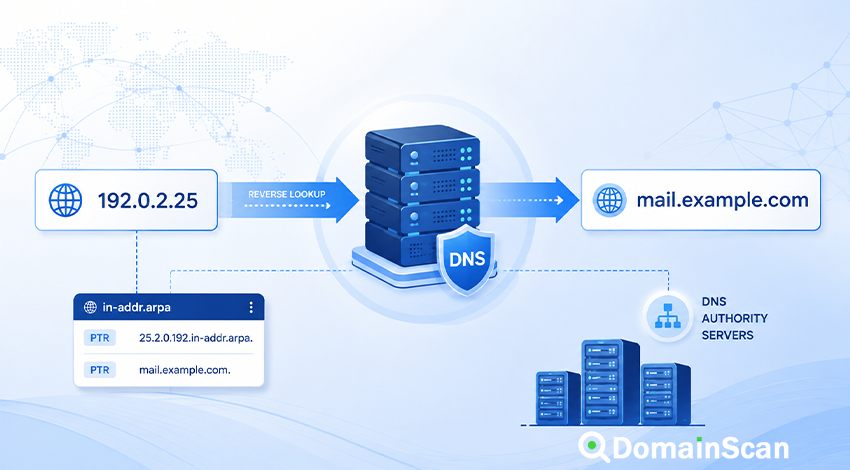
A PTR record is a DNS record used for reverse DNS lookups. Instead of taking a hostname and finding its IP address, reverse DNS starts with an IP address and attempts to find a hostname associated with it.
A normal forward DNS lookup might look like this:
mail.example.com → 192.0.2.25
A reverse DNS lookup works in the opposite direction:
192.0.2.25 → mail.example.com
The DNS record that provides the hostname in the reverse lookup is called a PTR record.
PTR records are commonly used in server diagnostics, email infrastructure, log analysis, network administration, and systems that want a readable name associated with a connecting IP address.
They are also frequently misunderstood. A PTR record does not prove that an IP address “owns” a domain, does not automatically identify every website hosted on an address, and usually cannot be configured from the same DNS control panel where a normal domain's A or MX records are managed.
What Does PTR Mean in DNS?
PTR stands for Pointer.
A PTR record points a specially formatted reverse-DNS name to another name in the DNS namespace.
Conceptually, the result is simple:
192.0.2.25
        ↓
PTR lookup
        ↓
mail.example.com
But DNS does not store the PTR record directly under the text 192.0.2.25.
The IP address is converted into a special reverse-DNS name first.
How Does Reverse DNS Work for IPv4?
IPv4 reverse DNS uses the in-addr.arpa namespace.
Suppose the IP address is:
192.0.2.25
The four octets are reversed:
25.2.0.192
Then in-addr.arpa is appended:
25.2.0.192.in-addr.arpa
A PTR record can then be published for that name:
25.2.0.192.in-addr.arpa. 3600 IN PTR mail.example.com.
A reverse resolver querying that address can retrieve:
mail.example.com
The reversed numbering follows the hierarchical structure of DNS and allows responsibility for IP address blocks to be delegated through the reverse-DNS tree.
Why Is the IPv4 Address Reversed?
DNS names are organized from broader domains on the right toward more specific labels on the left.
IP addresses are normally written in the opposite practical order for delegation purposes.
For:
192.0.2.25
the reverse form:
25.2.0.192.in-addr.arpa
places the larger address hierarchy closer to the right side of the DNS name.
This allows DNS delegation to work naturally within the reverse namespace.
How Does Reverse DNS Work for IPv6?
IPv6 reverse DNS uses the ip6.arpa namespace.
The process is more detailed because an IPv6 address contains 128 bits and is represented using hexadecimal characters.
Consider this IPv6 address:
2001:db8::10
Before constructing the reverse name, the address is expanded to its complete hexadecimal form.
Each hexadecimal digit is then reversed individually and separated by dots before ip6.arpa is appended.
This means IPv6 reverse-DNS names are much longer than IPv4 reverse names.
Administrators normally use DNS software or provider interfaces to generate them rather than entering the entire reverse name manually.
PTR Record vs A Record
An A record maps a hostname to an IPv4 address:
mail.example.com. 3600 IN A 192.0.2.25
A PTR record performs the reverse mapping:
25.2.0.192.in-addr.arpa. 3600 IN PTR mail.example.com.
The two records live in different DNS zones and are often controlled by different organizations.
This is a critical distinction.
PTR Record vs AAAA Record
An AAAA record maps a hostname to IPv6:
mail.example.com. 3600 IN AAAA 2001:db8::25
A PTR record in the corresponding IPv6 reverse zone can map that address back to:
mail.example.com
A and AAAA records are forward mappings. PTR records provide reverse mappings.
Who Controls a PTR Record?
The PTR record is normally controlled by whoever manages the IP address block, not simply by whoever owns the domain name.
That organization may be:
- A hosting provider
- A cloud platform
- An internet service provider
- A data center
- A network operator
- An organization with its own allocated IP space
This is why adding this record to the normal DNS zone for example.com does not create reverse DNS:
example.com. IN PTR mail.example.com.
The PTR record needs to exist in the reverse zone associated with the IP address.
Why Can't I Add a PTR Record at My Domain Registrar?
Your registrar or DNS provider usually controls the forward DNS zone for your domain.
For example:
example.com
www.example.com
mail.example.com
The reverse DNS zone belongs to the network that controls the IP address.
If your server uses an address assigned by a hosting company, that hosting company usually controls the relevant in-addr.arpa or ip6.arpa zone.
Many hosting providers offer a setting named:
- Reverse DNS
- rDNS
- PTR Record
- Reverse Hostname
That is normally where the PTR record should be configured.
Can One IP Address Have a PTR Record?
Yes. A public server IP can have a PTR record that returns a hostname.
For example:
192.0.2.25 → mail.example.com
The corresponding forward DNS should ideally also return the same address:
mail.example.com → 192.0.2.25
This creates a consistent forward and reverse relationship.
Can One IP Address Have Multiple PTR Records?
DNS can technically return multiple PTR records for one reverse name.
However, this is usually undesirable for ordinary server infrastructure.
Many applications expect a clear canonical hostname for an IP address, and different software may handle multiple PTR results differently.
For mail servers and general infrastructure, one meaningful PTR hostname is normally the simpler configuration.
What Is Forward-Confirmed Reverse DNS?
Forward-confirmed reverse DNS is a useful consistency check.
The process is:
- Start with an IP address.
- Perform a PTR lookup.
- Take the returned hostname.
- Perform an A or AAAA lookup for that hostname.
- Check whether the original IP address appears in the result.
For example:
192.0.2.25
    ↓ PTR
mail.example.com
    ↓ A
192.0.2.25
The forward and reverse mappings agree.
An inconsistent setup might look like:
192.0.2.25
    ↓ PTR
mail.example.com
    ↓ A
198.51.100.40
In that case, the reverse hostname does not point back to the original address.
Why Should PTR and Forward DNS Match?
Matching forward and reverse DNS makes server identity easier to understand and reduces ambiguity during diagnostics.
For example:
mail.example.com. IN A 192.0.2.25
and:
192.0.2.25 → mail.example.com
form a clear relationship.
This is particularly useful for mail infrastructure, monitoring systems, server logs, and network tools.
A matching PTR record is still not an authentication mechanism by itself. DNS records can be configured by whoever controls the relevant zones, so reverse DNS should not be treated as proof that a remote server is trustworthy.
What Is Reverse DNS Used For?
Reverse DNS has several practical uses.
Email server identification
Mail systems frequently examine the reverse DNS of connecting server IP addresses as one signal when evaluating a connection.
Network diagnostics
Tools such as traceroute may display hostnames derived from PTR records rather than only numeric IP addresses.
Server logs
Some systems perform reverse lookups to associate incoming addresses with readable names.
Infrastructure management
Administrators can use descriptive PTR names to identify routers, mail servers, gateways, and other systems.
Abuse investigation
Reverse DNS can provide contextual information about an address, although it should never be treated as definitive ownership or identity evidence.
Why Is Reverse DNS Important for Email Servers?
Mail servers are one of the most common places where PTR configuration becomes visible.
Suppose an outgoing SMTP server connects from:
192.0.2.25
Its reverse DNS might return:
mail.example.com
and the forward DNS might contain:
mail.example.com. IN A 192.0.2.25
This produces a coherent server identity.
Receiving systems may consider reverse DNS alongside many other factors, including:
- SMTP hostname
- SPF
- DKIM
- DMARC
- IP reputation
- Domain reputation
- Message content
- Connection behavior
- Blocklist status
PTR is therefore useful, but it is not a replacement for email authentication.
Does a PTR Record Guarantee Email Delivery?
No.
A correct PTR record is only one part of mail server configuration.
You can have:
192.0.2.25 → mail.example.com
and:
mail.example.com → 192.0.2.25
while email still fails because of:
- Poor IP reputation
- Blocklisting
- Invalid SPF
- Missing DKIM signatures
- DMARC policy problems
- SMTP configuration errors
- Rate limiting
- Recipient-side filtering
Reverse DNS should be treated as one infrastructure check rather than a guarantee of deliverability.
Does a PTR Record Prove Who Owns an IP Address?
No.
The PTR value is DNS data configured by the network operator or delegated administrator.
For example:
192.0.2.25 → server.example.com
does not by itself prove that the organization behind example.com legally owns the IP address.
IP ownership and allocation information should be checked through the relevant network registry, WHOIS/RDAP data, or provider documentation.
Does a PTR Record Show Which Website Is Hosted on an IP?
Not reliably.
A single server IP may host:
- One website
- Hundreds of websites
- A reverse proxy
- A CDN edge
- A shared hosting platform
- A mail server
- Several unrelated services
The PTR record usually provides one hostname for the address. It does not enumerate every domain or virtual host using that IP.
That is an important distinction between a PTR lookup and a reverse IP lookup.
PTR Lookup vs Reverse IP Lookup
These terms are sometimes used interchangeably, but they can describe different operations.
PTR or reverse DNS lookup
Uses the DNS reverse namespace to ask:
What hostname is published for this IP address?
Reverse IP lookup
Often refers to a broader search for domains or websites known to use the same IP address.
That information may come from:
- DNS datasets
- Passive DNS
- Search indexes
- Historical observations
- Hosting databases
A PTR record may return one hostname while a reverse IP database identifies many domains on the same address.
PTR Record vs Hostname
A server can have several different names associated with it.
For example:
www.example.com
api.example.com
mail.example.com
may all point to the same server.
The PTR record may still return only:
server01.example.net
This does not automatically mean the other hostnames are incorrect.
Forward DNS and reverse DNS serve different purposes.
What Should a Mail Server PTR Record Look Like?
A common configuration is to use a meaningful fully qualified domain name:
192.0.2.25 → mail.example.com
with matching forward DNS:
mail.example.com. IN A 192.0.2.25
The SMTP server may also identify itself using the same hostname.
This creates a clean relationship among:
- The server IP address
- The PTR hostname
- The forward A or AAAA record
- The SMTP hostname
Can a PTR Record Point to Any Domain?
Technically, a PTR can contain a DNS name selected by the reverse-zone administrator.
Operationally, the hostname should be meaningful and should generally have a corresponding forward record.
Using a random or unrelated hostname can create confusing or inconsistent DNS results.
Can the PTR Hostname Use a CNAME?
A PTR record itself returns a hostname.
For infrastructure such as mail servers, it is generally cleaner for that hostname to have direct A or AAAA records.
For example:
192.0.2.25
    ↓ PTR
mail.example.com
    ↓ A
192.0.2.25
Adding unnecessary alias chains makes the relationship harder to diagnose.
How to Check a PTR Record
A reverse DNS lookup starts with an IP address.
For example:
192.0.2.25
A useful check involves:
- Enter the IP address into a reverse DNS or PTR lookup tool.
- Retrieve the PTR hostname.
- Perform an A or AAAA lookup for the returned hostname.
- Check whether it resolves back to the original address.
- For a mail server, compare the result with its SMTP hostname.
DomainScan's Reverse IP Lookup and DNS tools can help inspect the relationship between an IP address and the names associated with it.
How to Check IPv4 Reverse DNS Manually
For:
192.0.2.25
the corresponding reverse query name is:
25.2.0.192.in-addr.arpa
A PTR query for that name may return:
25.2.0.192.in-addr.arpa. IN PTR mail.example.com.
DNS command-line utilities can perform this conversion automatically, so manual reversal is usually only useful for understanding how the system works.
Why Does My IP Have No PTR Record?
There are several possible reasons:
- The hosting provider has not configured reverse DNS.
- The IP address is dynamically assigned.
- The provider does not offer customer-controlled rDNS.
- The reverse zone is misconfigured.
- The wrong IP address is being checked.
- A recently added PTR record is still cached as a previous negative result.
If you control a VPS or dedicated server but cannot edit reverse DNS, contact the provider that assigned the address.
Why Does My PTR Record Show the Hosting Provider's Name?
Many IP addresses are assigned a default reverse hostname by the hosting or internet provider.
For example:
192.0.2.25 → host-192-0-2-25.provider.example
This is normal if no custom PTR record has been configured.
For general web hosting, a provider-generated PTR name may not matter.
For a dedicated outgoing mail server, administrators often configure a more meaningful hostname that matches the server's forward DNS.
Why Did I Change PTR but Still See the Old Hostname?
PTR records are DNS records and can be cached.
Suppose the previous value was:
192.0.2.25 → old.example.com
and you change it to:
192.0.2.25 → mail.example.com
The authoritative reverse DNS may already contain the new value while recursive resolvers continue returning the old one until their cached response expires.
Check multiple resolvers if a recent reverse-DNS change appears inconsistent.
Common PTR Record Problems
No PTR record exists
The reverse lookup returns no hostname.
If the address belongs to a hosting provider, configure rDNS through the provider or contact support.
PTR and A records do not match
For example:
192.0.2.25 → mail.example.com
mail.example.com → 198.51.100.20
Correct either the PTR or the forward DNS so the intended server relationship is consistent.
The PTR points to an old server name
This is common after server renaming or migration.
Update the reverse DNS through the IP provider and confirm that the new hostname resolves correctly.
The PTR points to a provider default hostname
This may be acceptable for ordinary infrastructure.
If the server sends email directly, a custom forward-confirmed hostname may be preferable.
The reverse DNS was changed in the wrong place
Adding a PTR record to the forward zone for your domain does not usually change the IP's actual reverse DNS.
The reverse zone is controlled by the IP address provider.
The hostname has no A or AAAA record
A PTR returns:
mail.example.com
but that hostname does not resolve.
Add the appropriate forward DNS record if the hostname is intended to represent the server.
The IP address is shared
On shared hosting, many customers may use the same public IP address.
The provider can normally publish only one general reverse-DNS identity for that address, even though many domain names resolve to it.
PTR Records and Shared Hosting
Shared hosting illustrates why reverse DNS should not be interpreted as a list of websites.
Suppose:
site-a.example → 192.0.2.25
site-b.example → 192.0.2.25
site-c.example → 192.0.2.25
The PTR might be:
192.0.2.25 → shared01.hosting-provider.net
That does not mean the three websites are incorrectly configured.
The PTR represents the IP's reverse hostname, while the web server uses HTTP host information to decide which site to serve.
PTR Records and CDNs
Content delivery networks often use large shared address pools.
A website behind a CDN may resolve to an IP whose PTR record belongs to the CDN's infrastructure rather than to the customer's domain.
This is expected.
For example:
www.example.com → CDN address
CDN address → edge123.cdn-provider.example
The PTR identifies the network endpoint rather than the individual website using the CDN.
PTR Records and Blocklists
A PTR record and a blocklist result are different things.
Reverse DNS may help identify a server hostname, while an IP blocklist indicates that an address has been listed by a particular reputation or abuse database.
A valid PTR record does not prevent blocklisting.
An address with proper reverse DNS can still have poor reputation because of spam, malware, compromised accounts, abusive traffic, or previous use of the IP.
Can Reverse DNS Be Used for Authentication?
Reverse DNS should not be used as strong authentication.
A PTR value tells you what hostname the reverse-zone administrator published for an IP address.
It does not provide cryptographic proof of identity.
Security-sensitive systems should rely on appropriate authentication mechanisms rather than trusting a hostname only because it was returned by reverse DNS.
Reverse DNS and Server Logs
Some logging systems convert client IP addresses into PTR names.
This can make logs easier to read:
192.0.2.25
may appear as:
mail.example.com
However, performing reverse DNS for every incoming request can add lookup overhead.
High-traffic services often log the IP address first and perform enrichment separately when hostname information is needed.
Reverse DNS and Traceroute
Network diagnostic tools may perform PTR lookups for addresses found along a route.
Instead of displaying only:
203.0.113.5
198.51.100.18
192.0.2.25
the tool may display hostnames such as:
router1.example.net
core2.example.net
server.example.com
These names can help identify network infrastructure, but their accuracy depends entirely on how the relevant PTR records are configured.
How to Set Up Reverse DNS Correctly
A typical dedicated-server configuration can follow these steps:
- Choose a meaningful hostname such as
mail.example.com. - Create an A or AAAA record pointing that hostname to the server IP.
- Confirm the server actually uses that address.
- Configure the PTR through the IP provider.
- Wait for DNS caches to refresh.
- Perform a reverse lookup.
- Perform a forward lookup of the returned hostname.
- Confirm that the original address appears in the forward result.
For a mail server, also verify the SMTP hostname and relevant SPF, DKIM, and DMARC configuration.
Example of a Clean Mail Server DNS Setup
Forward DNS:
mail.example.com. 3600 IN A 192.0.2.25
Reverse DNS:
25.2.0.192.in-addr.arpa. 3600 IN PTR mail.example.com.
Mail exchange:
example.com. 3600 IN MX 10 mail.example.com.
Conceptually:
example.com
    ↓ MX
mail.example.com
    ↓ A
192.0.2.25
    ↓ PTR
mail.example.com
This creates a straightforward relationship among the domain, mail server hostname, server address, and reverse DNS.
Frequently Asked Questions
What is a PTR record?
A PTR record is a DNS record commonly used for reverse DNS, mapping an IP address to a hostname.
What is reverse DNS?
Reverse DNS is a lookup that starts with an IP address and attempts to find a hostname associated with it.
What is rDNS?
rDNS is a common abbreviation for reverse DNS.
Where do I create a PTR record?
Usually through the provider that controls your IP address, such as a cloud provider, hosting company, ISP, or data center.
Can I create PTR in normal domain DNS?
Usually not. Your normal domain DNS controls forward records. The IP provider controls the corresponding reverse-DNS zone unless it has delegated that responsibility to you.
Does every IP address need a PTR record?
Not every internet-connected address requires one for basic connectivity. PTR records are particularly useful for servers, infrastructure diagnostics, and email systems.
Does a website need a PTR record?
A normal website can function without a custom PTR record because browsers primarily use forward DNS to locate the server.
Does a mail server need reverse DNS?
Reverse DNS is an important operational consideration for outgoing mail servers and is commonly evaluated by receiving systems, but it is only one part of a complete email configuration.
Can a PTR record point to an IP address?
No. The PTR record returns a domain name.
Can one IP host many domains even with one PTR record?
Yes. Shared hosting, CDNs, and reverse proxies commonly host many domains behind a single IP while the address has one general reverse hostname.
Why does reverse DNS show my hosting provider?
The IP provider may have configured a default PTR hostname. This is common when no customer-specific reverse hostname has been set.
How long does a PTR change take?
Like other DNS changes, a new authoritative PTR value may be published quickly while recursive resolvers continue returning an older cached result until its TTL expires.
Final Thoughts
A PTR record provides the DNS mapping commonly used to translate an IP address back into a hostname.
For IPv4, reverse DNS uses the in-addr.arpa namespace. IPv6 reverse mappings use ip6.arpa.
The most important practical point is that reverse DNS is usually controlled by the IP address provider rather than the company hosting your normal domain DNS.
For server infrastructure, particularly mail systems, a clean configuration usually has a meaningful PTR hostname and a matching A or AAAA record that resolves back to the original address.
At the same time, reverse DNS should not be treated as proof of ownership, security, reputation, or website identity. Shared hosting and CDN infrastructure often use PTR names that represent the underlying network rather than an individual website.
When troubleshooting, inspect both directions: look up the IP's PTR record, then resolve the returned hostname and compare the resulting addresses.
Use DomainScan's Reverse IP Lookup and DNS Lookup tools to investigate IP-to-hostname relationships and identify inconsistent forward and reverse DNS configurations.