What Is an AAAA Record and How Does It Work?
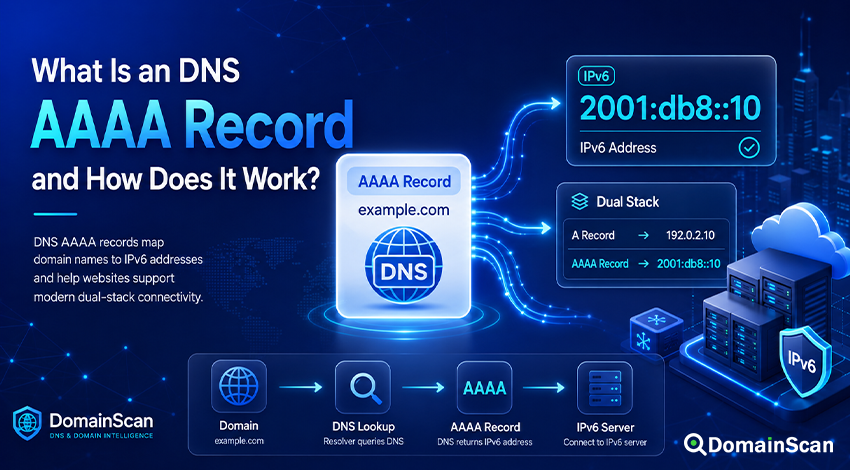
An AAAA record is a DNS record that maps a domain name or hostname to an IPv6 address.
It performs the same basic job for IPv6 that an A record performs for IPv4. When a device wants to connect to a hostname over IPv6, DNS can return an AAAA record containing the destination server's IPv6 address.
A typical AAAA record looks like this:
example.com. 3600 IN AAAA 2001:db8::10
This tells a DNS resolver that example.com is associated with the IPv6 address 2001:db8::10.
AAAA records are becoming increasingly important as networks, hosting providers, cloud platforms, mobile carriers, and internet service providers deploy IPv6 alongside IPv4.
However, adding an AAAA record is not simply a matter of copying an IPv6 address into DNS. The destination server, firewall, routing, web server, reverse proxy, and SSL configuration must also work correctly over IPv6.
What Does AAAA Mean in DNS?
The AAAA record is the DNS record type used to store an IPv6 address.
Its name is commonly read as “quad-A.”
The naming comes from the relationship between IPv4 and IPv6. An A record stores a 32-bit IPv4 address, while an IPv6 address is 128 bits long—four times the size.
An A record might look like:
example.com. 3600 IN A 192.0.2.10
The corresponding AAAA record might look like:
example.com. 3600 IN AAAA 2001:db8::10
Both records can exist for the same hostname.
How Does an AAAA Record Work?
Suppose a visitor opens:
https://example.com
The user's device may ask DNS for both IPv4 and IPv6 address records.
The DNS server could return:
example.com. 3600 IN A    192.0.2.10
example.com. 3600 IN AAAA 2001:db8::10
The device now knows that the website is available through both IP versions.
If the user's network has working IPv6 connectivity, the operating system and browser may prefer the IPv6 destination. If IPv6 is unavailable or the connection cannot be completed quickly enough, the client may use IPv4 instead.
A simplified lookup path looks like this:
example.com
     ↓
DNS lookup
     ↓
A record      → 192.0.2.10
AAAA record   → 2001:db8::10
     ↓
Client selects a working connection
     ↓
Web server
The exact connection-selection behavior is controlled by the operating system and application rather than by the DNS record itself.
What Is IPv6?
IPv6 is the newer version of the Internet Protocol designed to provide a much larger address space than IPv4.
An IPv4 address usually looks like:
192.0.2.10
An IPv6 address looks more like:
2001:db8:1234:5678:abcd:ef01:2345:6789
IPv6 addresses are written using hexadecimal numbers separated by colons.
Because IPv6 addresses can contain long sequences of zeros, they may also be shortened.
For example:
2001:0db8:0000:0000:0000:0000:0000:0010
can be written as:
2001:db8::10
The double colon represents a compressed sequence of zero groups.
A Record vs AAAA Record
The difference between these two DNS records is straightforward.
A record
An A record maps a hostname to an IPv4 address.
example.com. 3600 IN A 192.0.2.10
AAAA record
An AAAA record maps a hostname to an IPv6 address.
example.com. 3600 IN AAAA 2001:db8::10
A website does not need to choose only one record type. It can publish both.
example.com. 3600 IN A    192.0.2.10
example.com. 3600 IN AAAA 2001:db8::10
This is commonly called dual-stack operation.
What Is Dual Stack?
Dual stack means that a service supports both IPv4 and IPv6.
For DNS, this usually means that the hostname has both A and AAAA records.
For example:
www.example.com. 300 IN A    192.0.2.20
www.example.com. 300 IN AAAA 2001:db8::20
A visitor with IPv6 connectivity can connect using the AAAA record. A visitor using only IPv4 can connect through the A record.
This approach allows a website to support IPv6 without immediately removing IPv4.
For most public websites, running both protocols is more practical than attempting an IPv6-only deployment.
Do You Need an AAAA Record?
You only need an AAAA record if the service actually has working IPv6 connectivity.
Do not publish an AAAA record merely because your hosting panel displays an IPv6 address.
Before publishing the record, confirm that:
- The server has the IPv6 address configured.
- The hosting provider routes that address correctly.
- The firewall accepts IPv6 connections.
- The web server listens on IPv6.
- Ports 80 and 443 are reachable when required.
- The website responds correctly over IPv6.
- The SSL certificate works for the hostname.
A broken AAAA record can be worse than having no IPv6 record at all.
Why Can a Broken AAAA Record Cause Website Problems?
If DNS advertises an IPv6 address, some visitors will attempt to use it.
Imagine that DNS returns:
example.com. 3600 IN A    192.0.2.10
example.com. 3600 IN AAAA 2001:db8::10
The IPv4 server works, but the IPv6 address is not reachable.
Some devices may initially try IPv6 and then fall back to IPv4. Modern connection algorithms can reduce the delay, but visitors may still experience:
- Slow page loading
- Intermittent connection failures
- Timeouts
- Different behavior between networks
- A website working on one device but not another
This kind of issue can be difficult to notice because users on IPv4-only networks see no problem.
Why Does a Website Work on Wi-Fi but Not Mobile Data?
Different networks may have different levels of IPv6 support.
A mobile carrier may provide native IPv6 while a home broadband connection mainly uses IPv4.
If the website has a broken AAAA record, the user on the mobile network may attempt the faulty IPv6 route while the Wi-Fi user connects successfully over IPv4.
The reverse can also happen depending on the network configuration.
When a website works on some networks but consistently fails on others, checking A and AAAA records separately can reveal an IPv4 or IPv6-specific problem.
Can a Domain Have Multiple AAAA Records?
Yes. A hostname can have multiple IPv6 addresses.
For example:
example.com. 300 IN AAAA 2001:db8::10
example.com. 300 IN AAAA 2001:db8::11
example.com. 300 IN AAAA 2001:db8::12
DNS may return all of these addresses.
Multiple records can be used for redundancy or traffic distribution, but DNS does not automatically know whether one of the servers has failed.
If an address remains published while its server is offline, clients may still attempt to connect to it.
Can a Subdomain Have Its Own AAAA Record?
Yes. Each hostname can have its own IPv6 address.
For example:
example.com.      3600 IN AAAA 2001:db8::10
www.example.com.  3600 IN AAAA 2001:db8::20
api.example.com.  3600 IN AAAA 2001:db8::30
The website, API, mail service, and other applications can therefore run on different IPv6 destinations.
AAAA Record vs CNAME Record
An AAAA record contains an IPv6 address directly:
www.example.com. 3600 IN AAAA 2001:db8::10
A CNAME record points to another hostname:
www.example.com. 3600 IN CNAME host.example.net.
The CNAME target may then return an AAAA record:
host.example.net. 3600 IN AAAA 2001:db8::10
This means a hostname can reach an IPv6 service indirectly through a CNAME.
The important distinction is that the AAAA record contains the actual IPv6 address, while the CNAME contains another DNS name.
Does an AAAA Record Replace an A Record?
Not necessarily.
Publishing an AAAA record does not automatically make an A record unnecessary.
Many users and networks still rely on IPv4. Removing the A record may make the website unreachable for users who do not have a usable IPv6 path.
A common configuration is therefore:
example.com. 3600 IN A    192.0.2.10
example.com. 3600 IN AAAA 2001:db8::10
This provides compatibility with both networks.
Can an AAAA Record Point to an IPv4 Address?
No.
An AAAA record must contain an IPv6 address.
This is incorrect:
example.com. 3600 IN AAAA 192.0.2.10
Use an A record for IPv4:
example.com. 3600 IN A 192.0.2.10
Use an AAAA record for IPv6:
example.com. 3600 IN AAAA 2001:db8::10
Can an AAAA Record Contain a URL?
No.
An AAAA record contains only an IPv6 address.
This is not valid:
https://[2001:db8::10]/website
The DNS value should contain only:
2001:db8::10
Protocols, paths, query strings, and redirect destinations are handled outside the AAAA record.
Can an AAAA Record Include a Port?
No.
This is invalid:
2001:db8::10:443
The AAAA record only identifies the IPv6 address.
Applications determine which port to use. For example, HTTPS normally connects to port 443, while HTTP normally uses port 80.
What Is TTL in an AAAA Record?
TTL stands for Time to Live.
It controls how long DNS resolvers may cache the record.
For example:
example.com. 3600 IN AAAA 2001:db8::10
A TTL of 3600 seconds equals one hour.
If the IPv6 address is changed, resolvers that cached the previous record may continue returning the old address until that cache expires.
This is particularly important when:
- Moving a website to a new server
- Changing cloud providers
- Replacing IPv6 addresses
- Enabling a CDN
- Removing a broken IPv6 endpoint
How Long Does an AAAA Record Change Take?
Changes may appear on the authoritative DNS servers quickly, but cached copies can remain elsewhere.
The effective delay depends on:
- The previous TTL value
- Recursive resolver caches
- Local DNS caches
- Whether all authoritative servers have synchronized
- Negative caching when the record previously did not exist
If the authoritative name servers already return the new IPv6 address but a public resolver still returns the old value, caching is the most likely explanation.
How to Check an AAAA Record
You can use the DomainScan DNS Lookup tool to inspect the AAAA record currently published for a hostname.
A basic check involves:
- Enter the domain or hostname.
- Select the AAAA record type.
- Run the DNS lookup.
- Check the returned IPv6 address.
- Compare it with the address configured on the server.
- Check multiple resolvers if the record was recently changed.
Check each hostname separately:
example.com
www.example.com
api.example.com
The root domain may have an AAAA record while www does not, or the two names may point to different destinations.
How to Test Whether the IPv6 Server Actually Works
Finding an AAAA record is only the first step.
You also need to verify that the destination is reachable.
Useful checks include:
- Confirm that the IPv6 address responds from an IPv6-enabled network.
- Check whether the required TCP ports are open.
- Verify that the web server listens on IPv6.
- Test HTTP and HTTPS separately.
- Confirm that the correct website is served for the hostname.
- Check the TLS certificate.
A correct DNS result does not guarantee a working IPv6 service.
Common AAAA Record Problems
The AAAA record points to an old server
This can happen after a website migration.
The A record may have been updated while the AAAA record was forgotten.
For example:
example.com. IN A    198.51.100.20
example.com. IN AAAA 2001:db8:old::10
IPv4 visitors reach the new server while IPv6 visitors continue reaching the old one.
Always review both record types during a migration.
The IPv6 address exists but is not routed
An address can be configured in DNS even when no working network route exists to the server.
The result is a valid DNS response followed by a failed network connection.
Contact the hosting provider or network administrator if the assigned IPv6 range is not routed correctly.
The firewall allows IPv4 but blocks IPv6
IPv4 and IPv6 firewall rules are not always identical.
An administrator may open port 443 for IPv4 while accidentally leaving the IPv6 path blocked.
This can produce a website that appears normal on some networks but fails on IPv6-enabled connections.
The web server listens only on IPv4
The operating system may have IPv6 connectivity, but the web server may not be listening on the IPv6 interface.
Check the server configuration to confirm that HTTP and HTTPS services accept IPv6 connections.
The root domain works but www does not
The two names may have different DNS records.
For example:
example.com.     IN AAAA 2001:db8::10
www.example.com. IN A    192.0.2.10
In this configuration, the root domain supports IPv6 but the www hostname does not.
Whether this is a problem depends on the intended design.
www works but the root domain fails over IPv6
The opposite configuration is also possible.
Always test the exact hostname being reported by the user.
The SSL certificate fails only on IPv6
The IPv6 address may point to a different server than IPv4.
If that server presents the wrong certificate, users connecting over IPv6 may receive a certificate warning even though the IPv4 site is configured correctly.
Compare the servers behind both DNS record types.
A CDN has different IPv4 and IPv6 behavior
Content delivery networks often return different A and AAAA addresses from their own infrastructure.
This is normal.
However, an incorrect proxy, origin, firewall, or certificate configuration can still produce protocol-specific failures.
Should You Delete a Broken AAAA Record?
If a hostname advertises IPv6 but the service does not work over IPv6, removing the AAAA record can be an appropriate temporary fix.
This allows compatible clients to continue using IPv4 through the A record.
However, the better long-term solution is to determine why IPv6 is failing and fix the infrastructure if IPv6 support is intended.
Before deleting the record, confirm that:
- An A record exists and works.
- The website does not require IPv6-only access.
- The AAAA record is genuinely incorrect.
- The DNS record is not managed automatically by a CDN or hosting provider.
Does IPv6 Make a Website Faster?
Not automatically.
IPv6 removes the need for some forms of address translation and can provide efficient routing in certain networks, but real-world performance depends on the complete path between the visitor and the server.
Factors such as these usually matter more:
- Server location
- Network routing
- CDN usage
- Latency
- Page size
- Application performance
- Browser caching
An AAAA record should be published because the service has reliable IPv6 connectivity, not simply because IPv6 is assumed to be faster.
Does IPv6 Improve SEO?
Publishing an AAAA record by itself does not make a page more relevant or useful to search engines.
The important consideration is availability.
If IPv6 is enabled incorrectly and causes timeouts or inaccessible pages for some users or crawlers, it can harm the overall reliability of the site.
Working IPv6 is useful infrastructure. Broken IPv6 is an avoidable operational problem.
AAAA Records and Email Servers
Mail server hostnames can also publish AAAA records.
For example:
example.com.      IN MX   10 mail.example.com.
mail.example.com. IN A    192.0.2.50
mail.example.com. IN AAAA 2001:db8::50
This allows other mail systems to reach the server using either IPv4 or IPv6.
Email over IPv6 requires careful configuration. In addition to connectivity, administrators should pay attention to:
- Reverse DNS
- Mail server hostname configuration
- SPF authorization
- DKIM
- DMARC
- IP reputation
Simply publishing an AAAA record does not guarantee good email deliverability.
AAAA Records and DNS Propagation
AAAA records follow the same basic DNS caching rules as other record types.
After an IPv6 address changes, different resolvers may temporarily return different values.
You can use the DomainScan DNS Propagation Check to compare AAAA records across multiple locations.
If the authoritative servers all return the new address while some public resolvers still return an older value, caching is likely responsible.
If authoritative servers disagree with each other, the DNS configuration should be investigated.
Frequently Asked Questions
What is an AAAA record?
An AAAA record is a DNS record that maps a hostname to an IPv6 address.
Why is it called AAAA?
The record represents a 128-bit IPv6 address, which is four times the size of the 32-bit IPv4 address stored in an A record. It is commonly pronounced “quad-A.”
Can a domain have both A and AAAA records?
Yes. This is a common dual-stack configuration that allows users to connect over either IPv4 or IPv6.
Do I need an AAAA record if I already have an A record?
Only if the service has working IPv6 connectivity and you want it to be reachable over IPv6.
Can I remove the A record after adding AAAA?
You can, but doing so creates an IPv6-only hostname. Users without working IPv6 connectivity may no longer be able to reach the service.
Most public websites continue to publish both records.
Why is my AAAA record not working?
Possible causes include incorrect DNS data, missing IPv6 routing, firewall rules, a web server that does not listen on IPv6, closed ports, or the wrong server configuration.
Can an AAAA record point to a private IPv6 address?
DNS can technically contain non-public IPv6 addresses, but public visitors cannot normally use addresses intended only for internal networks.
Public DNS should generally point public services to globally reachable addresses.
Does an AAAA record redirect a website?
No. It only maps a hostname to an IPv6 address.
Website redirects are handled through HTTP responses or other application-level configuration.
How long does an AAAA record take to update?
The authoritative server may update quickly, but cached DNS responses can remain until their previous TTL values expire.
Why do I see several AAAA records?
A service may use multiple IPv6 addresses for redundancy, traffic distribution, CDN routing, or distributed infrastructure.
Final Thoughts
An AAAA record connects a hostname to an IPv6 address. It is the IPv6 counterpart of the familiar DNS A record and is an important part of making websites and internet services accessible across modern networks.
The DNS configuration itself is simple, but successful IPv6 deployment requires more than publishing an address. Routing, firewall rules, server listeners, SSL certificates, application configuration, and monitoring all need to work over IPv6 as well.
If a website behaves differently across networks, compare its A and AAAA records. A forgotten or incorrect IPv6 record can explain problems that are invisible to users connecting only through IPv4.
Use the DomainScan DNS Lookup tool to inspect a hostname's AAAA records, and use the DNS Propagation Check when a recent IPv6 DNS change is returning different results across locations.