What Is an NS Record and How Does It Work?
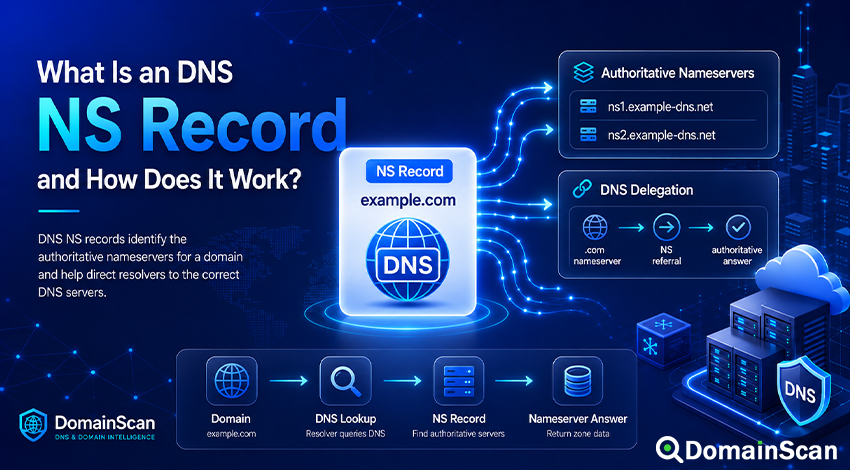
An NS record is a DNS record that identifies the authoritative nameservers responsible for a domain or DNS zone.
When a DNS resolver needs information about a domain such as example.com, it must know which nameservers can provide authoritative answers for that domain. NS records provide that information.
A typical NS record looks like this:
example.com. 86400 IN NS ns1.example-dns.net.
A domain normally has more than one NS record:
example.com. 86400 IN NS ns1.example-dns.net.
example.com. 86400 IN NS ns2.example-dns.net.
These records indicate that ns1.example-dns.net and ns2.example-dns.net are expected to serve authoritative DNS data for example.com.
NS records are one of the most important parts of DNS because they help divide responsibility across the distributed DNS hierarchy. If a domain's nameserver delegation is missing or incorrect, other DNS records may be perfectly configured inside a DNS control panel and still remain unreachable to users.
What Does NS Mean in DNS?
NS stands for Name Server.
An NS record identifies a hostname that should be authoritative for the specified DNS zone.
For example:
example.com. 86400 IN NS ns1.example.net.
In this record:
example.comis the domain or zone.86400is the Time to Live.INis the Internet record class.NSis the record type.ns1.example.netis the nameserver hostname.
The NS record contains a hostname, not an IP address.
The nameserver hostname must itself resolve to an IPv4 or IPv6 address so that DNS resolvers know where to send queries.
What Is an Authoritative Nameserver?
An authoritative nameserver is a DNS server that publishes the official DNS data for a zone.
For example, the authoritative DNS zone for example.com might contain:
example.com.      3600  IN A     192.0.2.10
example.com.      3600  IN MX 10 mail.example.com.
www.example.com.  3600  IN CNAME example.com.
example.com.      86400 IN NS    ns1.example-dns.net.
example.com.      86400 IN NS    ns2.example-dns.net.
When a resolver asks one of the authoritative nameservers for the A record of example.com, the server can answer using the DNS zone it manages.
This is different from a recursive resolver.
A recursive resolver searches for DNS information on behalf of users. An authoritative nameserver publishes the DNS information for the domains it manages.
How Do NS Records Work?
Suppose a resolver needs to find the IP address of:
www.example.com
The resolver may begin with information from the DNS hierarchy.
A simplified process looks like this:
- The resolver identifies the appropriate top-level domain nameservers.
- The top-level domain server returns a referral for
example.com. - The referral contains the NS records for the domain.
- The resolver finds the IP address of one of those nameservers.
- The resolver sends the DNS query to that authoritative server.
- The authoritative server returns the requested DNS record.
A simplified flow can be represented as:
www.example.com
       ↓
.com nameserver
       ↓
NS referral
       ↓
ns1.example-dns.net
       ↓
Authoritative DNS answer
       ↓
192.0.2.10
The NS record does not contain the website's IP address. It tells the resolver where to ask for that information.
What Is DNS Delegation?
DNS delegation is the process of assigning responsibility for a section of the DNS namespace to another set of nameservers.
For example, the .com zone does not store every A, MX, or TXT record for every .com domain.
Instead, the parent zone contains delegation information showing which nameservers are responsible for each registered domain.
A simplified parent-zone entry might contain:
example.com. IN NS ns1.example-dns.net.
example.com. IN NS ns2.example-dns.net.
This tells resolvers:
“For information about example.com, ask these nameservers.”
The authoritative servers for example.com then publish the actual zone data.
Registrar Nameservers and DNS Zone NS Records
One of the most confusing aspects of NS records is that nameserver information may appear in two places.
Nameservers configured at the registrar
When you register a domain, the registrar usually provides a setting called:
- Nameservers
- Custom nameservers
- DNS servers
- Authoritative nameservers
Changing this setting updates the delegation in the parent DNS zone through the registry.
For example, you might configure:
ns1.provider.net
ns2.provider.net
The registry then publishes those nameservers as the delegation for your domain.
NS records inside the DNS zone
The DNS provider also normally publishes NS records inside the domain's authoritative zone:
example.com. 86400 IN NS ns1.provider.net.
example.com. 86400 IN NS ns2.provider.net.
Ideally, the delegation in the parent zone and the authoritative NS set inside the child zone should agree.
If they do not, DNS troubleshooting becomes more complicated and some resolvers or diagnostic tools may report a delegation mismatch.
Why Does a Domain Usually Have Multiple Nameservers?
DNS is important infrastructure, so domains normally use more than one authoritative nameserver.
For example:
example.com. IN NS ns1.provider.net.
example.com. IN NS ns2.provider.net.
example.com. IN NS ns3.provider.net.
Multiple nameservers provide redundancy.
If one server is unavailable, resolvers can try another server from the NS set.
For redundancy to be useful, the servers should all contain consistent DNS data and should not depend on exactly the same failing infrastructure.
For some delegated zones managed directly by IANA, baseline requirements include at least two nameservers and additional requirements around reachability, authoritative responses, consistency, and network diversity.
Do NS Records Have Priority Values?
No.
Unlike MX records, NS records do not have numerical priority values.
This is valid:
example.com. IN NS ns1.example.net.
example.com. IN NS ns2.example.net.
This does not mean that ns1 is always used before ns2.
Resolvers can choose among the available authoritative nameservers according to factors such as:
- Response time
- Previous performance
- Network availability
- Resolver implementation
There is no NS equivalent of MX priority 10 or priority 20.
Can an NS Record Point Directly to an IP Address?
No. An NS record points to a hostname.
This is incorrect:
example.com. IN NS 192.0.2.53
The correct configuration is:
example.com. IN NS ns1.example.net.
Then the nameserver hostname resolves separately:
ns1.example.net. IN A    192.0.2.53
ns1.example.net. IN AAAA 2001:db8::53
Can an NS Record Point to a CNAME?
An authoritative nameserver hostname should resolve directly to address records rather than depend on a CNAME alias.
A normal configuration looks like:
example.com. IN NS ns1.example.net.
ns1.example.net. IN A 192.0.2.53
Using an alias adds an unnecessary dependency to a critical part of DNS resolution.
Nameserver hostnames should be stable and directly reachable.
What Are Glue Records?
Glue records are address records supplied by a parent DNS zone when they are necessary to reach a delegated nameserver.
Consider this configuration:
example.com. IN NS ns1.example.com.
There is an obvious problem.
To resolve example.com, the resolver needs to contact ns1.example.com.
But to find the address of ns1.example.com, it would normally need to ask the authoritative DNS servers for example.com.
This creates a circular dependency.
The parent zone solves this by providing a glue address together with the delegation:
example.com.     IN NS ns1.example.com.
ns1.example.com. IN A  192.0.2.53
The A record supplied through the parent referral gives the resolver enough information to contact the nameserver.
When Are Glue Records Needed?
Glue is commonly needed when the nameserver hostname is inside the domain being delegated.
For example:
example.com → ns1.example.com
Without an address provided by the parent, the resolver would need information from the child zone before it could reach the child zone.
If the nameserver belongs to an unrelated domain:
example.com → ns1.dns-provider.net
the resolver can usually resolve ns1.dns-provider.net through the normal DNS hierarchy, so the same circular dependency does not exist.
What Is an In-Bailiwick Nameserver?
An in-bailiwick nameserver is a nameserver whose hostname exists inside the domain or delegation being discussed.
For example:
example.com
ns1.example.com
ns1.example.com is in-bailiwick for example.com.
By contrast:
ns1.dns-provider.net
is outside the example.com namespace.
The distinction matters particularly when determining whether glue information is needed in the parent delegation.
What Happens When You Change Nameservers?
Changing nameservers is different from changing an ordinary A or TXT record.
When you replace:
ns1.old-provider.net
ns2.old-provider.net
with:
ns1.new-provider.net
ns2.new-provider.net
you are changing which DNS infrastructure is authoritative for the domain.
The process normally involves:
- Creating the DNS zone at the new provider.
- Copying all required DNS records.
- Verifying the new nameservers answer correctly.
- Changing the domain's nameserver configuration at the registrar.
- Waiting for cached delegation information to expire.
- Keeping the old DNS service available during the transition.
Do not switch nameservers before the new DNS zone is complete.
If the new nameservers do not contain the required A, AAAA, MX, TXT, CNAME, and other records, website and email services can fail immediately as resolvers begin using them.
Do DNS Records Automatically Move When Nameservers Change?
No.
This is one of the most important points to understand about nameserver migrations.
Suppose your old DNS provider contains:
example.com.     IN A     192.0.2.10
example.com.     IN MX 10 mail.example.com.
www.example.com. IN CNAME example.com.
example.com.     IN TXT   "v=spf1 include:_spf.example.net -all"
If you change the registrar to different nameservers, those records are not automatically copied to the new provider.
You must recreate the required DNS zone unless a migration system explicitly performs the transfer for you.
Forgetting this step can cause:
- Website downtime
- Email delivery failure
- Broken domain verification
- Failed SPF, DKIM, or DMARC checks
- Unavailable subdomains
How Long Does a Nameserver Change Take?
There is no single global time for every nameserver change.
The new delegation can be published relatively quickly, but recursive resolvers may have cached older NS information.
The transition depends on:
- Delegation TTL values
- Resolver caches
- Registry update timing
- Registrar processing
- Nameserver availability
- Whether both old and new DNS zones contain consistent records
During a transition, some users may query the old nameservers while others already use the new ones.
This is why the old DNS service should generally remain active until the migration has stabilized.
What Is a Nameserver Delegation Mismatch?
A delegation mismatch occurs when the nameservers published by the parent zone do not match the NS records served by the authoritative child zone.
For example, the parent zone may delegate:
example.com. IN NS ns1.new-provider.net.
example.com. IN NS ns2.new-provider.net.
while the child zone still contains:
example.com. IN NS ns1.old-provider.net.
example.com. IN NS ns2.old-provider.net.
DNS may continue to work in some situations, but the configuration is inconsistent and should be corrected.
Diagnostic tools may flag this as:
- NS mismatch
- Nameserver mismatch
- Delegation inconsistency
- Parent-child NS mismatch
Why Is Parent and Child NS Consistency Important?
The parent delegation tells resolvers where the child zone can be found.
The child zone's own NS records describe its authoritative server set.
When these records agree, the delegation is easier to understand and troubleshoot.
If they disagree, resolvers may encounter different server sets depending on how they reach the zone or what information they have cached.
Keeping both sides consistent is a basic part of maintaining reliable DNS delegation.
What Happens If One Nameserver Is Down?
If a domain has several authoritative nameservers and one becomes unavailable, resolvers can normally query another server.
For example:
example.com. IN NS ns1.example.net.
example.com. IN NS ns2.example.net.
If ns1.example.net does not respond, a resolver may try ns2.example.net.
This redundancy only works if:
- The other nameserver is reachable.
- It contains the same DNS zone.
- Its network is functioning.
- It answers authoritatively for the domain.
If every nameserver fails, the domain's DNS records may eventually become unavailable as cached data expires.
Why Do Nameservers Need to Answer Over UDP and TCP?
DNS commonly uses UDP for ordinary queries, but TCP is also an important part of the protocol.
Some DNS responses are too large for a normal UDP exchange or require retrying over TCP.
Authoritative DNS services should therefore support DNS queries over both UDP and TCP on port 53.
A firewall that permits UDP/53 but blocks TCP/53 can create failures that appear only for certain DNS responses.
Can Nameservers Use IPv6?
Yes.
A nameserver hostname can have both A and AAAA records:
ns1.example.net. IN A    192.0.2.53
ns1.example.net. IN AAAA 2001:db8::53
This allows DNS resolvers to contact the server over IPv4 or IPv6.
As with websites, publishing an AAAA record only makes sense when the nameserver actually works over IPv6.
What Is TTL in an NS Record?
NS records have TTL values just like other DNS records.
For example:
example.com. 86400 IN NS ns1.example.net.
A TTL of 86400 seconds equals 24 hours.
Resolvers may cache NS information, so an old nameserver set can continue appearing after a delegation change.
However, nameserver transitions involve both child-zone NS data and delegation data from the parent, so the overall caching behavior can be more complicated than changing a normal host record.
How to Check a Domain's NS Records
You can use the DomainScan DNS Lookup tool to inspect the NS records published for a domain.
A basic check involves:
- Enter the domain name.
- Select the NS record type.
- Run the lookup.
- Review every returned nameserver.
- Resolve each nameserver hostname to confirm that it has usable addresses.
- Check whether the servers answer authoritatively for the domain.
For delegation troubleshooting, the DomainScan DNS Delegation Check is more useful because the parent and child DNS information should be examined together.
How to Check DNS Delegation
A useful delegation check should answer several questions:
- Which nameservers does the parent zone delegate?
- Which NS records are published by the child zone?
- Do the two sets match?
- Do all nameserver hostnames resolve?
- Are the servers reachable?
- Do they answer authoritatively?
- Do all authoritative servers provide consistent DNS data?
- Are required glue records present?
A simple NS lookup alone may not reveal every delegation problem.
Common NS Record Problems
The domain points to the wrong nameservers
This often happens after changing DNS providers.
The zone may be correctly configured at the new provider, but the registrar still delegates the domain to the previous nameservers.
Check the parent delegation rather than relying only on the DNS provider's control panel.
The new nameservers have no DNS zone
A registrar may successfully accept the new nameserver values even if those servers are not ready to answer for the domain.
The result can be complete DNS failure.
Create and test the zone before changing the delegation.
Parent and child NS records do not match
This often happens after an incomplete migration.
Update the relevant configuration so the authoritative zone reflects the actual delegation.
One authoritative server has different records
All authoritative nameservers should normally provide consistent zone data.
If one server returns:
example.com. IN A 192.0.2.10
while another returns:
example.com. IN A 198.51.100.20
users may receive inconsistent results depending on which server their resolver contacts.
The nameserver hostname does not resolve
An NS record is not useful if the resolver cannot find the address of the nameserver.
Check its A and AAAA records.
Glue records are missing
This can prevent resolvers from reaching an in-bailiwick nameserver.
For example, when:
example.com → ns1.example.com
the parent registry may need an address for ns1.example.com as glue.
Glue records contain an old IP address
If a custom nameserver changes IP address, updating only its authoritative A record may not be enough.
The glue information registered with the parent may also need to be updated.
Old glue can direct resolvers to an outdated server.
The nameserver answers but is not authoritative
A DNS server may be reachable on port 53 while still not being correctly configured for the domain.
Check whether it provides an authoritative response for the zone rather than merely confirming that the server responds to network requests.
TCP port 53 is blocked
Basic small queries may appear to work over UDP while larger responses fail when TCP is required.
Authoritative DNS servers should be reachable using both protocols.
Why a Correct NS Record Does Not Guarantee Working DNS
A valid-looking NS record only identifies a nameserver hostname.
It does not prove that:
- The nameserver is online.
- The hostname resolves correctly.
- The server answers authoritatively.
- The DNS zone exists.
- The zone contains the correct records.
- The parent delegation matches.
- Glue information is correct.
- UDP and TCP DNS queries both work.
This is why delegation problems usually require checking several layers of DNS rather than looking at a single NS result.
How to Change Nameservers Safely
A careful nameserver migration can reduce the chance of website and email downtime.
Before changing the registrar configuration:
- Create the complete zone at the new DNS provider.
- Copy all A, AAAA, CNAME, MX, TXT, and other required records.
- Confirm that the new servers answer authoritatively.
- Compare their responses with the old provider.
- Check email authentication records.
- Check custom subdomains.
- Verify DNSSEC configuration if it is enabled.
- Then change the nameserver delegation.
After the change:
- Keep the old DNS zone active temporarily.
- Monitor parent delegation results.
- Compare responses from multiple resolvers.
- Confirm website and email functionality.
- Check for parent-child NS mismatches.
NS Records and DNS Propagation
The phrase “DNS propagation” is often used when nameservers are changed.
What usually happens is that different recursive resolvers refresh their cached delegation and NS information at different times.
During this period:
- One resolver may still contact the old DNS provider.
- Another resolver may already use the new provider.
- Old and new zones may both receive queries.
If both zones contain identical DNS records, users may not notice the transition.
If the zones differ, users can experience inconsistent website or email behavior.
NS Records and DNSSEC
DNSSEC adds another important consideration to nameserver migrations.
If the parent zone contains a DS record but the new authoritative DNS provider is not correctly configured with matching DNSSEC keys, validation can fail.
That can make the domain appear completely unavailable to DNSSEC-validating resolvers.
When changing DNS providers for a DNSSEC-enabled domain, follow the provider's documented migration process rather than changing nameservers casually.
Frequently Asked Questions
What is an NS record?
An NS record identifies a nameserver that is authoritative for a DNS zone.
How many NS records should a domain have?
Domains normally use at least two authoritative nameservers for redundancy. Some DNS providers publish three or more.
Can I have four nameservers?
Yes. A zone can have several nameservers as long as they are correctly configured and serve consistent DNS information.
Are NS records the same as DNS records?
NS records are one specific type of DNS record.
Other DNS record types include A, AAAA, CNAME, MX, TXT, PTR, and SOA.
Where do I change nameservers?
The domain's delegation is normally changed through the registrar or registry-facing domain management interface.
Changing an NS record only inside an unrelated DNS zone does not necessarily update the parent delegation.
Can I use nameservers from another company?
Yes. A domain registrar and DNS hosting provider do not need to be the same company.
Do nameserver changes move my website?
No. Changing nameservers changes which DNS system answers for the domain.
Website files, databases, servers, and applications do not move automatically.
Do nameserver changes move my email?
No. Email routing depends on the MX and related DNS records stored in the new zone.
If those records are not copied correctly, email can stop working.
Can NS records use IPv6?
The NS record itself contains a hostname. That hostname can resolve to IPv4 addresses, IPv6 addresses, or both.
What is a glue record?
A glue record is address information supplied by a parent DNS zone to help resolvers reach a delegated nameserver, especially when the nameserver is inside the delegated domain itself.
How long does a nameserver change take?
The new delegation may become available quickly, but cached information can cause old nameservers to continue receiving queries until relevant TTL values expire.
Final Thoughts
NS records define which nameservers are responsible for answering authoritative DNS queries for a domain or zone.
They are more than just another DNS record type. They form part of the delegation mechanism that connects one level of the DNS hierarchy to the next.
When troubleshooting nameservers, do not stop after confirming that an NS record exists. Check the parent delegation, child-zone NS records, nameserver addresses, glue records, authoritative responses, server reachability, and consistency between every authoritative server.
A carefully planned nameserver migration should begin by creating the complete DNS zone at the new provider before changing the delegation. Keeping the old service available temporarily can help prevent failures while cached DNS information expires.
Use the DomainScan DNS Lookup tool to inspect NS records, and use the DNS Delegation Check when you need to verify the relationship between the parent zone, authoritative nameservers, and the DNS zone they serve.