What Is an SSL Certificate Chain and How Does It Work?
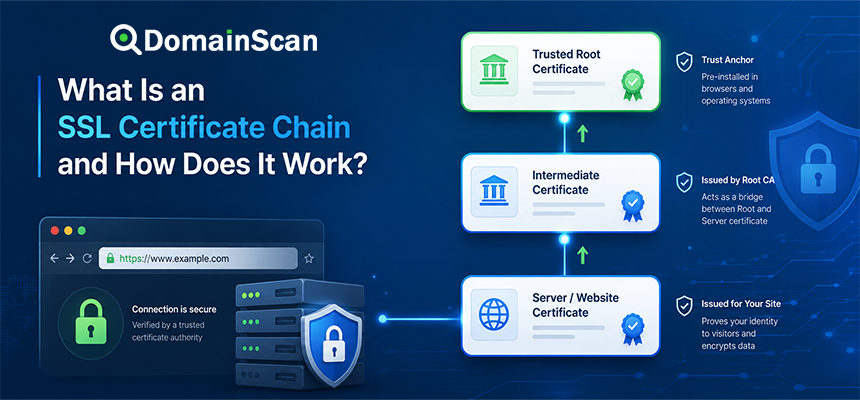
An SSL certificate chain is the sequence of certificates that allows a browser or other client to connect a website's certificate to a certificate authority it already trusts.
When a website presents an HTTPS certificate, the browser does not normally trust that certificate simply because it exists.
Instead, the browser attempts to build a valid certification path.
A simple certificate chain might look like this:
Website Certificate
        ↓
Intermediate Certificate
        ↓
Root Certificate
The website certificate identifies the hostname being visited. The intermediate certificate helps connect that website certificate to a trusted certificate authority. The root certificate represents the trust anchor already stored in the browser or operating system.
If the chain cannot be built correctly, HTTPS may fail even when the website certificate itself has not expired and contains the correct domain name.
What Is an SSL Certificate Chain?
A certificate chain is a sequence of cryptographically related X.509 certificates.
Each certificate in the chain is normally signed by the certificate authority represented by the next certificate above it.
For example:
www.example.com
      ↓ signed by
Example Intermediate CA
      ↓ signed by
Example Root CA
The browser begins with the website certificate and attempts to follow the signatures until it reaches a certificate authority it already trusts.
This process is known as certificate path validation.
Why Are Certificate Chains Necessary?
Browsers cannot ship with a trusted copy of every website certificate on the internet.
Instead, they maintain a relatively small collection of trusted certificate authority roots.
Those trusted roots can authorize intermediate certificate authorities, which can then issue certificates to websites.
This creates a scalable trust structure:
Trusted Root CA
        ↓
Intermediate CA
        ↓
Website Certificate
A browser only needs to trust the root. It can then validate certificates issued through the chain beneath it.
What Is the Leaf Certificate?
The website certificate is often called the leaf certificate or end-entity certificate.
This is the certificate issued directly for the website or service.
For example:
Subject:
example.com

Subject Alternative Names:
example.com
www.example.com
The leaf certificate contains information relevant to the website connection, including:
- The covered domain names
- The public key
- The validity period
- The certificate issuer
- The digital signature
- Key usage information
This is normally the first certificate presented by a web server during the TLS handshake.
What Is an Intermediate Certificate?
An intermediate certificate belongs to a certificate authority that sits between the website certificate and the trusted root.
For example:
example.com
    ↓
Intermediate CA
    ↓
Root CA
The intermediate CA signs the website certificate.
The root CA signs the intermediate certificate.
This means the browser can verify the website certificate without requiring the root certificate authority to sign every website certificate directly.
Why Do Certificate Authorities Use Intermediates?
Using intermediate certificate authorities provides important operational and security benefits.
A root certificate authority's private key is extremely sensitive.
If a root key were used directly for routine certificate issuance, it would need to be exposed to normal operational systems more frequently.
Instead, the root can sign one or more intermediate CA certificates.
The intermediate authorities then perform routine certificate issuance.
This creates separation between the long-term trust anchor and day-to-day certificate operations.
What Is a Root Certificate?
A root certificate represents a top-level certificate authority trusted by a client.
Browsers and operating systems maintain trusted root stores containing certificates that meet their platform's trust requirements.
A root certificate is commonly self-signed.
This means its issuer and subject represent the same certificate authority.
The root does not become trusted because it signs itself.
It is trusted because the browser, operating system, or administrator has explicitly included it in the trusted certificate store.
What Is a Trust Anchor?
A trust anchor is the trusted starting point used when validating a certificate path.
For ordinary public HTTPS, this is typically information associated with a trusted root certificate authority.
The browser does not need to receive the root certificate from the website because it normally already has the required trust anchor locally.
This distinction is important when inspecting a TLS connection.
Does the Server Send the Root Certificate?
Normally, it does not need to.
A typical server sends:
Website Certificate
Intermediate Certificate
Possibly additional intermediate certificates
The browser already has the trusted root locally.
Sending the root certificate generally does not create trust if the client does not already trust that root.
Trust anchors are distributed independently from the website's TLS certificate chain.
What Certificates Should a Web Server Send?
For a normal HTTPS configuration, the server should provide the leaf certificate and the intermediate certificates necessary for clients to build a path to a trusted root.
For example:
Server sends:

1. example.com certificate
2. Intermediate CA 1
3. Intermediate CA 2

Client already has:

Trusted Root CA
The exact number of intermediates depends on the certificate authority's hierarchy.
How Does a Browser Validate the Certificate Chain?
Suppose a server presents:
example.com Certificate
        ↓
Intermediate CA
The browser attempts to verify several things.
At a simplified level, it checks:
- Whether the website certificate is valid for the requested hostname.
- Whether the certificate is within its validity period.
- Whether the website certificate was signed by the intermediate CA.
- Whether the intermediate CA certificate is valid.
- Whether the intermediate ultimately connects to a trusted root.
- Whether certificate constraints and allowed usages are satisfied.
If the complete path validates successfully, the browser can trust the certificate for the intended connection.
What Does a Certificate Signature Do?
Each issued certificate contains a digital signature created by its issuer.
For example:
example.com certificate
        ↓
Signed by Intermediate CA private key
The browser uses the intermediate CA's public key to verify that signature.
The intermediate certificate itself was signed by another certificate authority:
Intermediate CA
        ↓
Signed by Root CA
The process continues until the browser reaches a trusted anchor.
What Is an Incomplete Certificate Chain?
An incomplete certificate chain occurs when the server fails to provide one or more intermediate certificates needed by the client.
For example, the correct chain is:
example.com
    ↓
Intermediate CA
    ↓
Root CA
but the server sends only:
example.com
The browser now needs the intermediate certificate before it can build the trust path.
Some clients may already have that intermediate cached or may be able to obtain it elsewhere.
Others may fail.
This is why an incomplete chain can appear to work on one device but fail on another.
Why Does an Incomplete Chain Work in Some Browsers?
Browsers and operating systems do not all handle missing intermediates in exactly the same way.
One device may already have the intermediate certificate from a previous connection.
Another client may be able to retrieve it through certificate metadata.
A different client may have neither capability and reject the connection.
This creates a dangerous troubleshooting situation because an administrator may test the site locally and conclude that everything is working.
The server should provide the necessary intermediate certificates rather than relying on client-side recovery.
Why Does a Website Work on Desktop but Fail on an Older Device?
Certificate-chain problems are one possible cause.
Older clients may have:
- Different root certificate stores
- Missing intermediate certificates
- Older certificate validation behavior
- Unsupported signature algorithms
A chain that works on a current desktop browser may therefore fail on an older phone, embedded device, or application.
What Is a Fullchain Certificate File?
Web server certificate packages often include files with names such as:
cert.pem
chain.pem
fullchain.pem
privkey.pem
The exact file names depend on the certificate provider or automation tool.
Conceptually:
Certificate file
Contains the website certificate.
Chain file
Contains the intermediate certificate or certificates.
Full chain file
Normally contains the website certificate followed by the required intermediate certificates.
Private key
Contains the private cryptographic key associated with the website certificate.
The private key must remain confidential.
Why Certificate Order Matters
During TLS, the end-entity certificate is presented first.
The remaining certificates should normally help the client follow the signing relationship toward a trust anchor.
A clean chain looks like:
1. Website Certificate
2. Intermediate CA 1
3. Intermediate CA 2
Incorrect or unnecessary certificate ordering can make debugging harder and may cause interoperability problems with some clients.
What Is a Cross-Signed Certificate?
A certificate authority can sometimes have more than one possible path to a trusted root.
This may happen through cross-signing.
For example, an intermediate CA could have certificates signed by different roots:
              Root A
                ↑
Website → Intermediate
                ↓
              Root B
Different clients may build different valid certificate paths depending on which roots they trust.
This has historically been useful when supporting older client trust stores.
Can the Same Website Have Multiple Valid Certificate Chains?
Yes.
Certificate path building is not always limited to a single possible route.
A certificate may participate in different valid paths depending on:
- Available intermediate certificates
- Cross-signed certificates
- The client's trusted roots
- Certificate constraints
The important requirement is that the client can construct a valid path to an acceptable trust anchor.
What Is a Self-Signed Root Certificate?
Root certificates are commonly self-signed.
For example:
Subject:
Example Root CA

Issuer:
Example Root CA
This does not mean any self-signed certificate should be trusted.
The operating system or browser must already recognize that root as a trust anchor.
A random self-signed certificate generated by a website administrator is not automatically trusted by public browsers.
Website Certificate vs Root Certificate
The website certificate identifies the website.
The root certificate establishes a trusted certificate authority.
These are different roles.
For example:
Website:
example.com

Intermediate:
Example TLS Issuing CA

Root:
Example Trusted Root CA
Website Certificate vs Intermediate Certificate
A website certificate is normally an end-entity certificate.
It is intended to identify the website or service.
An intermediate certificate is a CA certificate.
It is allowed to issue or sign other certificates according to its constraints.
Confusing these certificates during server configuration can result in invalid TLS deployment.
What Is the Basic Constraints Extension?
X.509 certificates can contain a Basic Constraints extension.
This helps identify whether a certificate is allowed to operate as a certificate authority.
An intermediate CA certificate normally indicates that it is a CA certificate.
A website leaf certificate normally does not have authority to issue other certificates.
What Is Path Length?
A CA certificate can include constraints limiting how many additional CA certificates may appear below it in a certification path.
This helps certificate authorities control the structure of their hierarchy.
Certificate validation considers these constraints when building a trusted path.
What Is Key Usage?
Certificates can contain a Key Usage extension specifying the cryptographic operations for which the key may be used.
A website certificate may allow operations related to TLS server authentication.
A certificate authority certificate needs permissions appropriate for certificate signing.
If the key usage is inconsistent with the certificate's role, validation can fail.
What Is Extended Key Usage?
Extended Key Usage, often abbreviated EKU, provides additional restrictions on how a certificate may be used.
A public website certificate commonly needs to be valid for TLS server authentication.
A certificate issued only for another purpose may not be accepted as a normal HTTPS server certificate.
Can an Intermediate Certificate Expire?
Yes.
Intermediate certificates have their own validity periods.
A website leaf certificate can still have time remaining while the path being presented contains an expired intermediate.
This can cause validation problems.
When checking certificate expiration, inspect the complete chain rather than looking only at the website certificate.
Can a Root Certificate Expire?
Root certificates also have validity periods.
Root transitions are managed by browser and operating-system trust programs and can affect older devices whose trust stores are no longer updated.
This is another reason certificate compatibility can differ across clients.
What Is Certificate Revocation?
A certificate may need to stop being trusted before its scheduled expiration date.
Possible reasons include:
- Private key compromise
- Certificate misissuance
- Incorrect information
- Security policy requirements
Certificate ecosystems support mechanisms such as CRLs and OCSP for communicating revocation information.
Revocation is separate from the basic chain-building process but can be part of certificate validation behavior.
What Is OCSP?
OCSP stands for Online Certificate Status Protocol.
It allows a client or related service to request information about the revocation status of a certificate.
Website infrastructure may also use OCSP stapling, where the server provides a recent signed status response during the TLS handshake.
Does a Complete Certificate Chain Guarantee HTTPS Will Work?
No.
The chain is only one part of TLS certificate validation.
The connection can still fail because:
- The certificate has expired.
- The hostname does not match.
- The certificate is not yet valid.
- The client does not trust the root.
- The certificate has inappropriate usage constraints.
- The server does not support compatible TLS settings.
- DNS points to another server.
How DNS Can Cause an Apparent Certificate Chain Error
Suppose:
example.com → 192.0.2.10
is the correct server.
An outdated AAAA record may also return:
example.com → 2001:db8::50
The IPv6 server might present an old or incomplete certificate chain.
IPv4 users see a valid HTTPS connection while IPv6 users report certificate errors.
Always confirm both A and AAAA records when certificate problems affect only some users.
How a Load Balancer Can Cause Chain Problems
A load balancer may terminate TLS before forwarding traffic to the website servers.
If the certificate chain on the load balancer is incomplete, fixing the certificate files on the origin server will not change what visitors receive.
A typical path might be:
Visitor
   ↓
Load Balancer
   ↓
Application Server
The public certificate must be checked at the system where TLS actually terminates.
How a CDN Can Affect the Certificate Chain
A CDN can create two separate TLS relationships:
Visitor
   ↓
CDN Edge Certificate
   ↓
CDN
   ↓
Origin Certificate
   ↓
Origin Server
The certificate chain seen by the visitor belongs to the CDN edge connection.
The origin may use a completely different certificate chain.
When debugging, determine whether the error occurs on the edge or between the CDN and origin.
What Is a Certificate Chain Error?
A certificate chain error generally means that the client could not successfully build or validate an acceptable certification path.
Error messages can refer to:
- Unable to get local issuer certificate
- Unable to verify the first certificate
- Certificate chain incomplete
- Unknown certificate authority
- Untrusted issuer
The exact wording depends on the application.
What Causes “Unable to Get Local Issuer Certificate”?
This commonly indicates that the client cannot find the certificate needed to verify the issuer of another certificate in the chain.
Possible causes include:
- A missing intermediate certificate
- An incorrect intermediate certificate
- An untrusted private CA
- A client with an outdated trust store
What Causes “Unable to Verify the First Certificate”?
This commonly occurs when the server provides a leaf certificate but the client cannot connect it to a trusted issuer.
Again, a missing intermediate is a common cause.
How to Check an SSL Certificate Chain
You can use the DomainScan SSL Checker to inspect the certificate presented by a hostname and review its chain.
A useful check should answer:
- Which certificate is presented for the hostname?
- Who issued it?
- Which intermediate certificates are provided?
- Are all certificates within their validity periods?
- Can the chain reach a trusted root?
- Does the certificate cover the requested hostname?
How to Troubleshoot an Incomplete Certificate Chain
Step 1: Check the public hostname
Inspect the exact hostname that is failing.
example.com
www.example.com
may use different TLS configurations.
Step 2: Inspect the certificates sent by the server
Determine whether the leaf certificate and required intermediate certificates are present.
Step 3: Identify the certificate issuer
The leaf certificate identifies which CA issued it.
Verify that the corresponding intermediate certificate is included.
Step 4: Check the intermediate validity period
An intermediate certificate can be present but expired.
Step 5: Check certificate order
The website certificate should be first, followed by the relevant intermediates.
Step 6: Check all public endpoints
If a domain has several IP addresses, test every server.
Step 7: Check IPv6 separately
An IPv6 endpoint may have a different certificate configuration.
Step 8: Check proxies and CDNs
Make sure you are repairing the system actually presenting the public certificate.
How to Fix a Missing Intermediate Certificate
A typical repair process is:
- Obtain the correct intermediate certificate from the certificate authority or certificate package.
- Confirm that it corresponds to the issuer of the leaf certificate.
- Build the appropriate full certificate chain.
- Configure the web server or proxy to use it.
- Reload the service.
- Check the public hostname again.
Do not download random intermediate certificates from untrusted websites.
Use certificate material provided by the issuing CA or trusted certificate-management system.
Should You Include Every Certificate You Can Find?
No.
A longer chain is not automatically better.
Servers should send the certificates needed to help clients build the intended validation path.
Adding unrelated, duplicate, or obsolete certificates creates unnecessary complexity and can increase handshake size.
Why You Should Not Rely on Browser Testing Alone
A website may look correct in your browser because your computer has cached the missing intermediate certificate.
Another client may fail immediately.
This is why an independent SSL checker is useful.
The checker sees what the server actually presents rather than what your local certificate cache may be able to repair.
How to Prevent Certificate Chain Problems
Good TLS management includes:
- Use certificate automation where practical.
- Install the full chain supplied by the CA.
- Monitor certificate expiration.
- Test every public endpoint.
- Check IPv4 and IPv6 separately.
- Verify deployment after renewal.
- Keep server and proxy configurations consistent.
- Monitor older client compatibility when relevant.
A Practical Certificate Chain Checklist
- Check the leaf certificate.
- Verify the requested hostname.
- Check the expiration date.
- Identify the issuer.
- Confirm required intermediates are present.
- Confirm intermediate certificates are valid.
- Confirm the path reaches a trusted root.
- Check certificate usage constraints.
- Test IPv4 and IPv6 endpoints.
- Check CDN or load balancer termination.
- Verify the public chain after every renewal.
Frequently Asked Questions
What is an SSL certificate chain?
An SSL certificate chain is the sequence of certificates used to connect a website's certificate to a certificate authority trusted by the client.
What is a leaf certificate?
The leaf certificate is the end-entity certificate issued for the website or service.
What is an intermediate certificate?
An intermediate certificate is a CA certificate that helps connect the website certificate to a trusted root certificate.
What is a root certificate?
A root certificate represents a top-level certificate authority trusted by a browser, operating system, or other client.
Does a website need to send the root certificate?
Normally no. The trusted root is usually already available in the client's trust store.
Why is my certificate chain incomplete?
The server may not be sending one or more required intermediate certificates.
Why does SSL work in my browser but fail in an application?
Your browser may already have a missing intermediate certificate cached or may build the chain differently from the application.
Can an intermediate certificate expire?
Yes. Intermediate certificates have their own validity periods and can cause validation failures when outdated.
Can one certificate have more than one valid chain?
Yes. Depending on cross-signing, intermediate availability, and client trust stores, more than one valid certification path may exist.
Does a complete chain mean the certificate is valid?
Not by itself. Hostname matching, expiration, certificate usage, signatures, trust, and other validation requirements must also succeed.
How do I check my SSL certificate chain?
Use an SSL checker to inspect the certificate and intermediates actually presented by the public hostname.
Final Thoughts
An SSL certificate chain allows a browser to connect a website certificate to a certificate authority it already trusts.
The website certificate sits at the bottom of that path, one or more intermediate certificate authorities may sit above it, and the validation process ultimately reaches a trusted root or other trust anchor maintained by the client.
One of the most common operational problems is a missing intermediate certificate. The site may still work on some devices because those clients already have the missing certificate available, while other browsers or applications fail to build the chain.
For that reason, certificate troubleshooting should inspect what the server actually sends rather than relying only on a successful test from one browser.
Use DomainScan SSL Checker to inspect the public certificate chain, review intermediate certificates, verify certificate validity, and identify incomplete or inconsistent TLS configurations across your website infrastructure.