What Is DNS Propagation and How Long Does It Take?
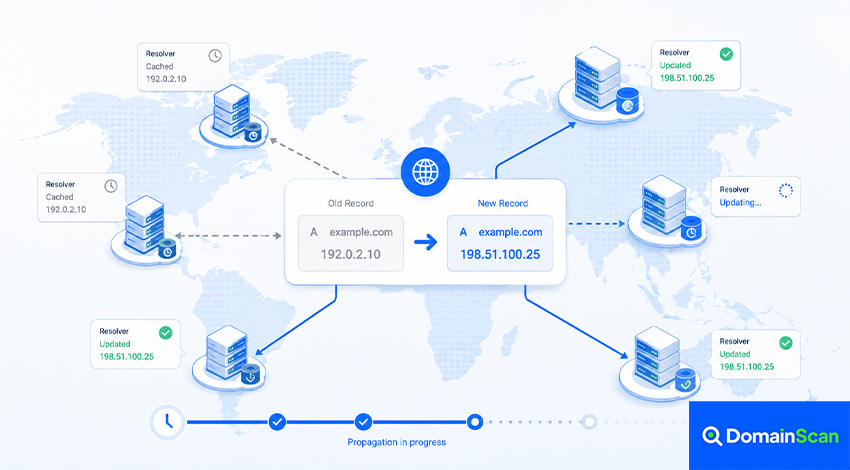
DNS propagation is the common term used to describe the period after a DNS change when different users, networks, and DNS resolvers may temporarily receive different answers.
For example, you might change the A record for a website from:
example.com. 3600 IN A 192.0.2.10
to:
example.com. 3600 IN A 198.51.100.25
Shortly after the change, one network may already return the new IP address while another still returns the old one.
This is commonly described as the DNS change “still propagating.”
In most cases, however, the new record is not slowly being copied from one DNS server to every other DNS server on the internet. The difference is usually caused by caching. Recursive DNS resolvers that still have the previous answer cached can continue using it until that cached data expires.
What Does DNS Propagation Actually Mean?
When a DNS record changes on an authoritative nameserver, that server can begin publishing the new value quickly.
Recursive DNS resolvers around the internet may already have the previous value stored in cache.
Consider this situation:
Old record:
example.com → 192.0.2.10

New record:
example.com → 198.51.100.25
Three resolvers might behave differently:
Resolver A → old address
Resolver B → new address
Resolver C → new address
Resolver A is not necessarily broken. It may simply still have a valid cached copy of the earlier DNS response.
Once that cached entry expires, the resolver can request a fresh answer from the authoritative DNS system.
Why Does DNS Use Caching?
Without caching, recursive resolvers would need to repeat full DNS lookups far more frequently.
Caching helps:
- Reduce DNS lookup latency
- Reduce traffic to authoritative nameservers
- Improve resilience when upstream infrastructure is temporarily unavailable
- Reduce repeated queries for popular domains
The tradeoff is that previously cached data may remain visible for some time after an authoritative record changes.
How Does TTL Affect DNS Propagation?
TTL stands for Time to Live.
It tells a recursive resolver how long a DNS record may normally remain cached before it should be refreshed.
For example:
example.com. 3600 IN A 192.0.2.10
has a TTL of 3600 seconds, or one hour.
If a resolver retrieves this record at 10:00, it may continue using the answer until around 11:00 without asking the authoritative server again.
If you change the record at 10:15, that resolver may still return the old IP address for another 45 minutes.
A different resolver that did not have the old response cached may immediately retrieve the new value.
This is why different locations can temporarily show different DNS answers. Longer TTLs improve cache efficiency, while shorter TTLs generally allow changes to be discovered sooner.
How Long Does DNS Propagation Take?
There is no universal propagation time for every DNS change.
A simple A or TXT record change may become widely visible within minutes when the previous TTL is short.
A record that was previously cached with a long TTL may continue appearing for several hours.
Nameserver changes can involve additional caching at the delegation level and may therefore behave differently from changing an ordinary A or CNAME record.
Instead of relying on a fixed statement such as “DNS always takes 24 to 48 hours,” it is better to examine the actual TTL, authoritative responses, and resolver results.
Why the Common “24 to 48 Hours” Rule Can Be Misleading
Many hosting companies tell users to wait 24 or 48 hours after changing DNS.
This is a convenient troubleshooting guideline, but it is not a universal technical timer built into DNS.
If the previous TTL was:
300 seconds
many resolvers may refresh the record within minutes.
If it was:
86400 seconds
a resolver that recently cached the record could keep the old value for up to roughly a day under normal caching behavior.
The actual experience depends on when each resolver last queried the record.
What Happens When You Change an A Record?
Suppose a website moves to a new server.
Before:
example.com. 3600 IN A 192.0.2.10
After:
example.com. 3600 IN A 198.51.100.25
During the transition:
- Some visitors may reach the old server.
- Some visitors may reach the new server.
- Your own computer may already use the new address.
- A monitoring service may still report the old address.
This is why the old server should normally remain available during a planned migration until traffic has clearly moved to the new infrastructure.
What Happens When You Change an AAAA Record?
IPv6 records are cached in the same general way.
If:
example.com. IN AAAA 2001:db8::10
is changed to another IPv6 address, some resolvers may continue returning the previous value until the existing cache expires.
This can produce confusing situations where IPv4 users reach the new server while IPv6 users continue reaching an older destination.
When migrating infrastructure, check A and AAAA records independently.
What Happens When You Change a CNAME Record?
A CNAME record has its own TTL.
For example:
www.example.com. 3600 IN CNAME old.hosting-provider.net.
may be changed to:
www.example.com. 3600 IN CNAME new.hosting-provider.net.
A resolver may still have the old CNAME cached even if the new provider is already configured correctly.
Also remember that the CNAME target has its own DNS records and TTLs, so troubleshooting may require checking both the alias and its destination.
What Happens When You Change MX Records?
MX propagation deserves extra care because it can affect where new email is delivered.
Suppose:
example.com. IN MX 10 mx.old-provider.net.
changes to:
example.com. IN MX 10 mx.new-provider.net.
Some sending mail systems may continue using the old MX information while others begin delivering to the new provider.
During a mail migration, it is therefore wise to keep the previous provider capable of receiving mail until the transition is stable.
What Happens When You Change TXT Records?
TXT records are commonly used for:
- SPF
- DKIM
- DMARC
- Domain verification
- Certificate validation
A verification service may report that a TXT record is missing even though you can already see it on the authoritative nameserver.
One possible cause is that the service's resolver previously cached a negative answer or an earlier TXT result.
DNS specifications explicitly support negative caching for cases such as NXDOMAIN and no-data responses.
What Is Negative DNS Caching?
DNS resolvers do not only cache successful answers.
They can also cache the fact that a name or record did not exist.
For example, suppose you query:
new.example.com
before creating the DNS record.
The resolver receives a negative answer.
You then create:
new.example.com. IN A 192.0.2.50
The authoritative server may now return the record correctly, but the resolver that cached the earlier negative result may temporarily continue reporting that the name does not exist.
This is one reason newly created records can sometimes appear slower to update than expected.
Nameserver Changes Are Different
Changing the authoritative nameservers for a domain is more significant than changing a normal DNS record.
For example:
Old:
ns1.old-provider.net
ns2.old-provider.net

New:
ns1.new-provider.net
ns2.new-provider.net
The delegation is published through the parent DNS zone, such as the relevant top-level domain.
Resolvers may have delegation or NS information cached, so some continue querying the old provider while others begin querying the new one.
For this reason, the new DNS provider should contain a complete working copy of the DNS zone before the nameserver change is made.
Why Should Old and New DNS Providers Temporarily Have the Same Records?
If both DNS providers return the same answers during a nameserver migration, users are unlikely to notice which provider their resolver is currently using.
For example, both should return:
example.com. IN A 198.51.100.25
www.example.com. IN CNAME example.com.
example.com. IN MX 10 mail.example.com.
If the old provider points to one server and the new provider points somewhere else before the intended cutover, users can receive inconsistent results.
How to Prepare DNS Before a Website Migration
A planned migration should begin before the server IP changes.
A practical workflow is:
- Check the existing TTL.
- Reduce it ahead of the migration if necessary.
- Wait long enough for the previous longer TTL to expire.
- Prepare the new web server.
- Test the new server before changing public DNS.
- Update the A and AAAA records.
- Monitor authoritative and recursive DNS responses.
- Keep the old server active during the transition.
- Increase TTL again after the migration is stable.
Why Lowering TTL Five Minutes Before Migration Usually Does Not Help
Suppose your record currently has:
TTL 86400
A resolver may already have cached that value for 24 hours.
If you lower the authoritative TTL to:
TTL 300
five minutes before the migration, the resolver does not automatically learn about the new TTL.
It may continue using the response it already cached until its original lifetime expires.
TTL needs to be reduced before the migration far enough in advance for the previous cache lifetime to age out.
How to Check DNS Propagation
A DNS propagation check compares responses from multiple resolvers or locations.
Suppose your new A record is:
198.51.100.25
A propagation check might show:
Singapore       198.51.100.25
United States   198.51.100.25
Germany         192.0.2.10
Australia       198.51.100.25
Brazil          192.0.2.10
This tells you that some resolvers still return the old value.
It does not immediately tell you why.
The next step is to check the authoritative DNS answer.
Always Check the Authoritative DNS First
This is one of the most useful rules when troubleshooting DNS changes.
If the authoritative server still returns the old value:
example.com → 192.0.2.10
then waiting for propagation will not fix the problem.
The active DNS zone itself is still publishing the wrong record.
Possible causes include:
- You edited the wrong DNS provider.
- The change was not saved.
- You edited the wrong hostname.
- The domain uses different authoritative nameservers.
- One authoritative nameserver has not synchronized.
If the authoritative server returns the new value while some recursive resolvers return the old one, caching becomes the much more likely explanation.
How to Tell Whether You Edited the Wrong DNS Provider
A common situation is:
- The domain was purchased from Registrar A.
- The website is hosted at Provider B.
- The authoritative DNS is hosted at Provider C.
Changing the A record in Registrar A's DNS panel does nothing if the domain is delegated to Provider C.
Check the domain's NS records to identify the actual authoritative nameservers.
Then make the change in the DNS system responsible for those servers.
Why Do Different Authoritative Nameservers Sometimes Return Different Results?
A domain usually has multiple authoritative nameservers.
For example:
ns1.example-dns.net
ns2.example-dns.net
They should normally provide consistent zone data.
If one returns:
198.51.100.25
and the other returns:
192.0.2.10
the problem is not ordinary resolver caching.
The authoritative DNS system itself is inconsistent.
This should be fixed at the DNS provider or server configuration level.
Does Clearing DNS Cache Speed Up Propagation?
Clearing your local DNS cache can remove a stale answer from your own device.
It does not clear DNS caches around the internet.
The process may look like this:
Your computer cache cleared
        ↓
Computer asks ISP resolver
        ↓
ISP resolver still has old record
        ↓
Old result returned again
Local cache clearing is useful when only your device appears to have stale DNS information.
It is not a global propagation command.
Should You Change to Another DNS Resolver?
Using another recursive resolver can help diagnose whether the resolver you normally use has stale information.
If Resolver A returns:
192.0.2.10
while Resolver B returns:
198.51.100.25
the difference may simply reflect their independent cache states.
Switching resolvers can change the answer your device receives, but it does not change the authoritative DNS configuration.
Why Does the Website Still Show the Old Content After DNS Updated?
If DNS already returns the new server IP, the problem may no longer be DNS.
Other possible causes include:
- Browser cache
- CDN cache
- Reverse proxy cache
- Application cache
- Old files on the new server
- Load balancer configuration
- Incorrect virtual host configuration
Verify the actual IP address being used before assuming the DNS change is still propagating.
Why Does the Website Work on Mobile Data but Not Wi-Fi?
Mobile and Wi-Fi connections may use different recursive DNS resolvers.
One resolver may already have refreshed its cache while another still returns the previous result.
This can produce situations such as:
Mobile network → new IP
Home Wi-Fi      → old IP
It can also be caused by IPv4 versus IPv6 differences, so check both A and AAAA records when necessary.
Why Does the Website Work for Me but Not for Someone Else?
Two users can have different DNS results because they may use:
- Different ISPs
- Different recursive resolvers
- Different local caches
- Different IPv4 or IPv6 paths
- Different CDN endpoints
Ask for the exact hostname and DNS result rather than treating all connectivity failures as the same problem.
Can DNS Stay Cached After TTL Expires?
TTL defines the normal cache lifetime, but modern DNS resolvers can support mechanisms that serve stale cached information during certain failures, particularly when authoritative DNS becomes temporarily unavailable.
This improves DNS resiliency but means TTL should not be interpreted as a promise that every resolver globally deletes a record at precisely the same second.
Common DNS Propagation Problems
The authoritative server still has the old record
This is a DNS configuration problem, not a waiting problem.
The wrong DNS provider was edited
Check the domain's authoritative NS records.
Only some recursive resolvers return the old value
This commonly indicates caching.
A newly created hostname still returns NXDOMAIN
Negative caching may be involved.
A record was updated but AAAA was forgotten
IPv6 users may continue reaching a different destination.
Nameservers were changed before the new DNS zone was ready
Some users may reach a provider that does not contain all required records.
One authoritative nameserver is out of sync
Resolvers can receive inconsistent responses depending on which authoritative server they query.
The DNS result is correct but the website is still wrong
Investigate the server, CDN, SSL certificate, web application, and other caching layers.
A Practical DNS Propagation Troubleshooting Checklist
- Confirm the exact hostname being tested.
- Check whether you changed A, AAAA, CNAME, MX, TXT, or NS records.
- Identify the authoritative nameservers.
- Query the authoritative DNS result.
- Confirm every authoritative server returns consistent data.
- Check the previous TTL.
- Compare several recursive DNS resolvers.
- Consider negative caching for newly created records.
- Clear the local DNS cache only if necessary.
- Check IPv4 and IPv6 separately.
- If DNS is correct, continue troubleshooting the actual service.
How DomainScan Can Help Check DNS Propagation
The DomainScan DNS Propagation Check can be used to compare DNS responses from different locations or resolvers.
When investigating a recent change, first identify the value you expect.
For example:
Expected A record:
198.51.100.25
Then compare the results.
If most locations return the new value while a few still return the previous address, resolver caching is a likely explanation.
If all locations return the old value, check the authoritative DNS configuration.
If different authoritative nameservers themselves return different values, investigate the DNS provider or zone synchronization instead of waiting for propagation.
Frequently Asked Questions
What is DNS propagation?
DNS propagation is the commonly used term for the period after a DNS change when different resolvers may temporarily return different results because of caching and refresh timing.
How long does DNS propagation take?
There is no fixed universal duration. It depends heavily on previous TTL values, resolver cache state, the type of DNS change, and whether the authoritative configuration is correct.
Can DNS propagation be instant?
A resolver with no cached copy may retrieve the new record immediately after the authoritative DNS is updated.
Other resolvers can continue returning an older cached value.
Does DNS always take 24 to 48 hours?
No. That is a broad guideline rather than a universal DNS rule.
Many changes appear much sooner when TTL values are short.
Can I force DNS propagation?
You cannot normally force every recursive resolver on the internet to clear its cache.
You can prepare for changes by lowering TTL in advance and ensuring authoritative DNS is configured correctly.
Does restarting my computer update DNS globally?
No. Restarting or clearing the local cache only affects your device. Upstream recursive resolvers maintain their own caches.
Why do propagation tools show different results?
They may query different recursive DNS servers that cached the domain at different times.
Why does my new domain still not work?
Possible causes include DNS caching, incomplete delegation, missing authoritative records, incorrect nameservers, DNSSEC problems, or hosting configuration errors.
Why does my new subdomain show NXDOMAIN?
A resolver may have cached a negative response from before the subdomain was created.
Should I wait if the authoritative DNS is wrong?
No. Waiting will not correct an incorrect authoritative record. Fix the DNS configuration first.
Should I lower TTL before changing hosting providers?
It is often useful for planned migrations. Lower it far enough in advance for the previous longer TTL to expire before changing the destination.
Final Thoughts
DNS propagation is best understood as a caching and refresh process rather than a global countdown.
After a DNS change, the authoritative nameservers may already contain the new value while recursive resolvers around the internet continue using previously cached data.
TTL plays an important role in how long those cached responses can normally remain in use, but negative caching, nameserver delegation, resolver behavior, IPv4 and IPv6 differences, and infrastructure errors can also affect what users see.
The fastest way to diagnose a DNS change is not simply to wait. Start with the authoritative DNS.
If the authoritative answer is wrong, fix the configuration. If it is correct and only some recursive resolvers show the old value, caching is a likely explanation.
Use DomainScan's DNS Propagation Check to compare results across resolvers, DNS Lookup to inspect the current records, DNS Delegation Check to verify authoritative nameservers, and Clear DNS Cache when a stale result appears to be limited to your own device.