What Is DNS TTL and How Does It Affect DNS Changes?
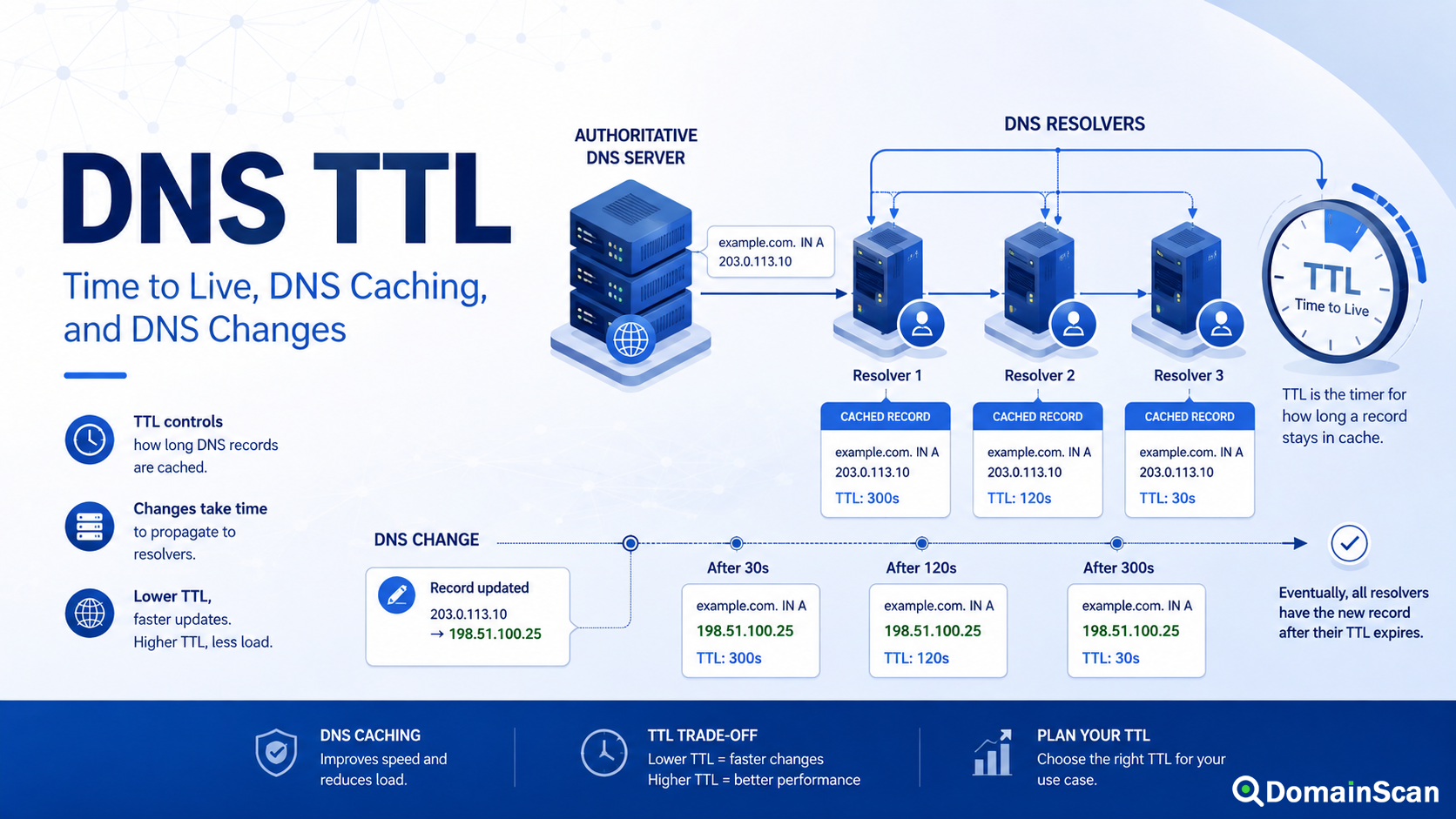
DNS TTL controls how long a DNS response can normally remain in a resolver's cache before that resolver needs to obtain a newer answer.
TTL stands for Time to Live.
You can see it in a DNS record such as:
example.com. 3600 IN A 192.0.2.10
In this example, the TTL is 3600 seconds, which equals one hour.
A recursive DNS resolver that receives this record can usually keep it in cache and reuse it for future queries until the cached lifetime runs out.
This simple number has an important effect on DNS operations. TTL influences how often resolvers need to contact authoritative nameservers, how quickly record changes become visible to users, and how long outdated DNS information may continue to appear after a migration or configuration change.
What Does TTL Mean in DNS?
TTL is a field attached to DNS resource records.
It represents a maximum caching lifetime expressed in seconds.
For example:
example.com. 300 IN A 192.0.2.10
has a TTL of five minutes, while:
example.com. 86400 IN A 192.0.2.10
has a TTL of 24 hours.
A resolver that caches the second record may continue reusing that answer much longer before asking for a fresh copy.
The important point is that TTL controls caching behavior. It does not control how quickly an authoritative DNS provider saves a change in its own system.
Where Is DNS Cached?
DNS information can be cached at several layers.
A typical lookup may involve:
- The browser
- The operating system
- A local router
- An ISP resolver
- A public recursive DNS provider
- A corporate DNS resolver
The most important TTL-based caching usually happens at recursive DNS resolvers.
Suppose a public resolver receives:
example.com. 3600 IN A 192.0.2.10
If another user asks the same resolver for example.com five minutes later, the resolver may answer directly from cache rather than query the authoritative server again.
This makes DNS faster and reduces load on authoritative infrastructure.
How Does TTL Affect a DNS Lookup?
Consider this A record:
example.com. 3600 IN A 192.0.2.10
A resolver looks it up at 10:00 and caches the response.
At 10:30, another user asks the same resolver for the domain.
The resolver can still return:
192.0.2.10
because the original one-hour cache lifetime has not expired.
At approximately 11:00, the cached record reaches the end of its normal TTL. The next query may cause the resolver to ask the authoritative DNS server again.
If the authoritative server now returns a different address, the resolver can cache the new result.
Why Do DNS Changes Not Appear Everywhere Immediately?
Suppose the current DNS record is:
example.com. 3600 IN A 192.0.2.10
At 10:15, the domain owner changes it to:
example.com. 3600 IN A 198.51.100.20
The authoritative DNS server may begin returning the new address almost immediately.
However, a resolver that queried the old address at 10:00 may still have approximately 45 minutes left on its cached response.
That resolver can continue returning:
192.0.2.10
while another resolver with no cached copy retrieves:
198.51.100.20
This is the main reason users in different locations may temporarily receive different DNS answers after a change.
DNS Propagation Is Mostly About Caching
The phrase “DNS propagation” is commonly used to describe the period after a DNS record changes.
It can give the impression that a new DNS record is slowly copied from one DNS server to another across the internet.
That is not usually what is happening.
Authoritative DNS servers publish the current value. Recursive resolvers independently replace their older cached answers as those cached entries expire or otherwise need to be refreshed.
A simplified view is:
Authoritative DNS changes
        ↓
Resolver A still has old cached record
Resolver B has no cache and gets new record
Resolver C refreshes later
        ↓
Results gradually become consistent
TTL is therefore one of the main factors behind what users experience as DNS propagation.
What Is a Short DNS TTL?
A short TTL causes resolvers to refresh a record more frequently.
Examples include:
60 seconds
300 seconds
600 seconds
A short TTL can be useful when a record is expected to change soon.
Typical use cases include:
- Website migrations
- Server failover systems
- Infrastructure testing
- Frequently changing endpoints
- Traffic management systems
For example:
example.com. 300 IN A 192.0.2.10
allows compliant resolvers to refresh the address much more frequently than a record with a 24-hour TTL.
What Is a Long DNS TTL?
A longer TTL allows resolvers to reuse a cached answer for a greater period.
Examples include:
3600 seconds
14400 seconds
43200 seconds
86400 seconds
Longer TTLs can make sense for stable DNS records that rarely change.
Possible benefits include:
- More DNS responses served from cache
- Fewer queries reaching authoritative nameservers
- Reduced dependency on repeated upstream lookups
- Potentially faster repeat resolution
The tradeoff is that unexpected changes may take longer to become visible to resolvers that already cached the previous data.
Is a Lower TTL Always Better?
No.
A very low TTL can make changes appear more quickly, but that does not mean every DNS record should use the lowest possible value.
Lower TTLs cause resolvers to refresh records more frequently.
This can increase:
- Queries to authoritative DNS servers
- Dependence on DNS server availability
- Lookup activity
For a record that almost never changes, an extremely low TTL may provide little practical benefit.
A good TTL should reflect how stable the record is and how quickly you may realistically need to change it.
Is a Higher TTL Always Better?
No.
A long TTL improves cache efficiency, but it reduces flexibility.
Suppose a server has:
example.com. 86400 IN A 192.0.2.10
and unexpectedly needs to move to a new IP address.
Resolvers that cached the old address may continue using it for many hours.
If the old server is already offline, some users can experience downtime even though the authoritative DNS has been corrected.
This is why critical records should not use long TTL values without considering how emergency changes would be handled.
What TTL Should You Use?
There is no single correct TTL for every domain or DNS record.
A useful approach is to choose values based on how often the record changes.
For example:
- Frequently changing infrastructure may use shorter TTLs.
- Ordinary website records may use moderate TTLs.
- Very stable infrastructure may use longer TTLs.
Values such as 300, 1800, 3600, and 86400 seconds are commonly encountered, but the best choice depends on the provider and operational requirements.
The question should not be “What is the best TTL?”
A better question is:
“How quickly might I need this record to change, and how much caching is appropriate while it remains stable?”
Why Should TTL Be Lowered Before a Server Migration?
Consider a website that currently uses:
example.com. 86400 IN A 192.0.2.10
The record can remain cached for up to 24 hours.
If you change the IP address at the moment the migration begins, some resolvers may continue using the previous address for much of the next day.
A better approach is to reduce the TTL before the migration.
For example:
example.com. 300 IN A 192.0.2.10
Once resolvers have had enough time to stop using the previous 86400-second cached response and begin caching the new 300-second TTL, the final server change can be made.
Resolvers will then normally refresh the address much sooner.
Why Does Lowering TTL at the Last Minute Not Work?
This is one of the most common TTL mistakes.
Suppose the current record is:
example.com. 86400 IN A 192.0.2.10
A resolver cached it this morning with a 24-hour TTL.
You then change the DNS configuration to:
example.com. 300 IN A 192.0.2.10
The resolver does not know that the TTL has changed because it is still using its previously cached answer.
It may not query the authoritative server again until the original 86400-second cache period expires.
Only after refreshing the record can it see the new 300-second TTL.
Therefore, TTL reductions need to be made in advance.
A Practical DNS Migration Timeline
A planned migration might look like this:
Day before migration
Reduce:
TTL 86400
to:
TTL 300
Wait for the previous TTL
Allow enough time for resolvers that cached the 86400-second value to expire and retrieve the shorter TTL.
Migration time
Change:
192.0.2.10
to:
198.51.100.20
Monitor DNS and traffic
Confirm that public resolvers are retrieving the new address and that the new server is handling traffic correctly.
After stabilization
Increase the TTL again if a longer cache period is appropriate.
Does Changing TTL Clear Existing DNS Caches?
No.
Changing the TTL at the authoritative DNS server does not remotely delete cached responses from recursive resolvers.
If a resolver already has:
example.com → 192.0.2.10
TTL remaining: 2400 seconds
changing the authoritative TTL to 300 does not force that resolver to discard its existing cached answer.
The resolver normally continues using the cached record until its current lifetime ends.
Does Clearing Your Local DNS Cache Fix TTL Problems?
Sometimes, but only locally.
Clearing the DNS cache on your computer can remove an old response stored by that device.
However, your device may then send a query to a recursive resolver that still has the old answer cached.
The result can be:
Local cache cleared
        ↓
Device asks recursive resolver
        ↓
Resolver still has old cached answer
        ↓
Old address returned again
This is why clearing a local cache does not force an ISP or public DNS resolver to refresh its own cache.
Browser Cache and DNS Cache Are Not the Same Thing
A website can still appear to show old behavior even after DNS has updated.
Possible caching layers include:
- DNS cache
- Browser cache
- CDN cache
- Reverse proxy cache
- Application cache
If a DNS lookup already returns the correct IP address but the browser still shows old content, DNS may no longer be the problem.
Check the actual DNS response before repeatedly clearing unrelated caches.
What Is Negative DNS Caching?
DNS resolvers can also cache negative answers.
For example, suppose a resolver asks for:
new.example.com
before that hostname exists.
The authoritative DNS system responds that the name or requested record does not exist.
The resolver may cache that negative result.
If you create the record shortly afterward:
new.example.com. IN A 192.0.2.50
the resolver may continue returning the earlier negative response until the applicable negative cache lifetime expires.
This explains why a newly created hostname can sometimes remain unavailable on a resolver even though the authoritative server already shows it.
Why Can Lowering the New Record's TTL Fail to Fix Negative Caching?
Suppose a hostname previously did not exist.
A resolver cached the negative answer.
You then create:
new.example.com. 60 IN A 192.0.2.50
The 60-second TTL applies to the new positive record after the resolver retrieves it.
It does not necessarily shorten the negative answer the resolver already cached earlier.
The resolver must first stop using the previous negative response.
TTL and A Records
An A record might use:
example.com. 3600 IN A 192.0.2.10
If the IPv4 address changes, the TTL affects how long older address information may remain cached.
TTL and AAAA Records
An IPv6 record works the same way:
example.com. 3600 IN AAAA 2001:db8::10
If the IPv6 address changes, cached AAAA records can continue sending IPv6 users toward the old server.
TTL and CNAME Records
A CNAME alias has its own TTL:
www.example.com. 3600 IN CNAME host.example.net.
The target hostname also has its own DNS records and TTL values:
host.example.net. 300 IN A 192.0.2.10
The alias and target can therefore have different cache lifetimes.
TTL and MX Records
MX records can also be cached:
example.com. 3600 IN MX 10 mx1.mail-provider.net.
During an email migration, some senders may continue using an older cached MX record after the authoritative configuration has changed.
This is why old email infrastructure should not always be shut down immediately after changing MX records.
TTL and TXT Records
TXT records used for SPF, domain verification, DKIM, or other systems are also subject to DNS caching.
For example:
example.com. 3600 IN TXT "site-verification=abc123"
If you change or create the value, a verification platform may not immediately see the same answer as the authoritative DNS server if its resolver has cached previous data.
TTL and NS Records
NS records also have TTLs.
For example:
example.com. 86400 IN NS ns1.example.net.
Nameserver changes can be more complicated because delegation information also exists in a parent DNS zone.
This is why changing authoritative nameservers can involve several caching layers rather than only the TTL displayed inside the child DNS zone.
Why Do Different DNS Tools Sometimes Show Different TTL Values?
A DNS tool may query an authoritative server or a recursive resolver.
If it queries the authoritative server, it may show the configured TTL.
If it queries a recursive resolver, the TTL may represent the remaining lifetime of the cached response.
For example, the authoritative record may be configured as:
3600 seconds
while a resolver returns:
2714 seconds
This does not necessarily mean the DNS zone is inconsistent.
The resolver may simply have cached the record approximately 886 seconds earlier.
Why Can a TTL Count Down?
When viewing a cached DNS response repeatedly, you may see values such as:
3540
3480
3420
3360
This can represent the remaining lifetime of the resolver's cached copy.
When the cache expires and the resolver refreshes the record, the TTL may return to a value close to the authoritative TTL.
What Does TTL 0 Mean?
A TTL of zero generally indicates that the DNS data should not be kept for reuse after the current transaction.
This is unusual for ordinary website DNS records.
Using a zero TTL eliminates much of the benefit of recursive caching and can significantly increase query frequency.
Some DNS providers may also enforce minimum TTL values and prevent customers from configuring extremely low values.
Can a DNS Provider Override Your TTL?
Yes, provider behavior can affect TTL handling.
A DNS platform may:
- Enforce a minimum TTL
- Provide an automatic TTL option
- Use fixed TTLs for proxied records
- Restrict available values by account type
Likewise, recursive resolver operators can apply their own cache policies in some circumstances.
The number entered into a DNS control panel should therefore be understood as part of a larger DNS caching system, not as a guarantee that every resolver behaves identically.
Can DNS Data Be Served After TTL Expiry?
Normally, the TTL defines the maximum ordinary cache lifetime before a resolver needs fresh data.
However, modern DNS resiliency mechanisms can allow a resolver to serve stale cached data in specific circumstances, such as when authoritative DNS servers are temporarily unreachable.
This behavior is designed to improve availability during DNS failures.
For day-to-day troubleshooting, TTL remains the main caching value to examine, but it should not be interpreted as a promise that every cached answer disappears globally at the exact same second.
How to Check a DNS Record's TTL
You can use the DomainScan DNS Lookup tool to inspect DNS records and their returned TTL values.
A useful troubleshooting process is:
- Enter the exact hostname.
- Select the relevant record type.
- Run the lookup.
- Check the returned record value.
- Review the TTL.
- Compare authoritative and public resolver responses if necessary.
For a recent change, the actual record value is usually more important than the TTL alone.
How to Troubleshoot a DNS Change That Is Not Updating
Step 1: Check the authoritative DNS server
Confirm that the authoritative system returns the new record.
If it still returns the old value, the problem is not resolver cache propagation. The active DNS zone has not been updated correctly.
Step 2: Check the domain's nameservers
Make sure you edited the DNS provider that is actually authoritative for the domain.
A common mistake is modifying records at the registrar while the domain uses third-party nameservers.
Step 3: Compare public resolvers
If the authoritative server is correct but public resolvers disagree, caching is a likely explanation.
Step 4: Check the previous TTL
Do not look only at the new TTL.
The old record may have been cached with a much longer value.
Step 5: Check negative caching
If the hostname was recently created, a resolver may have cached a previous NXDOMAIN or no-data response.
Step 6: Clear local cache if needed
This can remove a stale response on your own device, but it does not clear upstream resolver caches.
Step 7: Verify the application
If DNS already returns the new server but the website still appears old, check the CDN, browser cache, proxy, and application.
Common TTL Mistakes
Reducing TTL immediately before a migration
The old, longer TTL may already be cached.
Reduce it well in advance.
Leaving migration TTLs permanently low
A temporary five-minute TTL may be useful during a migration but unnecessary once infrastructure becomes stable again.
Using very long TTLs on unstable infrastructure
This can make emergency changes slower to reach cached resolvers.
Assuming TTL means exact global update time
There is no single moment when every DNS cache on the internet refreshes simultaneously.
Ignoring negative caching
A new DNS record can be correct and still appear missing on resolvers that cached an earlier negative result.
Confusing DNS cache with browser cache
If the correct IP is already returned, repeatedly changing DNS may make troubleshooting worse.
Frequently Asked Questions
What does TTL mean in DNS?
TTL stands for Time to Live. It tells DNS resolvers how long they may normally keep a DNS response in cache before refreshing it.
Is DNS TTL measured in seconds?
Yes. TTL values are represented in seconds in DNS records.
Is 300 TTL five minutes?
Yes.
300 seconds = 5 minutes
Is 3600 TTL one hour?
Yes.
3600 seconds = 60 minutes
Is 86400 TTL one day?
Yes.
86400 seconds = 24 hours
Does lowering TTL make DNS faster?
It can make record changes refresh more frequently, but it does not necessarily make ordinary DNS resolution faster.
Longer caching can actually reduce repeated upstream lookups.
Does changing TTL clear DNS cache?
No. Existing cached records normally retain the lifetime they received when they were originally cached.
How early should I lower TTL before a migration?
It should be lowered early enough for the previous longer TTL to expire from relevant resolver caches before the migration starts.
If the current TTL is 24 hours, reducing it only ten minutes before the migration is unlikely to help resolvers that already cached the old value.
Why does one DNS server show the old IP?
That resolver may still have a valid cached copy of the previous record.
Compare it with the authoritative DNS response.
Why is my new subdomain still showing NXDOMAIN?
A resolver may have cached the earlier negative response before the subdomain was created.
Can I set TTL to zero?
DNS supports zero TTL values in some contexts, but many managed DNS providers enforce minimum values. Zero is rarely appropriate for ordinary website records.
Final Thoughts
DNS TTL is a simple value with a major impact on how DNS changes behave.
Shorter TTLs allow resolvers to refresh data more often, while longer TTLs improve cache efficiency and are well suited to stable records. Neither approach is universally better.
The most important operational lesson is to plan TTL changes before infrastructure changes.
If a website or email service will move to a new server, lowering TTL only at the moment of migration is usually too late. Resolvers may already have the previous long-lived record cached.
When troubleshooting, compare the authoritative DNS answer with results from recursive resolvers. If the authoritative server has the new value while some resolvers still return the old one, cache lifetime is a likely explanation.
Use the DomainScan DNS Lookup tool to inspect current DNS records and TTL values, the DNS Propagation Check to compare responses from multiple locations, and Clear DNS Cache when you need to remove stale DNS information from your own device.