What Is HSTS and How Does HTTP Strict Transport Security Work?
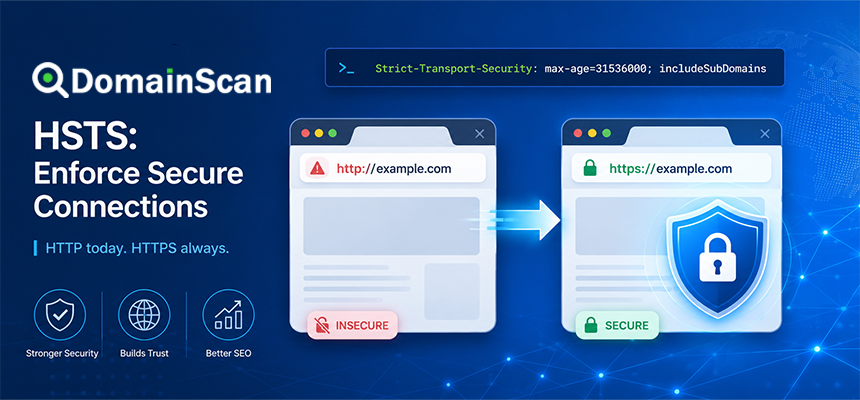
HSTS is a web security policy that tells browsers to access a website only through HTTPS for a defined period of time.
HSTS stands for:
HTTP Strict Transport Security
When a browser receives a valid HSTS policy from a website, it remembers that the hostname should use HTTPS.
Future requests to:
http://example.com
can then be upgraded automatically by the browser to:
https://example.com
before an ordinary insecure HTTP request is sent.
HSTS is designed to reduce the risk of users being downgraded from HTTPS to HTTP and to prevent browsers from bypassing certain certificate errors once a host is known to require HTTPS.
Why Is HSTS Needed?
A website may already redirect HTTP traffic to HTTPS.
For example:
http://example.com
        ↓
301 Redirect
        ↓
https://example.com
This is useful, but the first request still begins with HTTP.
Before the browser receives the redirect, that initial request is not protected by TLS.
HSTS changes this behavior after the browser has learned the policy.
Instead of sending the HTTP request first, the browser can internally rewrite it:
http://example.com
        ↓
Browser upgrades request
        ↓
https://example.com
This removes the ordinary insecure HTTP step for future visits.
How Does HSTS Work?
A website enables HSTS by sending an HTTP response header over a secure HTTPS connection.
A basic example looks like:
Strict-Transport-Security: max-age=31536000
This tells the browser that the hostname should be accessed only through HTTPS for the next 31,536,000 seconds.
That equals approximately one year.
After storing the policy, the browser remembers the rule for future visits.
What Is the Strict-Transport-Security Header?
The HSTS policy is delivered through the:
Strict-Transport-Security
HTTP response header.
A more complete example is:
Strict-Transport-Security: max-age=31536000; includeSubDomains
Another common form is:
Strict-Transport-Security: max-age=31536000; includeSubDomains; preload
The header can contain several directives that change how the browser applies the policy.
What Does max-age Mean?
The max-age directive tells the browser how long it should remember the HSTS policy.
For example:
max-age=3600
equals one hour.
max-age=86400
equals one day.
max-age=31536000
equals approximately one year.
The timer begins when the browser receives the HSTS header.
What Happens When the HSTS Timer Expires?
If the browser does not receive another valid HSTS header before the stored policy expires, the host can eventually stop being treated as HSTS-enabled.
However, normal visits to the HTTPS site can refresh the policy.
For example, if the site continues sending:
Strict-Transport-Security: max-age=31536000
the browser can reset the stored expiration period each time it receives the header.
What Does includeSubDomains Mean?
The includeSubDomains directive tells the browser to apply the HSTS policy not only to the main hostname but also to its subdomains.
For example:
Strict-Transport-Security: max-age=31536000; includeSubDomains
on:
example.com
can cause the policy to apply to:
www.example.com
shop.example.com
api.example.com
mail.example.com
This is powerful but should be enabled carefully.
Why includeSubDomains Can Be Risky
If even one important subdomain does not support HTTPS correctly, enabling includeSubDomains can make that service inaccessible in browsers that have stored the policy.
Suppose:
example.com → HTTPS works
www.example.com → HTTPS works
legacy.example.com → HTTP only
If the parent domain sends:
includeSubDomains
the browser may attempt to force:
https://legacy.example.com
even though that service was designed only for HTTP.
This can break the subdomain.
What Is HSTS Preload?
HSTS normally has a first-visit limitation.
A browser cannot obey a site's HSTS header until it has received that header at least once over HTTPS.
HSTS preload is designed to reduce that gap.
Browsers can include certain domains in a built-in preload list.
For a preloaded domain, the browser already knows before the first visit that HTTPS is required.
The connection can therefore begin with HTTPS immediately.
What Does the preload Directive Mean?
A website may send:
Strict-Transport-Security: max-age=31536000; includeSubDomains; preload
The preload token signals an intention to participate in HSTS preload mechanisms.
However, adding the word preload to the header does not automatically add the domain to browser preload lists.
The domain must also meet the relevant preload requirements and be submitted through the appropriate preload process.
What Is the HSTS First-Visit Problem?
Without preload, the browser must first visit the site securely before it learns the HSTS policy.
Imagine a user manually enters:
example.com
The browser may initially attempt:
http://example.com
The server then redirects to HTTPS and sends the HSTS header.
After that, future HTTP attempts can be upgraded locally.
The first connection therefore relies on the HTTP-to-HTTPS redirect unless the domain is already known through preload or a previously stored policy.
HSTS vs HTTP to HTTPS Redirect
These technologies are related but different.
HTTP redirect
The browser sends an HTTP request to the server.
The server responds:
301 Moved Permanently
and directs the browser to the HTTPS URL.
HSTS
The browser may upgrade the request before sending insecure HTTP traffic.
A complete setup often uses both.
The HTTP redirect helps users who have not learned the HSTS policy yet.
HSTS protects later visits.
Does HSTS Replace HTTPS?
No.
HSTS depends on HTTPS.
It does not create encryption by itself.
The website still needs:
- A valid SSL/TLS certificate
- A working HTTPS service
- Port 443 available
- Correct certificate hostname coverage
- A trusted certificate chain
HSTS simply tells the browser that the secure HTTPS version must be used.
Does HSTS Replace an SSL Certificate?
No.
A browser that upgrades:
http://example.com
to:
https://example.com
still validates the server's certificate.
If the certificate is expired, mismatched, or untrusted, HSTS does not fix it.
What Happens When a Certificate Expires on an HSTS Website?
This is one of the most important operational consequences of HSTS.
If the certificate expires, the browser cannot simply downgrade to HTTP.
For an HSTS host, the secure connection is mandatory.
The result may be a hard access failure until the certificate is fixed.
This is why certificate monitoring is especially important on HSTS-enabled sites.
Can Users Ignore Certificate Warnings on HSTS Sites?
Browsers can treat certificate failures more strictly for HSTS hosts.
In some cases, the normal option to continue past a certificate warning is unavailable.
This behavior is intentional.
If users could simply bypass certificate validation, the protection provided by HSTS would be weakened.
Why HSTS Should Not Be Enabled Too Early
HSTS is easy to enable but harder to undo immediately.
Before setting a long max-age, confirm that HTTPS is stable.
Do not begin with:
max-age=31536000; includeSubDomains
on a site that has not been thoroughly tested.
A safer deployment can begin with a shorter duration.
A Gradual HSTS Deployment Strategy
A cautious rollout might look like this.
Stage 1
Strict-Transport-Security: max-age=300
Test HTTPS behavior.
Stage 2
Strict-Transport-Security: max-age=86400
Observe the site for a longer period.
Stage 3
Strict-Transport-Security: max-age=2592000
Continue monitoring certificates and subdomains.
Stage 4
Strict-Transport-Security: max-age=31536000
Use a longer policy after confidence is established.
Only add includeSubDomains when all required subdomains are ready.
How Do You Disable HSTS?
A server can send:
Strict-Transport-Security: max-age=0
This tells browsers receiving that HTTPS response to remove the stored HSTS policy for the host.
However, there is an important limitation.
The browser must still successfully reach the HTTPS site to receive that header.
Why HSTS Cannot Be Disabled Instantly for Everyone
Suppose users already stored:
max-age=31536000
and the HTTPS service becomes unavailable.
You cannot simply switch the site back to HTTP because those browsers already know the site requires HTTPS.
They may continue enforcing the policy until:
- The site becomes reachable over HTTPS and sends
max-age=0. - The stored HSTS policy expires.
- The browser state is manually changed.
This is why HSTS requires careful planning.
Why HSTS Preload Is Even Harder to Reverse
A preloaded domain is included in browser software or related preload data.
Removing it requires removal from the preload list and then distribution of updated browser versions.
Users running older browser versions may continue treating the domain as preloaded.
Preload should therefore be considered a long-term commitment.
HSTS and Subdomains
Consider this domain structure:
example.com
www.example.com
api.example.com
old.example.com
Before enabling:
includeSubDomains
verify HTTPS on every relevant hostname.
A forgotten legacy subdomain can become inaccessible after the policy reaches users.
HSTS and Wildcard DNS
Wildcard DNS can create additional considerations.
For example:
*.example.com → 192.0.2.10
may cause many unplanned subdomains to resolve.
If includeSubDomains is enabled, browsers expect HTTPS on those hostnames as well.
The server and certificate configuration must be able to handle the intended names safely.
HSTS and SSL Certificate Name Mismatch
HSTS does not fix certificate hostname problems.
Suppose:
User visits:
shop.example.com

Certificate covers:
www.example.com
The browser will still reject the certificate.
HSTS only ensures that HTTPS is used.
The certificate must still match the requested hostname.
HSTS and Expired Certificates
An expired certificate remains invalid.
HSTS makes secure access mandatory, so certificate expiration can result in a complete browser-access failure.
Monitor certificates well before expiration.
HSTS and Certificate Chains
A valid chain is still required.
For example:
Website Certificate
        ↓
Intermediate CA
        ↓
Trusted Root
If the intermediate certificate is missing, HSTS cannot make the certificate trustworthy.
HSTS and DNS
HSTS operates in the browser and does not replace DNS.
The browser still needs to resolve:
example.com
to an address.
If DNS points to the wrong server, HSTS may force HTTPS to a server that presents the wrong certificate.
This can make DNS errors appear as TLS errors.
HSTS and DNS Propagation
During a server migration, different resolvers may temporarily direct users to different servers.
For example:
Resolver A → old server
Resolver B → new server
If HSTS is active, both servers must support correct HTTPS during the transition.
Leaving the old server available only over HTTP is not enough.
HSTS and IPv6
An HSTS browser can connect over either IPv4 or IPv6.
Suppose:
A:
example.com → 192.0.2.10

AAAA:
example.com → 2001:db8::20
Both endpoints should provide valid HTTPS.
A forgotten IPv6 server with an expired certificate can break access for users whose network prefers IPv6.
HSTS and CDNs
A CDN may add the HSTS header at the edge instead of the origin.
The public path may be:
Visitor
   ↓
CDN
   ↓
Origin Server
If the CDN sends:
Strict-Transport-Security
users will store the policy regardless of whether the origin itself generates that header.
Always identify which layer controls HSTS before changing configuration.
HSTS and Reverse Proxies
A reverse proxy may terminate HTTPS and add security headers.
For example:
Browser
   ↓ HTTPS
Nginx Reverse Proxy
   ↓ HTTP
Application
The application may not know that HSTS is being added externally.
Inspect the final public response headers rather than only the application configuration.
Should HSTS Be Sent Over HTTP?
Browsers do not use HSTS headers received through insecure HTTP connections to establish trust.
The policy needs to be delivered through HTTPS.
This prevents an attacker on an insecure connection from setting arbitrary HSTS policies for domains.
Where Should the HSTS Header Be Added?
The header should be sent by the component handling the public HTTPS response.
This may be:
- Nginx
- Apache
- A CDN
- A load balancer
- A reverse proxy
- An application framework
Avoid adding conflicting HSTS policies at several layers without understanding which header reaches the browser.
How to Check Whether HSTS Is Enabled
Inspect the HTTPS response headers for:
Strict-Transport-Security
A response may contain:
Strict-Transport-Security: max-age=31536000; includeSubDomains
If the header is absent, the server is not currently delivering an HSTS policy through that response.
Why HSTS May Not Appear on Every Response
Configuration can vary between:
- Root domain
- www hostname
- Application pages
- Redirect responses
- CDN edges
- Different servers
Test the actual public hostname and response path.
HSTS on example.com vs www.example.com
These hosts can have different stored HSTS policies.
For example:
example.com
and:
www.example.com
are separate hostnames unless a parent policy with includeSubDomains applies.
Do not assume a policy on www automatically protects the root domain.
HSTS and HTTP Redirect Loops
HSTS itself does not normally create an HTTP redirect response.
The browser performs an internal HTTPS upgrade.
However, broken application rules can create loops such as:
HTTPS
 ↓
Application redirects to HTTP
 ↓
Browser upgrades to HTTPS
 ↓
Application redirects to HTTP
This can result in a redirect loop.
Applications behind proxies should correctly understand the original request protocol.
HSTS Behind a Load Balancer
A load balancer may receive HTTPS from the user and forward HTTP internally.
For example:
Visitor
   ↓ HTTPS
Load Balancer
   ↓ HTTP
Application
The application may mistakenly believe the original request was HTTP and redirect it.
Forwarded protocol headers and proxy configuration must be handled correctly.
HSTS and Development Environments
Be careful when testing HSTS on domains also used for development.
A browser that stores a long HSTS policy may continue forcing HTTPS later.
This can make local or temporary HTTP environments harder to test.
Use short max-age values during initial testing.
Can HSTS Break Localhost?
HSTS policies apply according to hostnames stored by the browser.
Developers can create confusing local behavior when testing domains mapped through local host files or development DNS.
A previously stored HSTS rule can continue forcing HTTPS even after the local application changes.
HSTS and Cookies
HSTS and secure cookies address different problems.
HSTS tells the browser to use HTTPS.
A cookie using the:
Secure
attribute tells the browser to send that cookie only through secure connections.
A well-configured application may use both.
HSTS and Content Security Policy
HSTS and Content Security Policy are also different security controls.
HSTS focuses on forcing HTTPS.
Content Security Policy can restrict which resources and scripts a page is allowed to load or execute.
They can complement each other as part of a broader web security configuration.
HSTS and Mixed Content
HSTS does not automatically solve every mixed-content problem.
An HTTPS page may still reference insecure resources such as:
http://example.net/script.js
Browsers may block or upgrade certain requests depending on browser behavior and other security policies.
The safest approach is to update application resources to use HTTPS directly.
Does HSTS Improve SEO?
HSTS itself is primarily a security feature rather than an SEO mechanism.
Its practical value is helping ensure consistent HTTPS access.
A stable HTTPS configuration avoids accidental insecure access and supports a single secure version of the site.
Does HSTS Make a Website Faster?
HSTS can remove an HTTP-to-HTTPS network redirect for browsers that already know the policy.
Without HSTS:
HTTP request
    ↓
301 redirect
    ↓
HTTPS request
With an active HSTS policy:
Browser upgrades locally
    ↓
HTTPS request
This can eliminate one network round trip in that specific situation.
However, performance is not the primary reason to enable HSTS.
Does HSTS Protect Against Man-in-the-Middle Attacks?
HSTS helps protect against attacks that rely on downgrading users from HTTPS to insecure HTTP.
It also prevents browsers from casually bypassing certificate errors for known HSTS hosts.
It does not replace TLS, certificate validation, DNS security, or application security.
Does HSTS Protect the First Visit?
Not always.
A normal HSTS policy is learned only after the browser successfully receives it over HTTPS.
HSTS preload can reduce this first-visit limitation for domains included in browser preload data.
Should Every Website Use HSTS?
HSTS can be valuable for production websites that are permanently committed to HTTPS.
Before enabling it, confirm that:
- HTTPS works consistently.
- Certificates renew reliably.
- All important hostnames support HTTPS.
- IPv4 and IPv6 both work.
- CDN and proxy configuration is stable.
- Legacy HTTP-only services have been identified.
When Should You Avoid includeSubDomains?
Avoid it until every relevant subdomain is known to support HTTPS.
Examples that may need investigation include:
legacy.example.com
internal.example.com
old-api.example.com
mail.example.com
Do not assume every historical DNS record is HTTPS-ready.
When Should You Avoid HSTS Preload?
Do not preload a domain when:
- You may need HTTP again.
- Some subdomains do not support HTTPS.
- Certificate management is unreliable.
- The infrastructure changes frequently.
- You do not understand preload removal consequences.
Preload is best treated as a mature-stage configuration rather than the first step of an HTTPS migration.
How to Deploy HSTS Safely
A practical deployment process is:
- Enable HTTPS on the root domain.
- Enable HTTPS on www and important subdomains.
- Fix certificate errors.
- Fix mixed content.
- Verify HTTP redirects to HTTPS.
- Test IPv4 and IPv6.
- Confirm automatic certificate renewal.
- Start with a short HSTS max-age.
- Monitor for problems.
- Increase max-age gradually.
- Add includeSubDomains only after auditing subdomains.
- Consider preload only after the HTTPS configuration is mature.
How to Troubleshoot an HSTS Problem
Step 1: Confirm HTTPS works
Open:
https://example.com
and verify the certificate.
Step 2: Inspect the HSTS header
Look for:
Strict-Transport-Security
Step 3: Check max-age
Determine how long browsers are instructed to remember the policy.
Step 4: Check includeSubDomains
Identify whether the policy affects child hostnames.
Step 5: Check DNS
Verify that A, AAAA, and CNAME records direct users to valid HTTPS endpoints.
Step 6: Check the certificate
Use DomainScan SSL Checker to inspect expiration, hostname coverage, and certificate chain.
Step 7: Check IPv6
Verify AAAA destinations support HTTPS.
Step 8: Check CDN and proxies
Determine which system actually sends the HSTS header.
Example of a Safe Basic HSTS Header
A basic production policy may look like:
Strict-Transport-Security: max-age=31536000
This applies to the current hostname without explicitly extending the policy to all subdomains.
Example With Subdomains
Strict-Transport-Security: max-age=31536000; includeSubDomains
Use this only when all relevant subdomains are ready for permanent HTTPS enforcement.
Example With Preload Intent
Strict-Transport-Security: max-age=31536000; includeSubDomains; preload
This is a much stronger long-term commitment and should not be enabled casually.
Common HSTS Mistakes
Using a one-year max-age immediately
Start conservatively while testing.
Enabling includeSubDomains without auditing subdomains
A forgotten HTTP-only service can break.
Using preload before the site is mature
Removal is not immediate.
Ignoring certificate expiration
HSTS makes HTTPS mandatory, so expired certificates can cause serious downtime.
Assuming HSTS fixes invalid certificates
It does not.
Adding the header only over HTTP
The browser needs to receive the policy through HTTPS.
Not checking IPv6
An old AAAA endpoint can break HSTS users.
Forgetting CDN configuration
The CDN may be the system actually sending or overriding the HSTS policy.
A Practical HSTS Checklist
- Confirm HTTPS works.
- Check the SSL certificate.
- Check the certificate chain.
- Check the expiration date.
- Check root and www hostnames.
- Check all important subdomains.
- Check A records.
- Check AAAA records.
- Check CDN and reverse proxies.
- Fix mixed content.
- Configure HTTP-to-HTTPS redirects.
- Start with a short max-age.
- Increase max-age gradually.
- Audit before enabling includeSubDomains.
- Understand preload before submitting the domain.
How DomainScan Can Help
Several DomainScan tools can help verify infrastructure before a strict HSTS deployment.
SSL Checker
Use it to inspect:
- Certificate validity
- Expiration
- Hostname coverage
- Issuer
- Certificate chain
DNS Lookup
Use it to inspect:
A
AAAA
CNAME
and confirm that every hostname points to the intended HTTPS infrastructure.
DNS Propagation Check
Use it when recent DNS changes may still send users to older servers.
Open Ports Lookup
Use it to help confirm whether HTTPS-related network endpoints are reachable.
Frequently Asked Questions
What is HSTS?
HSTS is a browser security policy that tells clients to use HTTPS for a hostname for a specified period.
What does HSTS stand for?
HTTP Strict Transport Security.
How does HSTS work?
The website sends a Strict-Transport-Security header over HTTPS. The browser stores the policy and upgrades future HTTP requests to HTTPS while the policy remains active.
Does HSTS redirect HTTP to HTTPS?
Not in the same way as a server-side 301 redirect. The browser can internally upgrade the request before sending insecure HTTP traffic.
Does HSTS require an SSL certificate?
Yes. The HTTPS service still needs a valid TLS certificate.
What is max-age in HSTS?
It defines how many seconds the browser should remember the HSTS policy.
What does includeSubDomains do?
It extends the HSTS policy to subdomains beneath the host that sent the policy.
What is HSTS preload?
It allows qualifying domains to be included in browser preload data so HTTPS can be enforced even before the first normal HSTS header is received.
Can HSTS break a website?
Yes, if HTTPS, certificates, subdomains, IPv6, or other infrastructure are not ready for strict HTTPS enforcement.
How do I disable HSTS?
A server can send Strict-Transport-Security: max-age=0 over a working HTTPS connection, but existing preload status or unreachable HTTPS infrastructure can make reversal slower or more difficult.
Should I use includeSubDomains?
Only after confirming that all relevant subdomains support HTTPS correctly.
Should I preload my domain?
Only after the domain and its required subdomains are permanently ready for HTTPS and you understand the long-term implications.
Final Thoughts
HSTS is one of the most useful ways to make HTTPS enforcement more consistent after a browser has learned that a domain should never use insecure HTTP.
Its main strength is also its main operational risk: once browsers store the policy, HTTPS becomes mandatory until the policy expires or is successfully removed.
For that reason, HSTS should be deployed gradually rather than treated as a simple checkbox.
First make sure SSL certificates, certificate renewal, DNS, IPv4, IPv6, CDNs, reverse proxies, and important subdomains all work correctly over HTTPS. Then begin with a short max-age and increase it as confidence grows.
Use DomainScan SSL Checker to verify certificate health, DNS Lookup and DNS Propagation Check to confirm that every hostname reaches the expected infrastructure, and Open Ports Lookup when investigating whether HTTPS services are reachable before enforcing a long-term HSTS policy.